Order lets players buy from each other without being online at the same time. A player posts an order ("64 diamonds at $500 each") and pays for it up front. Anyone can open the board, deliver matching items, and gets paid for every item on the spot. The owner collects the goods later.
Orders expire after 7 days by default, and the owner gets back the money for whatever wasn't delivered. Shulker boxes can be delivered whole, several currencies are supported, and a MySQL database lets a network share one board.
Permissions#
| Permission | Lets a player | Default |
|---|---|---|
order.leftovers | Claim items from /order leftovers. | Everyone |
order.admin | Open the admin panel. | OP |
orders.admin | Reload the config and add custom items. | OP |
orders.history | Open order history, their own or another player's. | OP |
order.limit.<number> | Have at most that many open orders. Only checked when limit-orders.enabled is true. | None |
blazez.updates | Get the update alert on join. | OP |
/order, /orders and /order messages need no permission.
Commands#
| Command | What it does | Permission |
|---|---|---|
/order [search] | Opens the order board, optionally already searched. Alias /ordering. | None |
/orders [search] | The same board. | None |
/order messages | Turns order announcements in chat off or on for you. | None |
/order leftovers | Opens your leftover items. | order.leftovers |
/orderhistory [player] | Opens past orders, yours or another player's. | orders.history |
/order admin | Opens the admin panel. | order.admin |
/order import <category> | Adds the item in your hand to a category as a custom orderable item. | orders.admin |
/orders import <category> target | Adds every item in the chest you're looking at to a category. | orders.admin |
/orders create <owner> <material> <amount> <price per item> [economy] | Creates an order without taking any balance. Works from the console, for events and giveaways. | orders.admin |
/order reload | Reloads the config files. | orders.admin |
Categories: blocks, tools, food, combat, potions, books, ingredients, utilities. Every /order subcommand also works as /orders.
Configuration#
| File | What it controls |
|---|---|
config.yml | Prices, expiry, limits, currencies, storage, sign prompts, webhooks and messages. |
items.yml | Every item players can order, by category. |
inventories/*.yml | Each menu: title, layout, icons and their text. |
license.yml | Your license key and update alerts. |
orders.yml / orders.db | Orders, when storage is filesystem or sqlite. |
Most settings can also be changed in game from /order admin, see Admin panel.
config.yml#
| Key | Default | What it does |
|---|---|---|
expire-time-seconds | 604800 | How long an order stays up (7 days). |
refund-on-expire | true | Refund the owner for undelivered items when an order expires. |
minimum-price-per-item | 1 | Lowest price per item a player can set. |
maximum-price-per-item | -1 | Highest price per item. -1 means no limit. |
item-blacklist | [] | Item types that can't be ordered, for example BEDROCK. |
tax.enabled | false | Turns the order tax on. |
tax.type | PERCENT | PERCENT takes a share of the amount, FLAT takes a fixed fee. |
tax.value | 5 | The percentage or the flat fee. |
tax.payer | SELLER | SELLER is deducted from each delivery payout. BUYER is added on top when the order is created and is not refunded. |
tax.destination | BURN | BURN removes the money. ACCOUNT deposits it into the account named in tax.account. |
tax.account | empty | Player name that receives the tax when the destination is ACCOUNT. |
price-format-type | 2 | 1 shows 1,000, 2 shows 1k. |
accept-formatted-sign | true | Accept 100k, 2.5m or 1b when typing an amount or price. |
accept-shulker-boxes | true | Allow delivering items inside shulker boxes. |
delivering-check-ignore-lore | false | Ignore lore when matching delivered items. |
drop-loot-to-leftovers | false | Send Drop Loot to /order leftovers instead of the ground. |
limit-orders.enabled | false | Cap open orders per player with order.limit.<number>. |
announce-orders | true | Announce new orders in chat. |
world-blacklist | otherside | Worlds where the board can't be opened. |
command-aliases | ordering | Extra names for /order. /order and /orders always work. |
priority-shop | empty | Shop plugin for Sell Loot (EconomyShopGUI, EconomyShopGUI-Premium, LiteSell, UltimateShop or ShopGUIPlus). Empty picks one, none turns Sell Loot off. |
lockdown-mode.enabled | false | Turns every Order feature off, for emergencies. |
placeholders.enabled | false | Register the placeholders. |
placeholders.unlimited | Unlimited | What %order_max% shows when limit-orders is off. |
Currencies#
Vault is on by default. You can add any number of currencies that PlaceholderAPI can read, such as coins or gems. When more than one is on, the player picks which one to pay in when creating an order.
economies:
  vault:
    enabled: true
    format: '&a$%value%'
  placeholder-api:
    enabled: false
    economies:
      coins:
        enabled: true
        format: '&e%value% Coins'
        commands:
          deposit-balance: coins give %player% %amount%
          withdraw-balance: coins take %player% %amount%
        placeholder: '%coinsengine_balance_raw_coins%'
placeholder must return the player's raw balance. The two commands are run from the console to take and give money. Each currency also has an icon item shown in the currency picker.
Storage#
database.type picks where orders are saved:
| Type | Use it for |
|---|---|
filesystem (default) | One server. Orders go to orders.yml, no setup. |
sqlite | One server with many orders. Everything goes to orders.db (database.sqlite.file). |
mysql | A network sharing one board. Fill in database.sql on every server. |
With MySQL, every server reads changes made on the others every database.snapshot-refresh-seconds (default 5). Deliveries are checked against the latest copy of the order in the database, so two servers can't overfill the same order. Changing the storage type needs a restart.
Discord webhooks#
Set webhook.enabled: true and paste a webhook url, and Order posts an embed when an order is created, delivered, completed or cancelled. Each of the 4 embeds under webhook.messages has its own title, color, content, thumbnail (player-head or an image URL), footer, timestamp and fields. Fields take %owner%, %item%, %amount%, %price%, %player%, %status% and %date%.
Update alerts#
Staff with blazez.updates (OPs by default) get one chat message when they join, listing every installed BlazeZ plugin that has an update waiting. It stays off until you set check-for-updates: true in this plugin's license.yml.
Install#
- Install Vault and an economy plugin. Order doesn't load without Vault.
- Put the Order jar in
plugins/and start the server once. Order createsplugins/DonutOrder/withconfig.yml,items.yml, theinventories/folder andlicense.yml. - Paste your license key into
license-keyinlicense.yml. Your key is under My Licenses on the BlazeZ portal; licenses linked to your Discord account show up there automatically. If yours is missing, open a License Key ticket in the BlazeZ Discord. - Restart the server and run
/order. - After editing files, run
/order reload.
Creating an order#
- Run
/order, open your orders and pick an item from the categories. - Set the amount and the price per item. Both take shorthand like
100k,2.5mor1b. Values are typed on a sign, with a separate sign layout for Bedrock players through Floodgate. - Confirm. The full cost (amount times price) is taken from the player's balance right away and the order goes live.
The owner can cancel an order at any time. Cancelling refunds the money for the part that wasn't delivered.
The board#
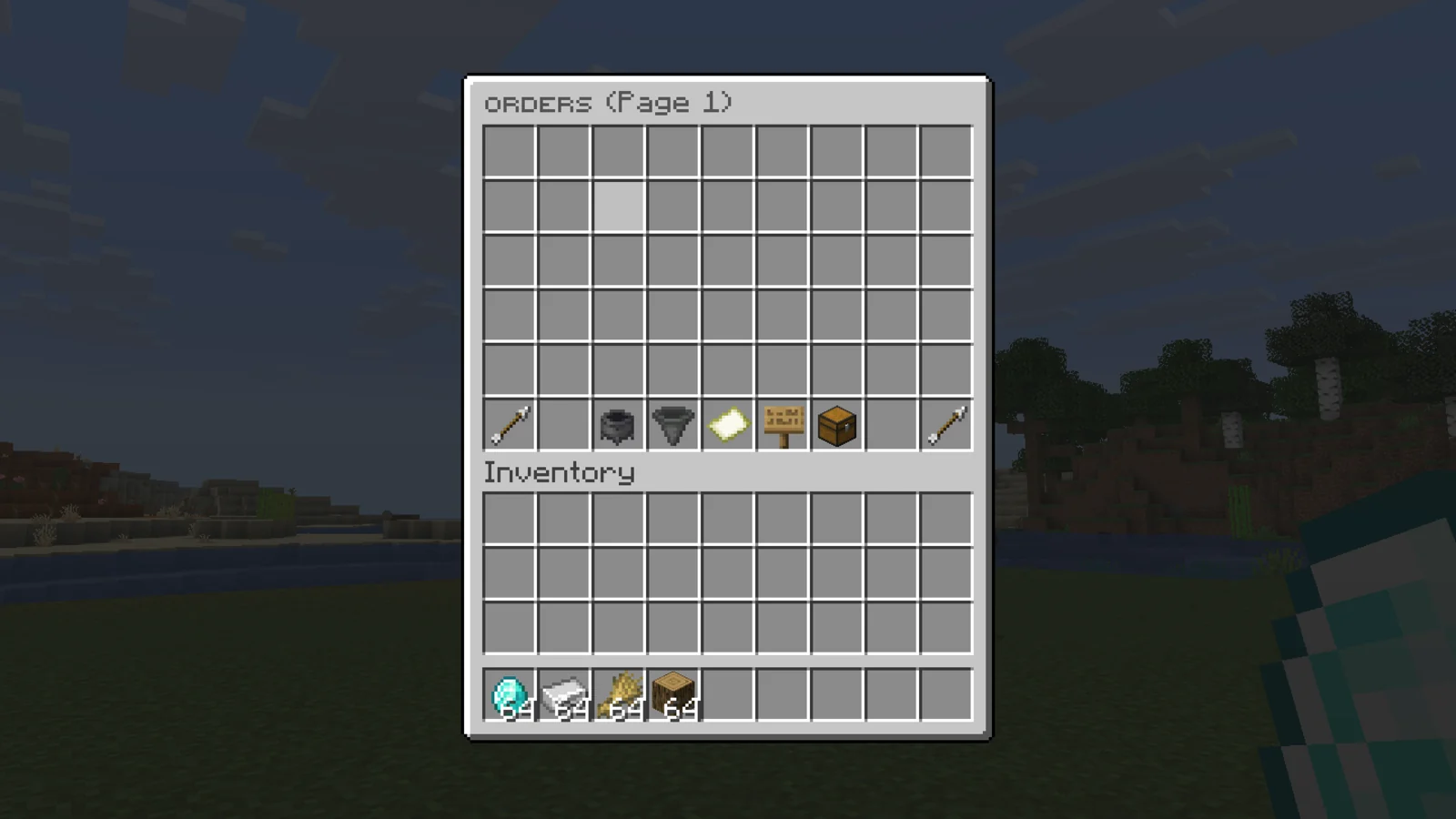
/orders shows every open order, with these controls:
- Sort by most paid (price times amount), most delivered, most recent, or highest price per item.
- Filter by category or show all.
- Search by item or player name.
- Refresh, and Your Orders to see only your own.
Delivering#
Pick an order and put matching items in the delivery menu. The player is paid in the order's currency for every item delivered, minus the tax when tax.payer is SELLER, and the order owner is told.
- Regular items match by item type. Display name, lore and custom model data on the order's icon are ignored, so a plain diamond fills a diamond order.
- Custom items added with
/order importmust match exactly.delivering-check-ignore-lore: truerelaxes lore checks for everything. - Damaged tools and armor are refused.
- With
accept-shulker-boxes: true, a player can deliver a whole shulker box and the matching items inside are taken out and counted. An order can also ask for a filled shulker box itself.
Collecting#
The owner opens their order to take the delivered items. The bottom bar has:
- Sell Loot: sells everything delivered, across every page, to your shop plugin for money. It only shows when a supported shop is installed: EconomyShopGUI, UltimateShop, ShopGUIPlus or LiteSell.
- Drop Loot: drops everything in front of the player. In a WorldGuard region with
item-drop: denyit goes to/order leftoversinstead, anddrop-loot-to-leftovers: truealways sends it there.
Items that are left when an order ends go to the owner's /order leftovers.
Adding your own items#
items.yml lists every orderable item by category. To add one in game, hold it and run /order import <category>. To add many, fill a chest, look at it and run /orders import <category> target. Added items are saved to items.yml and matched exactly on delivery, which is what you want for custom-named or enchanted items.
The admin panel has the same under Add / remove custom item, where you can also remove items you added.
ItemsAdder items#
With ItemsAdder installed, you can use ia:<namespace>:<name> (or itemsadder:<namespace>:<name>) anywhere a material goes. As an orderable item in items.yml:
items:
  ingredients:
    '1':
      material: "ia:myitems:ruby"
As a menu icon in any inventories/ file, set the icon's type to the id. name and lore are optional, the item keeps its own look. ItemsAdder items match by id, so a delivered item counts even when its durability differs. An unknown id is skipped in items.yml and shows as stone in menus, with a warning in the console.
Admin panel#
/order admin opens a hub with every setting:
- General settings: prices, limits, expiry, announcements, sign shorthand, shulker deliveries, debug, blacklisted worlds and command aliases.
- Add / remove custom item.
- Player orders: browse every open order and delete the ones you pick.
- Economy: Vault, the PlaceholderAPI currencies and the priority shop.
- Storage: storage type and the MySQL connection.
- Discord webhook: URL, name, avatar and every embed field.
- Messages & sounds, and the sign prompts for Java and Bedrock.
- The lockdown switch and a reload button.
Values are typed in chat. Type cancel to keep the current value or none to clear it. Passwords and the webhook URL are hidden on screen. Changes are saved to config.yml and apply straight away, except the storage type, which applies on the next start.
Placeholders#
Set placeholders.enabled: true and run /order reload. PlaceholderAPI must be installed.
| Placeholder | Returns |
|---|---|
%order_active% | The player's open orders. |
%order_total% | All of the player's orders that still exist. |
%order_max% | The player's order limit from order.limit.<number>. |
%order_to_collect% | Delivered items waiting to be collected. |
%order_delivered% | Items delivered to the player's orders. |
%order_paid% | Money paid for the player's open orders. |
%order_paid_out% | Money paid to sellers on the player's orders. |
Add _raw to to_collect, delivered, paid or paid_out for an unformatted number.
Developer API#
The API lives in me.blazezstudio.minecraft.api. Add softdepend: [DonutOrder] to your plugin.yml.
Method on OrderController | Returns |
|---|---|
getBestOrderForItem(item) | The best-paying open order for an item (CompletableFuture<Optional<OrderModel>>). |
getActiveOrdersForItem(item) / getActiveOrdersForMaterial(material) | Matching open orders, best price first (async). |
getActiveOrdersForItemNow(item) / activeOrdersSnapshot() | The same from memory, no waiting, safe from any thread. |
findBestDeliverable(item, query) / findDeliverable(item, query) | Open orders matching an OrderQuery (exclude an owner, a minimum price, a currency). |
matches(item, order) | Whether an item counts for an order, by the same rules as the menu. |
countDeliverable(player, order) | How many items the player could deliver now. |
deliver(player, order, amount) | Takes the items, pays the player and updates the order, like a menu delivery. |
deliverWithoutItems(player, order, amount) | The same without touching the inventory, for plugins that already removed the items. |
deliverBestCascade(seller, item, amount, minPrice, notify) | Fills the best orders priced above minPrice first and reports what's left. |
Async methods return a CompletableFuture. Call the deliver methods on the player's thread, since they touch the inventory and economy. NotifyOptions.of(seller, owner, discord) controls which messages a delivery sends.
A sell plugin that routes items to orders paying more than the server price:
Events in me.blazezstudio.minecraft.api.event.impl: OrderCreateEvent, OrderDeliverEvent, OrderCancelEvent and OrderExpireEvent. Each gives you the OrderModel.
Troubleshooting#
- The Sell Loot button is missing: no supported shop plugin was found. The console prints
Using shop hookon startup. /orderdoes nothing: checklockdown-mode.enabledandworld-blacklist.- Players can't see their own history:
/orderhistoryneedsorders.history, which is OP-only by default.