Kratos predicts each player's movement tick by tick on the server and flags the difference when legitimate physics can't explain it. Latency, low TPS, knockback, riptide, elytra, vehicles, cobwebs and slime are part of the prediction, so a player on high ping isn't punished for lag. Combat hits are measured against the victim's real interpolated position at the time of the hit.
Staff get clickable chat alerts, an in-game flag log, a checks editor, freezes, replays of what a player did, and a client fingerprint that catches cheat clients on join. Bedrock players who join through Geyser are judged by a separate engine built for their protocol, and never by the Java checks.
Features#
Movement simulation
Every player's movement is predicted tick by tick on the server. Lag, low TPS, knockback, elytra and riptide are part of the prediction, so high ping doesn't flag. Movement
Lag-compensated combat
Reach, hitboxes, aim, killaura, triggerbot and auto-clicker checks, with each hit measured against where the victim really was. Combat
Clickable alerts
Staff see every flag in chat. Hover for the check's detail, click to spectate the player. Alerts
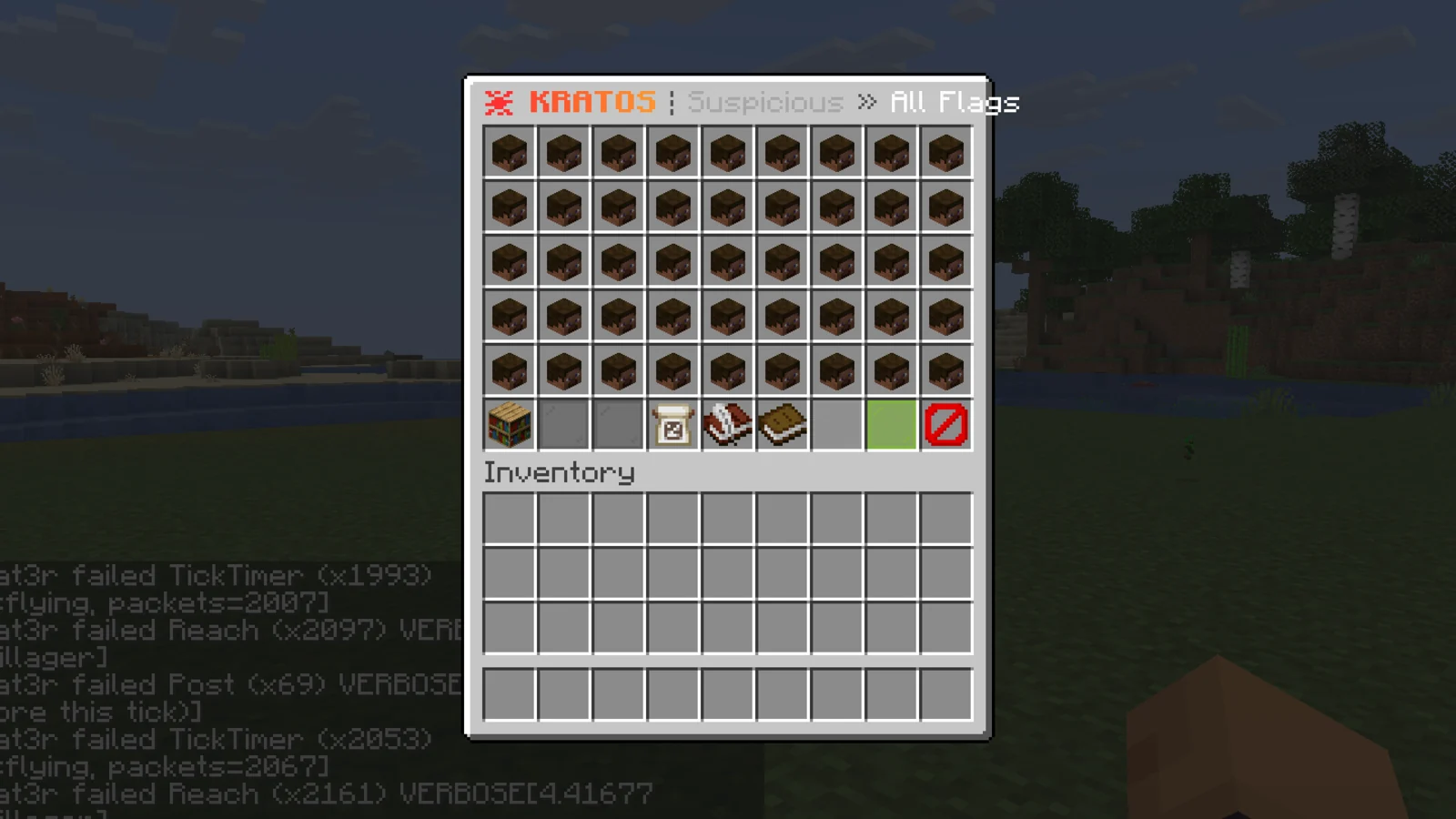
Flag log
/kratosflags shows the last 200 flags as one head per player, filtered by Cheating or Suspicious. Flag log
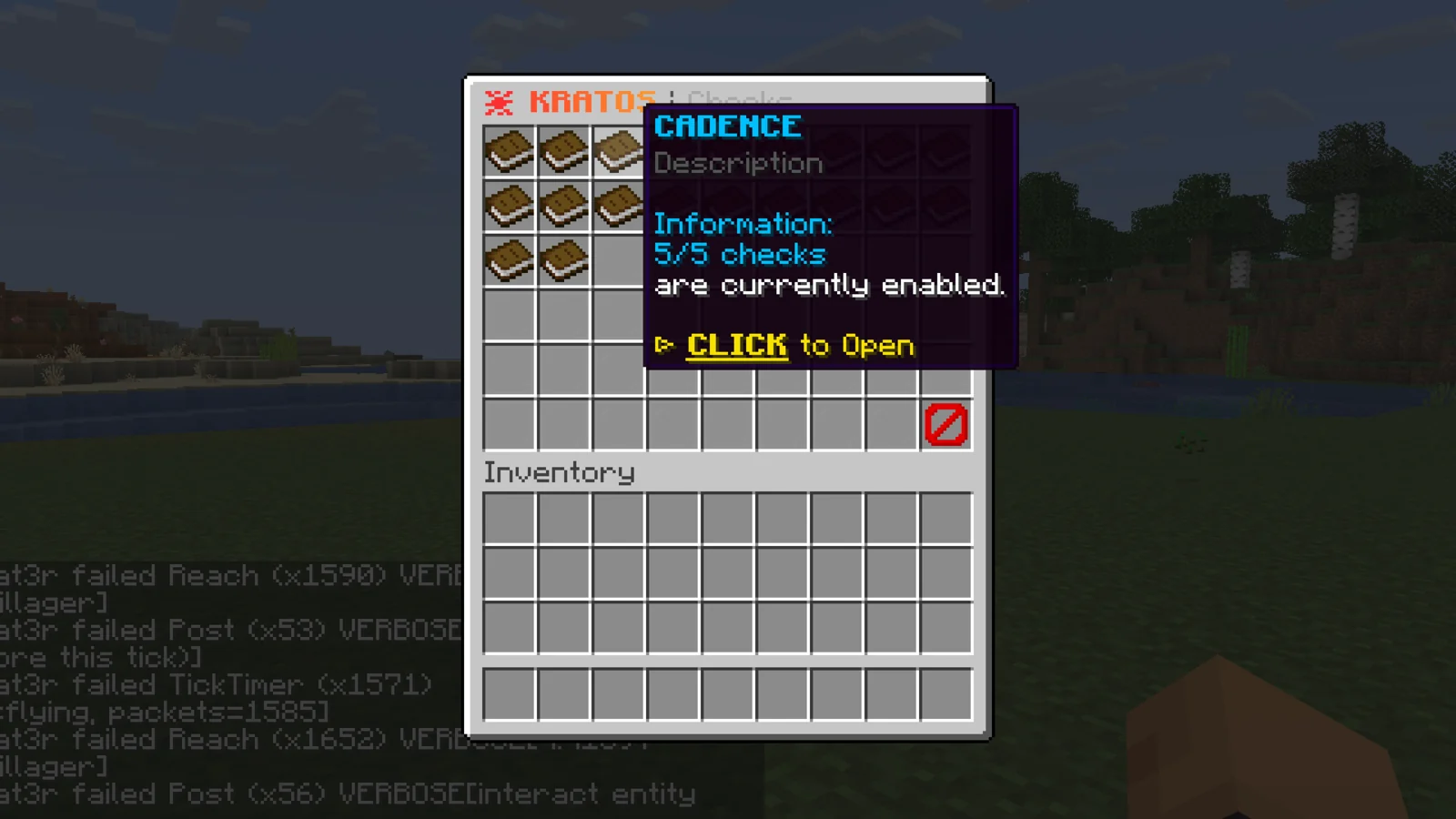
Live checks editor
/kratoschecks switches any check on or off and changes its thresholds in game, saved to checks.yml. Checks catalog
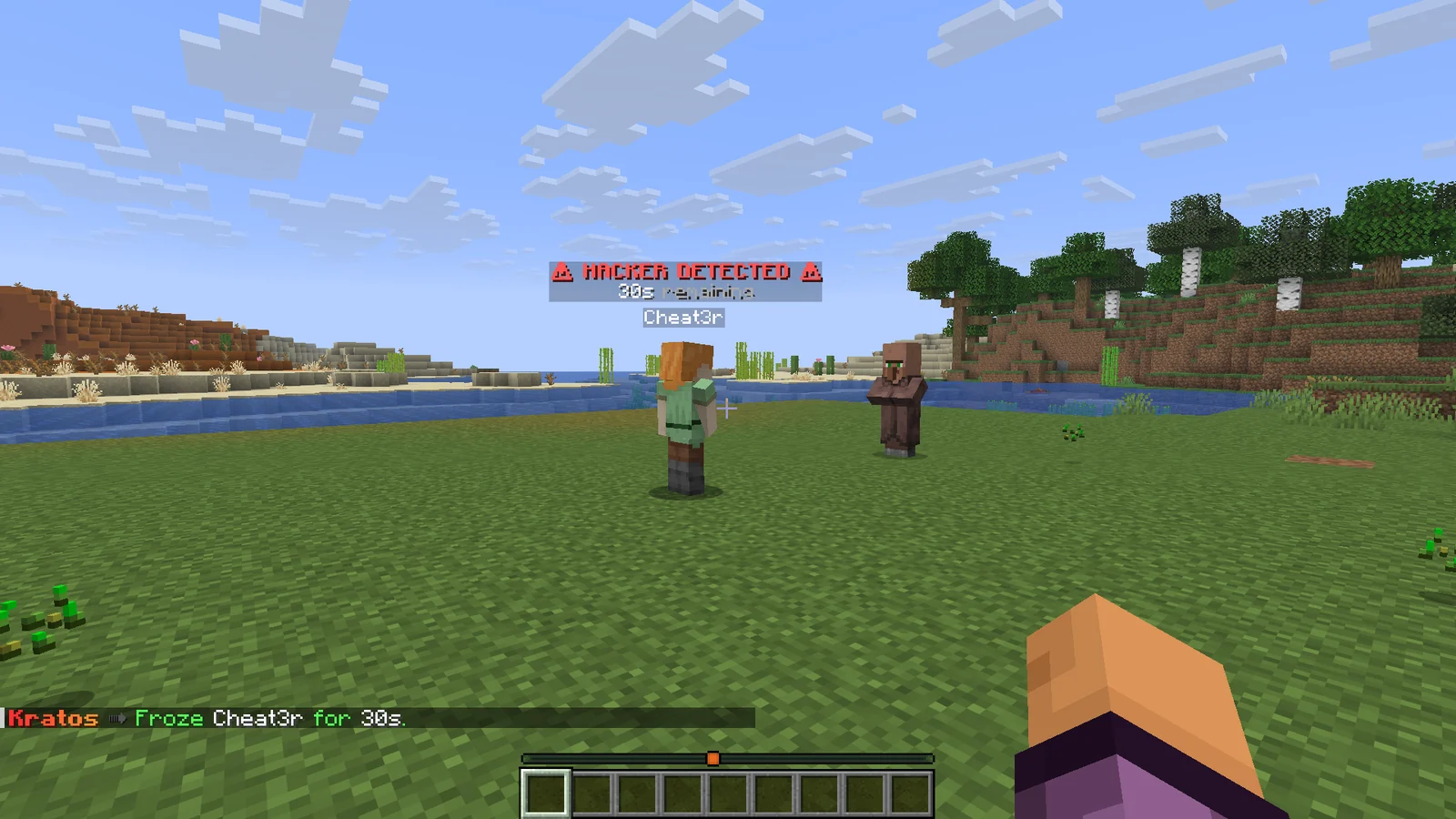
Freeze
A player who piles up violations is held in place for 30 seconds, which stops cheats a check can detect but can't cancel. Freeze
Cheat clients blocked on join
Client brand, plugin channels, mod loaders and a sign probe identify cheat clients before they play. Client fingerprint
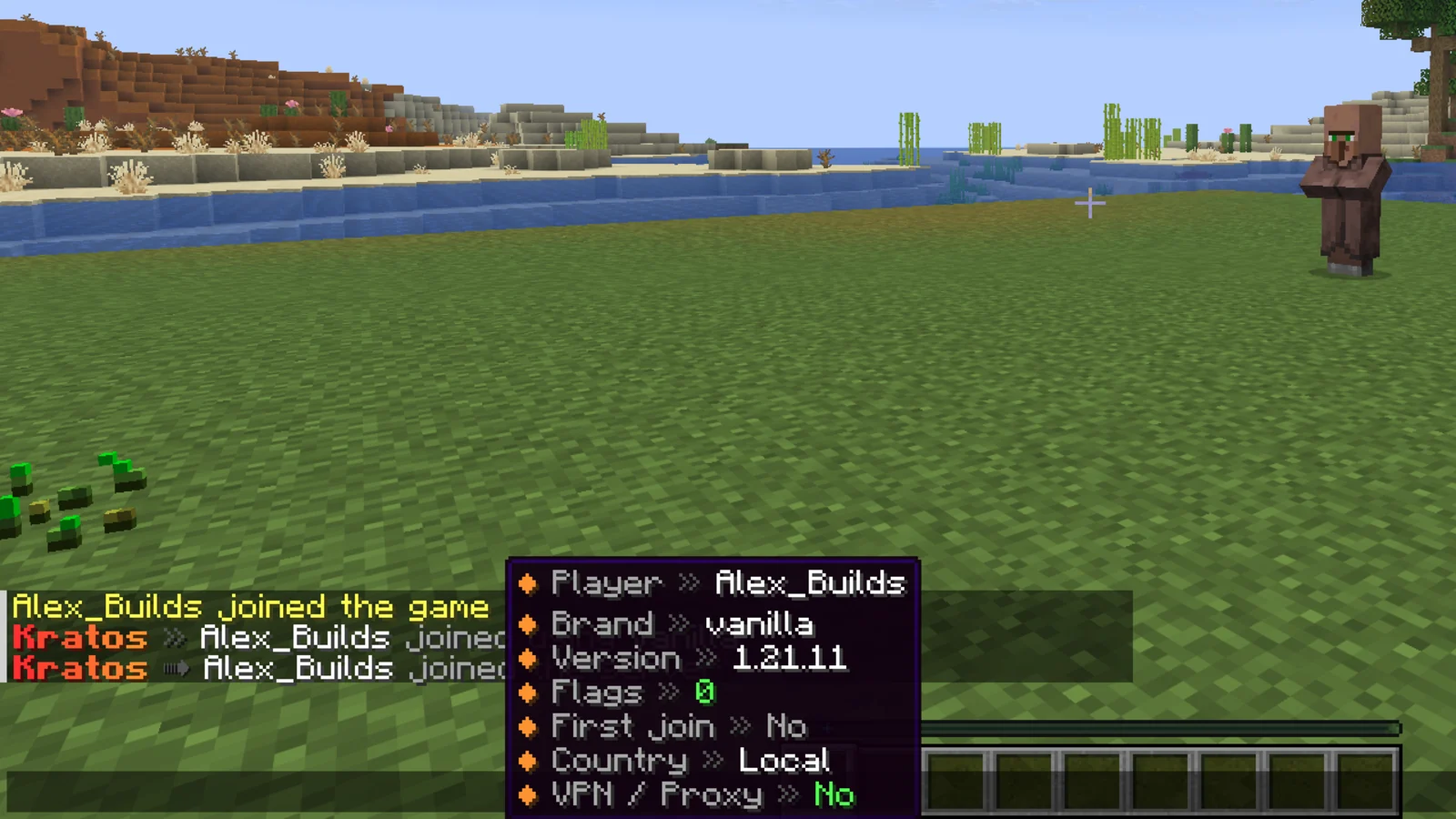
Join insight
When a player joins, staff see their client, version, flag count, country and whether they're on a VPN. Alerts
Replays
Rewind what any player did with a body only you can see, with nearby players, projectiles, block edits and chat played back. Replay
Bedrock engine
Geyser players are judged by a separate engine built for their protocol, never by the Java checks, including when Geyser runs on Velocity. Bedrock players
Web panel
A live flag feed, per-server analytics and a settings editor for every server on your license. Web panel
Anti-ESP
Players behind solid blocks are removed from the viewer's client, so ESP and tracers have nothing to draw. Needs the Nemesis Hide Entity add-on. Anti-ESP
Permissions#
| Permission | Lets a player | Default |
|---|---|---|
kratos.* | Use every staff command and GUI listed below. | OP |
kratos.reload | Run /kratos reload. | OP |
kratos.alerts | Receive flag alerts and toggle them with /kratos alerts. | OP |
kratos.alerts.enable-on-join | Have alerts switched on automatically on join, unless they turned them off themselves. | OP |
kratos.alerts.enable-on-join.silent | Get alerts switched on at join without the confirmation message. | OP |
kratos.spectate | Spectate a player with /kratos spectate. | OP |
kratos.spectate.clickalert | See the click-to-spectate shortcut on alerts, when alerts.click-to-spectate.require-permission is true. | OP |
kratos.freeze | Freeze a player with /kratos freeze. | OP |
kratos.unfreeze | Release a frozen player with /kratos unfreeze. | OP |
kratos.flags | Open the flag log with /kratosflags or /sus. | OP |
kratos.report | Report false flags from the flag log. | OP |
kratos.gui | Open and edit the checks catalog with /kratoschecks. | OP |
kratos.replay | Browse and watch replays with /kratosreplay. | OP |
kratos.replay.save | Keep a player's recent window with /kratosreplay <player> start. | OP |
kratos.replay.reload | Run /kratosreplay reload. | OP |
kratos.fingerprint.command | Run /checkforhacks. | OP |
kratos.fingerprint.bypass | Join with a flagged client without being punished. Staff still get a warning. | OP |
kratos.antiesp.bypass | See every player, even ones Anti-ESP would hide behind walls. The node is set by anti-esp.bypass-permission. | OP |
kratos.exempt | Skip every check. | Nobody |
kratos.nosetback | Never be set back. | Nobody |
kratos.nomodifypacket | Never have packets cancelled or modified. | Nobody |
kratos.exempt.<check> | Skip one check. Only read when bypass.exempt-permissions is true. | Nobody |
kratos.nosetback.<check> | Skip setbacks from one check. Only read when bypass.exempt-permissions is true. | Nobody |
kratos.nomodifypacket.<check> | Skip packet changes from one check. Only read when bypass.exempt-permissions is true. | Nobody |
Warning
Operators match any permission node that isn't registered, so every op would match every kratos.exempt.<check> node. That's why bypass.exempt-permissions is false by default and ops are checked like everyone else. Turn it on only if you grant per-check exemptions on purpose.
Commands#
| Command | What it does | Permission |
|---|---|---|
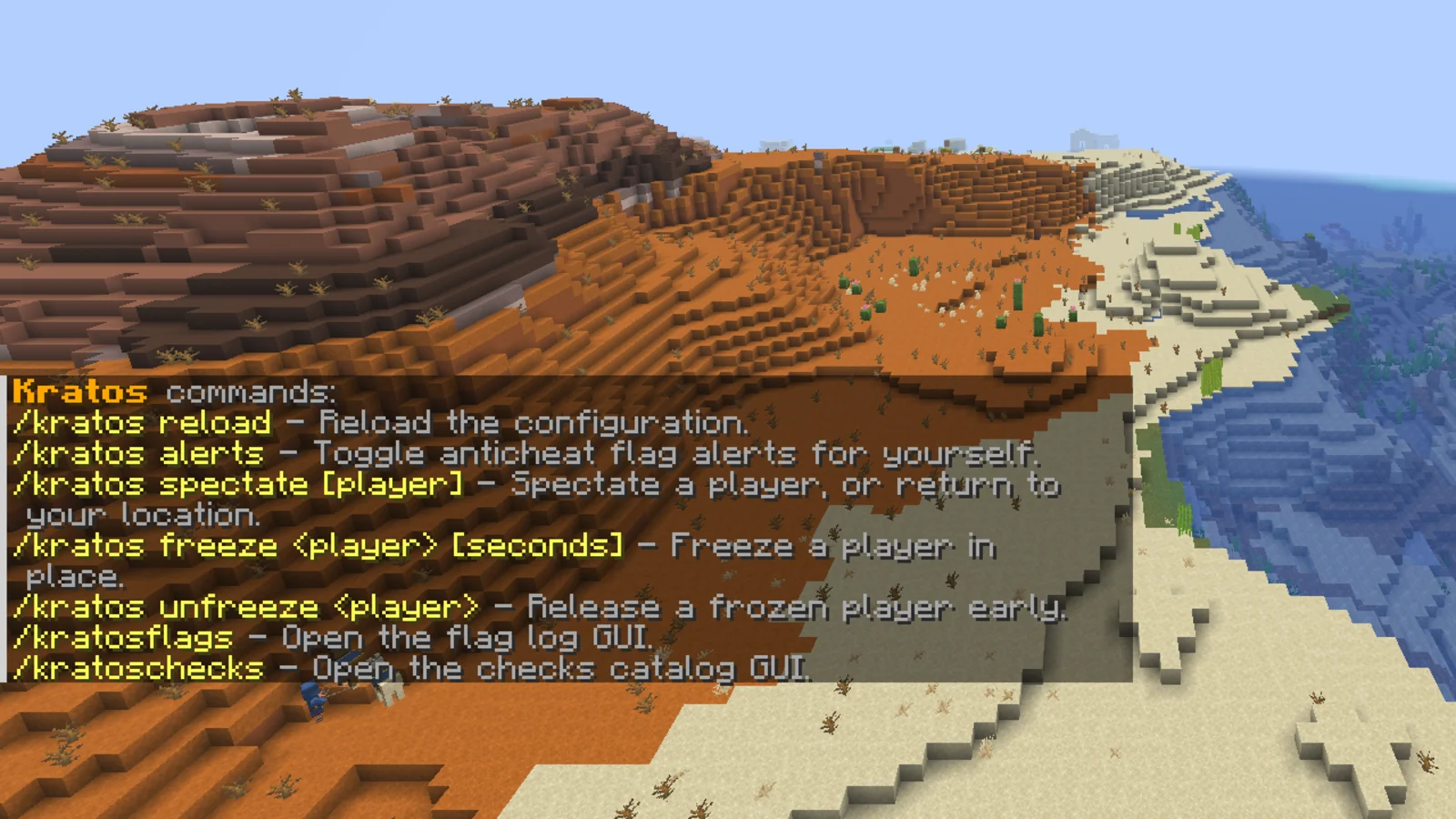
/kratos or /kratos help | Lists the Kratos commands you have permission to use. | None |
/kratos reload | Reloads every Kratos config file. | kratos.reload |
/kratos alerts | Toggles flag alerts for yourself. Your choice is kept across rejoins. From console it toggles console alerts until the next reload or restart. | kratos.alerts |
/kratos spectate [player] | Spectates a player. Without a player, returns you to where you were. | kratos.spectate |
/kratos freeze <player> [seconds] | Freezes a player in place. Default length is freeze.seconds (30). | kratos.freeze |
/kratos unfreeze <player> | Releases a frozen player early. | kratos.unfreeze |
/kratosflags (aliases /kflags, /klog) | Opens the flag log GUI. | kratos.flags |
/sus | Opens the same flag log GUI. | kratos.flags |
/kratoschecks (alias /kchecks) | Opens the checks catalog GUI. | kratos.gui |
/kratosreplay (alias /kreplay) | Opens the replay browser. | kratos.replay |
/kratosreplay <player> | Opens the replay setup screen for one player. | kratos.replay |
/kratosreplay <player> start [seconds] | Keeps that player's last seconds as a saved replay. Works from console. | kratos.replay.save |
/kratosreplay saved | Browses saved replays. | kratos.replay |
/kratosreplay play <id> | Plays one saved replay. | kratos.replay |
/kratosreplay stop | Ends the replay you're watching. | kratos.replay |
/kratosreplay reload | Reloads the replay settings. | kratos.replay.reload |
/checkforhacks <player> | Probes a player's client and prints their brand, channels and strikes. | kratos.fingerprint.command |
/sus is registered only while features.sus-command is true (the default) and Spartan's own /sus isn't running. On a server that also runs Spartan, Kratos sends its flags into Spartan's /sus instead.
Configuration#
Kratos splits its settings across several files in plugins/Kratos/. The panel and the in-game checks editor write to the same files.
| File | Controls |
|---|---|
config.yml | Language, bypass lists, ignored zones, alerts, Discord webhook, freeze, replay, web panel link, flag history, join notifier. |
checks.yml | One section per check, named after the check: thresholds, violations-to-flag, window-ms, setback-violations, decay, freeze-violations. Also disabled-checks. See Check list. |
ai.yml | The optional AI analyst and the tuning for aim, clicker, reach, hitbox, crystal and mace smash analysis. |
fingerprint.yml | Client fingerprint detections, cheat client signatures and the actions they trigger. |
messages.yml | Every player and staff message, in MiniMessage format. |
license.yml | Your license key, and hide-entity-license-key for Anti-ESP. Kept apart so you can share config.yml without the keys. |
The options most servers change:
| Key | Default | What it does |
|---|---|---|
language | EN | Language messages.yml is written in on a fresh install. |
bypass.players | [] | Names or UUIDs that Kratos ignores completely. |
bypass.worlds | [] | Worlds where nobody is flagged, set back, frozen or has packets cancelled. |
experimental-checks | false | Turns on checks still marked experimental. |
disabled-checks | [] | Checks to switch off by name (in checks.yml). |
alerts.print-to-console | false | Also prints every alert to the console. |
alerts.default-violations-to-flag | 5 | Violations before a check alerts, for checks without their own value. |
alerts.default-window-seconds | 300 | Window those violations are counted in. |
alerts.command-on-flag.enabled | false | Runs alerts.command-on-flag.command from console on every flag. |
features.exempt-creative | true | Skips players in creative mode. |
features.exempt-elytra | false | Skips players while gliding. |
features.sus-command | true | Registers /sus as a shortcut to the flag log. |
custom-command.enabled | false | Adds a second command name for every /kratos subcommand. |
custom-command.name | anticheat | The extra command name, for example /anticheat alerts. Usage and help text follow the name used. Needs a restart. |
custom-command.hide-kratos-command | false | Hides /kratos from players' tab completion, so only the custom name shows. |
Apply changes with /kratos reload. Replay settings reload with /kratosreplay reload.
Install#
- Put
Kratos-<version>.jarin your server'spluginsfolder. TheDeveloper APIfolder in the download is for plugin developers only. Don't install that jar. - Start the server once. Kratos creates
config.yml,checks.yml,ai.yml,fingerprint.yml,messages.ymlandlicense.yml. - Put your license key in
license.ymlunderlicense-key. Your key is under My Licenses on the BlazeZ portal. - Set
languageinconfig.ymlif you want messages in another language, then deletemessages.ymlso it's written again in that language. - Restart the server.
- Join as an op and run
/kratos. You should see the command list, and alerts are on for you by default.
If Geyser runs on your Velocity proxy instead of on the backend, also follow Bedrock players.
Movement#
The simulation engine predicts where each player should be every tick and flags the difference. Small offsets add up as violations, and a large offset sets the player back to their last valid position straight away.
Setbacks come from Simulation.setback-violation-threshold (2) and Simulation.immediate-setback-threshold (0.18). The simulation check alerts at Simulation.violations-to-flag (100), higher than most checks because tiny offsets are common. Lag allowance widens by Simulation.lag-leniency-multiplier (3.0) whenever TPS drops under Simulation.lag-tps-threshold (19.3).
Separate checks cover phasing through blocks, NoSlow, timer abuse, knockback and explosion velocity, ground spoofing, NoFall, vehicle movement and Baritone pathing. Each has its own section in checks.yml, and Check list names every one.
On 26.2 and newer clients, the prediction also covers potent sulfur geysers, shelf mushroom bounces, and the air drag, friction and bounciness attributes.
NoFall#
NoFall flags a player who claims to be on the ground with nothing under them, and ignores the claim so fall damage still applies. In open air it flags on the first claim. Next to a block edge it waits NoFall.confirm-ticks (4) ticks and only flags if the claim repeats, so clipping a block corner while falling doesn't flag. The edge area is NoFall.edge-horizontal (0.6) blocks sideways and NoFall.edge-below (1.5) blocks down.
Spear lunge#
The spear's Lunge dash is applied by the client. Kratos counts the spear's attack charge in the client's own ticks and flags a stab taken before the weapon's attack delay has passed. The delay comes from the player's attack-speed attribute, so haste and weapon modifiers count, and a hotbar swap restarts the full delay. Legitimate lunges are part of the movement prediction, so they don't flag. Tune it under SpearLunge in checks.yml.
Combat#
Combat checks cover reach, hitboxes, aim, anti-knockback, killaura, triggerbot, shield breaking, auto-clicker patterns and hit timing. Each hit is lag-compensated against where the victim really was. Verdicts are graded as legitimate, suspicious or cheating, and only strong evidence escalates, with extra allowance for high ping and low TPS.
Reach is measured against the weapon in hand, including weapons with more than 3 blocks of reach such as the spear. A hit made within a couple of ticks of a hotbar swap is measured against whichever of the two weapons allows it, so swapping off a spear mid-fight doesn't flag.
Aim#
Aim tracking flags a crosshair that stays locked on a moving target while the player turns. It looks at the last ai.aim.tracking.samples (30) aim samples and alerts when ai.aim.tracking.locked-samples (14) of them sit within ai.aim.tracking.max-error-degrees (1.0) of the target, at any height on the body. A second alert within a minute, or ai.aim.tracking.instant-freeze-locks (16) locked samples at once, freezes the player. These settings are in ai.yml.
Bow aim#
Silent bow aim turns the player's view onto the target only for the tick the arrow is released. Kratos flags a shot where the view jumps onto the target for that one tick and straight back off it, and freezes after ai.aim.bow.revert-shots (3) such shots within ai.aim.bow.revert-window-seconds (20). Flick shots and turning away after a shot don't count.
Triggerbot#
Once a player has landed Triggerbot.combat-hits (3) hits within Triggerbot.combat-window-ms (8000), Kratos waits for a second with no swings, then shows a fake player in their crosshair that only they can see. Hitting it within Triggerbot.probe-window-ms (150) of it appearing, or before their client even received it, counts as a confirmation. Two confirmations within two minutes freeze the player. A new probe can appear every Triggerbot.probe-cooldown-ms (8000), and none is placed while a real player is near the crosshair. Triggerbot.entry logs how fast hits follow a target entering the crosshair when debug is on, and never flags while Triggerbot.entry.flag is false.
Mace smash timing#
A mace smash landed by a routine is made of ordinary packets, so Kratos judges timing instead. It measures how quickly a smash follows the victim raising a shield, how little that delay varies over a session, and how long the crosshair was on the victim before the swing. Hits where the target was already lined up well before the swing are discarded. It alerts staff but doesn't freeze or ban, because ai.smash.escalate is false by default.
Automation checks#
AutoTotem, AutoArmor, AutoPearl and AutoAnchor look for inventory and item actions no human can do. AutoArmor, for example, flags an armor swap while the camera is turning or movement keys are held, which is impossible with the inventory open, and a piece re-worn faster than a human could react after it broke. It never touches the player's inventory and never flags on equip speed alone.
AutoWeb flags cobwebs placed on an enemy by a routine: swapping to the web, placing it and swapping away in the same tick, or snapping the view onto the enemy's block and straight back. Two in AutoWeb.window-seconds (60) alert and AutoWeb.events-to-freeze (3) freeze.
AutoDrain flags a player who picks up or covers water or lava an enemy placed near them within AutoDrain.fast-ticks (3) ticks of their client receiving it. Two fast drains within AutoDrain.window-seconds (60) alert and AutoDrain.events-to-freeze (3) freeze.
Anti-ESP#
Anti-ESP hides each player from anyone who can't actually see them. Every few ticks Kratos traces lines of sight from the viewer's eyes, and from where the third-person camera would be, to the other player. If solid blocks cover every line, that player is removed from the viewer's client, so ESP and tracers have nothing to draw. As soon as a line of sight opens, the player is shown again. Glass, ice, leaves and barriers don't hide anyone.
Anti-ESP needs a Nemesis license that includes the Hide Entity add-on. Put that key in license.yml under hide-entity-license-key. If Nemesis is installed on the same server, Kratos reads its key automatically. Without a valid key, Anti-ESP stays off and the console says why. Hidden players stay in the tab list.
| Key | Default | What it does |
|---|---|---|
anti-esp.enabled | true | Turns Anti-ESP on when the Hide Entity key is valid. |
anti-esp.interval-ticks | 4 | How often lines of sight are checked. |
anti-esp.min-distance | 8.0 | Players closer than this are always shown. |
anti-esp.max-distance | 80.0 | Players further than this keep their current state. |
anti-esp.reveal-margin | 0.6 | Extra blocks around a player that count as visible, so they appear just before they round a corner. |
anti-esp.lookahead-ticks | 3.0 | How far ahead a moving player's position is predicted. |
anti-esp.third-person | true | Also checks from the front and back third-person camera. |
anti-esp.combat-grace-ms | 5000 | Players who attacked recently stay visible within 24 blocks. |
anti-esp.bypass-permission | kratos.antiesp.bypass | Viewers with this permission see everyone. |
Players in spectator mode and Bedrock players always see everyone.
Alerts#
A flag shows up in chat for every staff member with alerts on. Hover an alert to see the check's detail, and click it to spectate the player.
Alerts are on at join for anyone with kratos.alerts.enable-on-join and kratos.alerts. A staff member who turns them off with /kratos alerts stays off across rejoins and restarts. Console alerts are off by default. Run /kratos alerts from console to see them there, or set alerts.print-to-console to true to keep them on.
| Key | Default | What it does |
|---|---|---|
alerts.alert-on-setback | true | Also alerts when a check sets a player back. |
alerts.proxy-alerts | false | Sends alerts across your proxy network. |
alerts.click-to-spectate.enabled | true | Adds the click-to-spectate action to alerts. |
alerts.click-to-spectate.require-permission | false | Shows the shortcut only to staff with kratos.spectate.clickalert. |
discord-webhook.webhook | empty | Discord webhook URL for flag embeds. |
discord-webhook.embeds.flag.enabled | false | Posts each flag as a Discord embed. |
When a player joins, alert-enabled staff get a line with a hover card showing the player's client brand, version, Kratos flag count, whether it's their first join, their country and whether they're on a VPN or proxy. Turn it off with JoinNotifier.enabled.
Flag log#
/kratosflags (or /sus) opens the last 200 flags as one head per flagged player. Filter by All, Cheating or Suspicious at the bottom of the menu.
Click a head to see that player's flags. Each entry shows the check, the verdict and the violation level. Click an entry to teleport to the player if they're online.
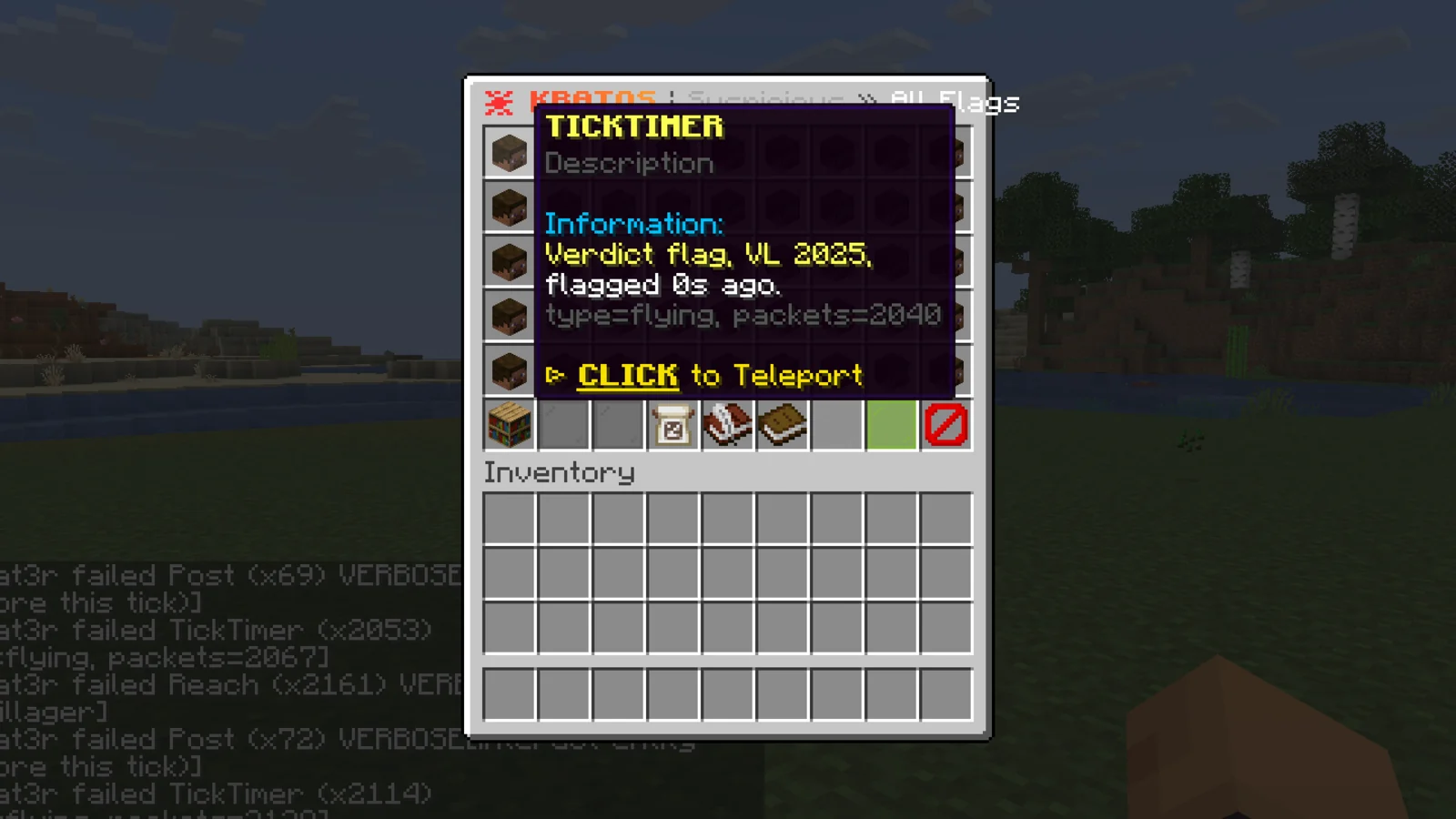
Staff with kratos.report see a Report False Flags button. Pick the flags that fired wrongly, add a note, and they go to the BlazeZ developers with the check's full detail. The flag log is kept in memory and clears on restart. For long-term history, turn on history.enabled or use the web panel.
Checks catalog#
/kratoschecks opens every check grouped by category. Click a category to see its checks, then click a check to edit its settings live.
Every check can be switched on or off and has violations-to-flag, decay, setback-violations, display name and description, plus whatever keys its own section in checks.yml holds. Numbers have a plus and minus stepper (shift for 10 at a time) and a type-an-exact-value option in chat. Changes are written to checks.yml.
Check list#
Checks sit in 14 categories: Combat, Aim, Movement, Elytra, Vehicle, Timer, Placement, Breaking, Inventory, Automation, Protocol, Exploit, Chat and AI. A check's name is what alerts show, the name of its section in checks.yml, and the <check> part of kratos.exempt.<check>. Experimental checks only run while experimental-checks is true.
Configs from older Kratos versions are updated on startup and keep their values.
Combat (20)
| Check | What it catches |
|---|---|
AntiExplosion | Took less explosion knockback than the prediction allows. |
AntiKnockback | Took less knockback than the prediction allows. |
AttackUseOrder | Used an item right after attacking in the same tick (experimental). |
AttackWhileUsing | Attacked while using an item (experimental). |
DualInteract | Interacted with a block and an entity in the same tick (experimental). |
HandOrder | Interacted with the off hand before the main hand (experimental). |
Hitbox | Hit an entity outside its hitbox. |
InteractOrder | Sent entity interactions in the wrong order (off by default). |
InvalidHitVector | Interacted with a point outside the target's hitbox. |
KillAura | Attacked a bait entity no legit crosshair could hit. |
MultiHitVector | Interacted with different points of an entity in the same tick (experimental). |
MultiTarget | Interacted with multiple entities in the same tick (experimental). |
NoSwing | Attacked an entity without swinging. |
Reach | Hit an entity from farther away than possible. |
SelfInteract | Interacted with self. |
SwingOrder | Sent the attack and arm swing in the wrong order. |
SwingWhileUsing | Swung while using an item (experimental). |
Triggerbot | Hit a probe target the moment it entered the crosshair. |
UnknownEntity | Interacted with an entity that does not exist (experimental). |
WallHit | Attacked an entity through a solid wall (off by default). |
Aim (5)
| Check | What it catches |
|---|---|
DuplicateRotation | Sent the same rotation twice in a row. |
IgnoredRotation | Ignored a rotation the server set. |
InvalidPitch | Sent a pitch past straight up or down. |
SilentRotation | Used an item with a rotation the camera never had. |
YawWrap | Wrapped the yaw a full turn in one tick. |
Movement (11)
| Check | What it catches |
|---|---|
AbilitySpoof | Claimed to be flying while unable to fly. |
Blink | Kept answering the server while holding back movement (experimental). |
DuplicateInput | Sent movement input twice in one tick (experimental). |
GroundSpoof | Sent an on-ground state the prediction disagrees with. |
MicroMovement | Sent a position update without moving far enough (experimental). |
MissingPositionUpdate | Went too long without sending a position update. |
NoFall | Claimed ground contact with nothing below to dodge fall damage. |
NoSlow | Was not slowed while using an item. |
Phase | Moved through a solid block. |
Simulation | Moved differently than the movement prediction allows. |
SpearLunge | Lunged before the spear was charged. |
Elytra (9)
| Check | What it catches |
|---|---|
DoubleGlide | Started gliding while already gliding. |
GlideInVehicle | Started gliding in a vehicle (experimental). |
GlideInWater | Started gliding in water (experimental). |
GlideOnGround | Started gliding while on the ground. |
GlideSpam | Started gliding too frequently. |
GlideWhileFlying | Started gliding while flying (experimental). |
GlideWithLevitation | Started gliding with levitation (experimental). |
GlideWithoutElytra | Started gliding without an elytra (experimental). |
GlideWithoutJump | Started gliding without jumping. |
Vehicle (7)
| Check | What it catches |
|---|---|
InteractWhileRowing | Attacked or used an item while rowing a boat (experimental). |
InvalidPaddle | Sent incorrect boat paddle states (experimental). |
InvalidVehicleInput | Sent impossible vehicle input values. |
InvalidVehicleJump | Jumped in a vehicle that cannot jump (experimental). |
PaddleWithoutBoat | Sent boat paddle states while not in a boat (experimental). |
SteerWithoutItem | Steered a pig or strider without the item on a stick. |
VehicleSpoof | Claimed to be in a vehicle while not in a vehicle. |
Timer (5)
| Check | What it catches |
|---|---|
BurstTimer | Caught up on lagged movement faster than allowed. |
SlowTimer | Sent movement slower than the game runs (experimental). |
TickTimer | Sent more than one movement per client tick. |
Timer | Sent movement faster than the game runs. |
VehicleTimer | Sent vehicle movement faster than the game runs. |
Placement (12)
| Check | What it catches |
|---|---|
AirPlace | Placed a block against air or liquid. |
FarPlace | Placed a block from too far away. |
FastPlace | Placed blocks on every tick for longer than a player can click. |
GhostHand | Interacted with a block through a wall. |
HiddenFacePlace | Placed a block against a face hidden from view. |
InvalidCursor | Placed with a cursor position outside the block. |
InvalidPlaceFace | Placed against an impossible block face. |
MultiPlace | Placed multiple blocks in a tick (experimental). |
NonFiniteCursor | Placed with a non-finite cursor position. |
PlaceWithoutLooking | Placed a block while not looking at it. |
ScaffoldRotation | Repeated the exact same turn between block placements (experimental). |
UsePlaceOrder | Used an item before placing the block in the same tick (experimental). |
Breaking (11)
| Check | What it catches |
|---|---|
AirBreak | Broke air, liquid or another block that cannot be broken. |
BreakWhileUsing | Broke a block while using an item (experimental). |
BreakWithoutLooking | Broke a block while not looking at it (experimental). |
DigFaceMismatch | Dug a different face than the one it cancelled. |
FarBreak | Broke a block from too far away (experimental). |
FastBreak | Broke a block too quickly. |
HiddenFaceBreak | Dug a block face hidden from view. |
InvalidBreakFace | Dug an impossible block face. |
InvalidDigCancel | Cancelled digging a block it was not digging. |
MultiBreak | Broke multiple blocks in a tick. |
NoSwingBreak | Broke a block without swinging (experimental). |
Inventory (11)
| Check | What it catches |
|---|---|
ClickTypeOrder | Mixed inventory click types in one tick (experimental). |
ClickWhileMoving | Clicked in the inventory while moving. |
CloseWhileMoving | Closed the inventory while moving. |
DropOrder | Opened the inventory or swapped hands while dropping an item (experimental). |
DropSwapOrder | Dropped or swapped items in the middle of another action (experimental). |
DuplicateSlot | Selected the hotbar slot it already held. |
InvalidClick | Sent an inventory click with an impossible button (experimental). |
InvalidSlot | Selected a hotbar slot that does not exist. |
InventoryMove | Moved while a container GUI was open. |
InventoryOrder | Opened, clicked or closed the inventory in the wrong order (experimental). |
SlotSwitchOrder | Switched hotbar slot in the middle of another action (experimental). |
Automation (5)
| Check | What it catches |
|---|---|
AutoAnchor | Placed, charged and detonated respawn anchors faster than a player can switch items. |
AutoArmor | Equipped armor in a way a player operating the inventory GUI could not. |
AutoTotem | Moved a totem in a way a player operating the inventory GUI could not. |
AutoWeb | Placed cobwebs on an enemy faster or more precisely than hands can. |
Baritone | Moved and turned like a pathfinding bot. |
Protocol (15)
| Check | What it catches |
|---|---|
ActionAfterMove | Sent an action after its movement packet in the same tick. |
ActionOrder | Combined actions in one tick that a client sends apart (experimental). |
ChunkBatchOrder | Acknowledged chunk batches out of order (experimental). |
InvalidEntityAction | Sent an entity action with impossible values. |
InvalidItemAction | Sent a drop, swap or release action carrying block data. |
InvalidKeepAlive | Answered a keep-alive the server never sent. |
InvalidSequence | Sent an out of order block action sequence number (experimental). |
InvalidSpectate | Sent spectate packets while not in spectator mode. |
InvalidTransaction | Rejected a server transaction. |
InvalidUseItem | Sent an impossible use item packet. |
RespawnWhileAlive | Tried to respawn while alive (experimental). |
SkippedTransaction | Skipped a transaction the server sent. |
SprintSneakOrder | Acted in the same tick it toggled sprint or sneak (experimental). |
TickEndOrder | Sent a packet after its movement and before the tick ended (experimental). |
UseInteractOrder | Used an item before interacting with an entity in the same tick (experimental). |
Exploit (11)
| Check | What it catches |
|---|---|
CreativeClick | Sent creative mode inventory clicks while not in creative mode. |
InvalidBookEdit | Sent an invalid book edit. |
InvalidBundleSlot | Selected a bundle slot that does not exist. |
InvalidViewDistance | Sent a view distance below the minimum. |
LecternClick | Clicked slots in a lectern. |
LongAnvilName | Renamed an item past the anvil name limit. |
NegativeClick | Sent an inventory click with a negative slot or button. |
NegativeSequence | Sent a negative sequence number. |
NonFiniteMovement | Sent a non-finite position or rotation. |
OutOfBoundsPosition | Sent a position outside the world. |
OversizedTabComplete | Sent an oversized tab completion request. |
Chat (4)
| Check | What it catches |
|---|---|
ChatWhileHidden | Chatted while chat is hidden (experimental). |
ChatWhileMoving | Chatted while moving (experimental). |
EmptyTabComplete | Sent an empty tab completion request (experimental). |
InvalidChat | Sent an invalid chat message or command. |
AI (8)
| Check | What it catches |
|---|---|
AimAI | Aimed in a pattern the aim model rates as assisted. |
ClickerAI | Clicked in a pattern the click model rates as automated. |
CombatAI | Fought in a pattern the combat model rates as cheating. |
CrystalAI | Placed and broke crystals like a crystal aura. |
HitboxAI | Landed hits outside the visible hitbox too consistently. |
MovementAI | Moved in a pattern the movement model rates as cheating. |
ReachAI | Hit distances piled up against a reach limit. |
SmashAI | Timed mace smashes like a routine. |
Freeze#
When a check piles up enough violations inside its window, Kratos freezes the player in place for freeze.seconds (30). The player is dropped to solid ground first, sees a title, and a hologram floats over their head. Freezing stops cheats a check can detect but can't cancel on its own.
The global threshold is freeze.violation-threshold (30). A check with its own freeze-violations in checks.yml uses that instead, and 0 turns freezing off for that check. Without a per-check value, Kratos never freezes below the check's own violations-to-flag, so noisy checks don't freeze a player before staff ever saw an alert.
| Key | Default | What it does |
|---|---|---|
freeze.enabled | true | Master switch for automatic freezes. |
freeze.teleport-to-ground | true | Drops the player to solid ground before freezing. |
freeze.disabled-checks | [] | Checks that still flag but never freeze. |
freeze.block-commands.enabled | true | Blocks commands while frozen. With an empty blacklist, all commands are blocked. |
freeze.on-freeze.commands | [] | Console commands run when a player is frozen. |
freeze.on-logout.enabled | false | Runs freeze.on-logout.commands (a ban by default) when a frozen player logs out. |
freeze.ban-on-repeat.enabled | false | Bans a player frozen freezes (3) times within within-hours (24). |
freeze.hologram.enabled | true | Shows the hologram over a frozen player. |
freeze.ban-on-repeat also counts freezes that would have happened while freeze.enabled is false. Checks in freeze.disabled-checks never count toward it.
Client fingerprint#
Fingerprint identifies cheat clients and mods when a player joins, from the client brand, registered plugin channels, mod loaders and a sign translation probe. All of it is set in fingerprint.yml. Bedrock players are skipped by default (skip-bedrock).
| Detection | Default | What it catches |
|---|---|---|
brand | On | Client brands on the signatures.brands list, and brand spoofing. |
channel | On | Plugin channels on the signatures.channels list. |
vanilla-spoof | On | Clients claiming a vanilla brand while showing modded traits. |
loader | On | Fabric, Forge, NeoForge or Quilt, only for the loaders you set to true (all false by default). |
sign-probe | On | Mods from the signatures.sign-probes list, such as Meteor, freecam mods, X-ray mods and Baritone. |
fast-rotation | On | Rotation faster than max-degrees-per-tick (180) for streak (5) ticks. |
radar | Off | Minimap mods on the signatures.radar-channels list. |
freecam-behavior | Off | Freecam-style behavior while the player's body stays still. |
Each detection has an action. ALERT tells staff only. PUNISH also runs the enforcement tiers: enforcement.first-strike on the first offence (a kick by default) and enforcement.repeat-strike on the next (a ban by default). Strikes survive a kick and reset on restart.
The kick screen is a multi-line message built from enforcement.kick-message.
Use warn-only for mods that should never be punished, and whitelist to allow a mod for specific players. Players with kratos.fingerprint.bypass aren't punished, and staff are warned when they join with a flagged client. While a sign probe runs, the player can't open inventories (sign-probe.block-inventory).
Replay#
Kratos keeps a rolling recording of every player so staff can watch what happened. /kratosreplay opens a picker of everyone with footage. Picking a player opens a setup screen for the rewind window, playback speed, follow distance and what the replay shows.
Starting a replay spawns a body only you can see, controlled from a hotbar: rewind 10 seconds, slow down, pause, speed up, skip 10 seconds, open the subject's inventory as it was at that moment, teleport to them, and stop. Your own items come back when it ends, and you take no damage while watching.
Players within nearby-player-radius (48) of the subject appear too. Pearls, arrows, tridents and potions fly again, block edits show as ghost blocks, and attacks, deaths, chat, commands, pickups, drops and inventory clicks print as a timestamped log.
| Key | Default | What it does |
|---|---|---|
Replay.enabled | true | Turns recording on. |
Replay.recording.max-history-seconds | 900 | How far back the rolling recording goes. |
Replay.recording.ignored-worlds | [] | Worlds that aren't recorded. |
Replay.flag-capture.enabled | true | Saves a replay automatically when a check flags. |
Replay.flag-capture.min-violations | 10 | Violations before a flag capture is saved. |
Replay.flag-capture.max-saved | 200 | Saved flag replays kept before the oldest are deleted. |
Replay.manual-capture.max-seconds | 120 | Longest window /kratosreplay <player> start can keep. |
Replay.web-viewer.enabled | true | Uploads saved replays to the web panel for 3D playback in the browser. |
Replay.web-viewer.terrain-radius | 32 | Blocks of terrain around the player sent with a web replay (8 to 80). |
Nobody but the viewer sees a replay. When Spartan's replay module is running on the same server, Kratos doesn't record and points staff to Spartan's /replay.
Web panel#
Kratos links your server to the Kratos panel on its own, using your license key. Open it from the BlazeZ portal and every server running on your key is listed with live player counts, the flag feed, per-server analytics and a settings editor. Starting another server on the same key adds it within seconds.
Settings saved in the panel are pushed to the server and applied with a live reload. Keys that run console commands are refused, so the panel can change thresholds and toggles but can't make a server run a command.
The panel's Freeze page lists every check that can freeze, grouped by category, with a switch per check and per category. A check switched off still flags and alerts but never freezes, and anyone frozen by it is released. Changes land within a second and are stored in freeze.disabled-checks.
The panel's Replays page plays every uploaded replay in 3D, with POV, follow, orbit and free cameras, a timeline marked with flags, hitboxes and the reach line on each hit. The MP4 button saves a replay as a video file: pick the whole replay or from the playhead, a speed of 0.25x to 2x and 720p or 1080p. The video uses the current camera, hitbox and aim line settings and can show the player, flags and time on screen. It renders in your browser and needs Chrome, Edge or Safari.
cloud.enabled turns the panel link off, and cloud.server-name sets the name the server shows under.
AI analyst#
The AI analyst gives a second opinion on a flag before any automatic ban. It reads the check, violation level, check detail and client brand, then returns a verdict, a confidence score and a plain-English case file for staff. It's off by default.
Set it up in ai.yml under ai.analyst: enabled, api-key, model and base-url. It works with Anthropic and with any OpenAI-compatible provider through base-url. When confidence reaches auto-ban-confidence (90), it runs ban-command. Below that, it posts the verdict to staff (post-to-staff). If api-key holds your Kratos license key instead of an AI provider key, Kratos warns in console and keeps verdicts off until a real provider key is set.
Bedrock players#
Bedrock players are detected through Floodgate or Geyser. Any name starting with bedrock-username-prefix (.) is also treated as Bedrock, which covers servers where Geyser runs somewhere else. Bedrock players skip every Java check and are judged by a separate Bedrock engine (bedrock-checks-enabled, default true).
Floodgate or Geyser sometimes report a player as Bedrock only after login. Kratos looks again 1 and 5 seconds after join and takes such a player off the Java checks.
The Bedrock engine needs a live Geyser session. If Geyser runs on your Velocity proxy, install the same Kratos jar on the proxy too, where it loads as a Velocity plugin:
- Copy the Kratos jar into the proxy's
pluginsfolder. - Make sure Geyser-Velocity is installed on the proxy, and Floodgate on every backend Bedrock players can join.
- Restart the proxy, then every backend running Kratos.
- Check the proxy console for
[bedrock] Bedrock protection active on the proxy.and the backend console for a relay connected line once a Bedrock player joins.
Flags from the proxy are handed to the backend the player is on, so alerts, freezes and the flag log work the same as for Java players. bedrock-relay-enabled turns the backend's relay listener off. Servers with Geyser installed locally don't need this.
The Bedrock boat check (BedrockVehicle in checks.yml, off by default) only runs where Geyser is installed on the backend. On a Geyser-on-proxy network it stays inactive.
Other options#
Ignored zones make whole worlds or WorldGuard regions check-free: no flags, alerts, setbacks or freezes. Checks keep running inside so they're ready when the player walks out. Set ignored-zones.enabled, worlds and regions. With keep-setbacks: true the zone stays enforced but silent.
Flag history stores every flag in a database when history.enabled is true. history.database.type is SQLITE, MYSQL or POSTGRESQL, and history.server-name tags rows so several servers can share one database.
Cheat review posts a daily, weekly and monthly summary of flags to the console, with totals per check and per player and the busiest hour. It needs history.enabled. Turn it on with cheat-review.enabled and pick the hour with run-hour (4).
Menu titles can be changed with gui.custom-screen-titles. Set enabled: true and edit the title of each menu: flag-log, checks, check-settings, report, replay-picker, replay-setup and replay-saved. {name} is the check or player shown in that menu.
Player messages ship in 26 languages: EN, ES, RU, DE, FR, PT, PL, TR, ZH, ID, IT, VI, NL, KO, CS, TH, HU, AR, JA, UK, SV, DA, RO, SK, HE and LT.
On Folia, lag is measured per region, and combat verdicts stop at suspicious instead of freezing or banning, because region lag is only partly observable. Staff still get every alert.
Placeholders#
| Placeholder | Returns |
|---|---|
%kratos_version% | Running Kratos version. |
%kratos_prefix% | The message prefix. |
%kratos_player% | Player name. |
%kratos_player_uuid% | Player UUID. |
%kratos_player_ping% | Ping measured by Kratos. |
%kratos_player_brand% | Client brand. |
%kratos_player_version% | Client version. |
%kratos_player_h_sensitivity% | Detected horizontal mouse sensitivity, in percent. |
%kratos_player_v_sensitivity% | Detected vertical mouse sensitivity, in percent. |
%kratos_player_fast_math% | true when the client uses fast math. |
%kratos_player_tps% | Server TPS. |
Developer API#
The download has a KratosAPI jar in the Developer API folder. Add it as a compile-only dependency and never shade it. PlayerFlagEvent fires after Kratos has decided how to respond and can't be cancelled. PlayerPreFlagEvent fires before the violation is counted, and cancelling it makes Kratos act as if the check never triggered.
KratosAPI.get() gives you tracked players, check info and per-player check state, alert toggles, read-only config and the flag history. Keep PlayerPreFlagEvent listeners fast, because they run on the path that decides a flag.
Troubleshooting#
Players get kicked with a timeout moments after joining when Vulcan also runs. Set connection.other-anticheat-support to true in plugins/Vulcan/config.yml. Vulcan treats replies to Kratos's lag-compensation packets as invalid otherwise. Kratos prints this fix to the console on startup when the setting is off.
An op is never flagged. Check bypass.players and bypass.worlds, and whether bypass.exempt-permissions is true. With it on, every op matches every kratos.exempt.<check> node.
Bedrock players on a Velocity network aren't checked. Geyser runs on the proxy, so install Kratos there as described in Bedrock players.