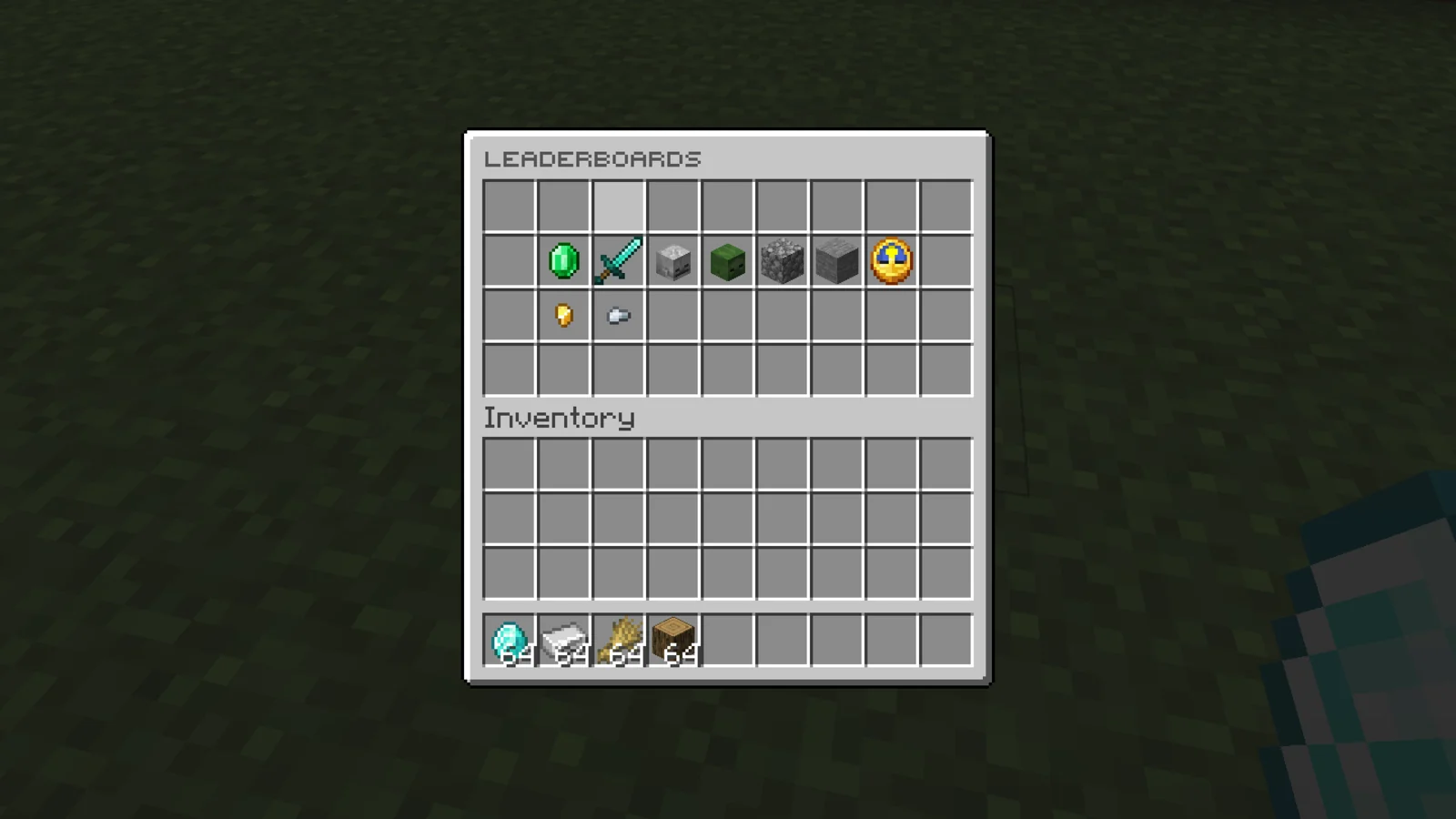
EasyBoard tracks 10 player stats and shows the top players three ways: holograms in the world, a /leaderboards menu with player heads, and a /stats screen per player. Every viewer sees their own rank under the top 10 on each hologram.
Holograms use Minecraft's own text displays, so no hologram plugin is needed. With MySQL, several servers share the same rankings.
Permissions#
| Permission | Lets a player | Default |
|---|---|---|
donutleaderboards.admin | Move holograms with /leaderboards movehere. | OP |
/leaderboards and /stats need no permission.
Commands#
| Command | What it does | Permission |
|---|---|---|
/leaderboards | Opens the leaderboard menu. Alias /leaderboard. | None |
/stats [player] | Opens your stats, or another player's. Alias /statistics. | None |
/leaderboards movehere <leaderboard> | Moves a leaderboard's hologram to where you stand and saves it. Use the name from the first column in Leaderboards, such as Mob Kills. | donutleaderboards.admin |
Configuration#
config.yml holds everything. Player data is in playerdata/ or MySQL, and your license key is in license.yml.
Leaderboards#
| Leaderboard | Config key | Tracks | Needs |
|---|---|---|---|
Money | money | Balance, including offline players | Vault and an economy plugin |
Kills | kills | Player kills | |
Deaths | deaths | Deaths | |
Mob Kills | mobs-killed | Mob kills | |
Broken Blocks | blocks-broken | Blocks broken | |
Placed Blocks | blocks-placed | Blocks placed | |
Playtime | playtime | Time played | |
Money Spent | money-spent-on-shop | Money spent in the shop | ShopGUIPlus or EconomyShopGUI |
Sell | sell | Money earned from /sell | ShopGUIPlus, EconomyShopGUI or Essentials |
Shards | shards | Shards | Shards and PlaceholderAPI |
Each one can be turned off, moved to another menu slot and given its own icon in config.yml.
General#
| Key | Default | What it does |
|---|---|---|
refresh-time-seconds | 120 | How often rankings and holograms update. Keep it at 120 or more. Needs a restart. |
limit-per-category | 300 | How many players each leaderboard ranks. Keep it at 300 or less. |
offline-player-skins | auto | Whether player heads look up skins for offline players. auto does it only on online-mode servers, false never does, which stops skin lookup spam on cracked servers. |
holograms-enabled | true | Show holograms. |
storage.type | YAML | YAML or MYSQL. Needs a restart. |
chat-format.enabled | true | Hovering a player's name in chat shows their stats, and clicking opens /stats. |
placeholders.enabled | false | Register the placeholders when PlaceholderAPI is installed. |
placeholders.empty | N/A | What a placeholder returns for an empty position. |
Holograms#
Each leaderboard has an entry under holograms with its location and lines:
holograms:
  money:
    location:
      world: world
      x: 0
      y: 0
      z: 0
    lines:
      - '&aᴍᴏsᴛ ᴍᴏɴᴇʏ'
      - '&a#1 &f%top_1_player%: &a%top_1_value%'
      - '&a#2 &f%top_2_player%: &a%top_2_value%'
Lines take %top_1_player% to %top_10_player%, %top_1_value% to %top_10_value%, and the viewer's own %local_player%, %local_player_place% and %local_player_value%. Instead of typing coordinates, stand where the hologram should be and run /leaderboards movehere Money.
Menus#
inventory is the main menu and the top-player pages, and stats-inventory is /stats. In the layout, O is filled with player heads, ^ is the leaderboard icon, < and > turn pages, and + closes the menu.
custom-items adds your own items to the menus, such as a border or a Discord button:
custom-items:
  discord:
    enabled: true
    menus: [main]
    material: PLAYER_HEAD
    base64: ''
    name: '&9&lDISCORD'
    lore:
      - '&7Join the community!'
    slots: [4]
menus takes main, category and stats. Names and lore take & colors, &#rrggbb hex, %player% and PlaceholderAPI placeholders.
MySQL#
Point every server at the same database to share rankings across a network.
storage:
  type: MYSQL
  mysql:
    host: localhost
    port: 3306
    database: easyboard
    username: root
    password: ''
    table: easyboard_players
    pool-size: 8
use-ssl: falseInstall#
- Put the EasyBoard jar in
plugins/and start the server once. It createsplugins/EasyBoard/. - Paste your license key into
license-keyinlicense.yml. Your key is under My Licenses on the BlazeZ portal; licenses linked to your Discord account show up there automatically. If yours is missing, open a License Key ticket in the BlazeZ Discord. - Restart the server, then stand where each hologram should go and run
/leaderboards movehere <leaderboard>.
Coming from DonutLeaderboards, swap the jar. On first start EasyBoard copies your old config and player data over.
Placeholders#
Set placeholders.enabled: true and install PlaceholderAPI. <board> is the config key from Leaderboards, such as money or mobs-killed.
| Placeholder | Returns |
|---|---|
%easyboard_<board>_top_<n>_name% | The player at place n. |
%easyboard_<board>_top_<n>_value% | Their value, formatted like the holograms. |
%easyboard_<board>_rank% | The viewing player's place. |
%easyboard_<board>_value% | The viewing player's value. |