EasyCrates crates are blocks you place in the world. By default a player with a key right-clicks the crate, picks the reward they want from a menu and confirms, so they always know what they get. Set a crate to spin mode and it rolls a weighted random reward with an animation instead.
Keys can be items (physical keys) or a number stored per player (virtual keys). Crates can also be daily crates on a timer, show drop chances, open 10 or 100 keys at once, and guarantee a rare reward after a dry streak.
Permissions#
| Permission | Lets a player | Default |
|---|---|---|
easycrates.admin | Use every /crates command. | OP |
easycrates.cooldown.bypass | Ignore daily crate cooldowns. | Nobody |
donutcrates.admin | The old name, gives easycrates.admin. | OP |
Opening crates needs no permission, only a key.
Commands#
Every /crates command needs easycrates.admin. Aliases: /easycrates, /crate, /donutcrates.
| Command | What it does |
|---|---|
/crates get <crate> | Gives you the crate block to place. |
/crates givekey <player> <crate> [amount] | Gives virtual keys. |
/crates givephysicalkey <player> <crate> [amount] | Gives key items. |
/crates removekey <player> <crate> [amount] | Takes virtual keys away. |
/crates givekeyall <crate> [amount] [permission] | Gives virtual keys to every online player, or only those with a permission. |
/crates editor | Opens the crate editor. |
/crates preview <crate> | Opens a crate's reward preview. |
/crates open <crate> | Opens a spin crate. |
/crates multiopen <crate> <amount> | Opens several keys at once. |
/crates openreview <player> <crate> | Opens a crate's menu for another player. |
/crates history | Shows recent crate opens. |
/crates import [dry] [delete] | Copies player data from file storage into MySQL. |
/crates import excellentcrates [overwrite] | Imports crates from ExcellentCrates. Needs excellentcrates-import: true. |
/crates reload | Reloads the config and every crate. |
/crates version | Shows the plugin version. |
/crates givekey works from the console, so store and vote plugins can use it.
With keys-command.enabled: true, every player also gets /keys (alias /key), which lists how many keys they have per crate. It needs no permission.
Configuration#
| File | What it controls |
|---|---|
config.yml | Open cooldown, automatic key-all, Redis, storage, crate cleanup and messages. |
crates/<name>.yml | One crate each. The file name is the crate's name in commands. Add display-name to show a nicer name in messages instead of the file name. |
crate-example.yml | A full reference crate with every option explained. |
locations.yml | Where crates are placed. Managed by the plugin. |
license.yml | Your license key. |
A crate file#
icon:
  name: '&aᴄᴏᴍᴍᴏɴ ᴄʀᴀᴛᴇ'
  material: CHEST
inventory:
  name: '&8ᴄʜᴏᴏsᴇ 1 ɪᴛᴇᴍ'
  rows: 3
hologram:
  1:
    height: 1.5
    lines:
      - '&aᴄᴏᴍᴍᴏɴ ᴄʀᴀᴛᴇ'
      - '&a%easycrates_common-crate% &fKeys'
rewards:
  1:
    slot: 10
    give-icon: true
    icon:
      material: NETHERITE_HELMET
      name: '&aᴄᴏᴍᴍᴏɴ ʜᴇʟᴍᴇᴛ'
  2:
    slot: 11
    give-icon: false
    icon:
      material: COMMAND_BLOCK
      name: '&a$500'
    commands:
- 'eco give %player% 500'| Key | What it does |
|---|---|
icon | The crate block item you place. |
inventory | Title, rows and background of the reward menu. |
key-item | The physical key. One is made for you if you leave it out. |
hologram | Lines above the crate, through DecentHolograms, FancyHolograms or HolographicDisplays. |
rewards.<id>.slot | Where the reward sits in the menu. |
rewards.<id>.icon | The item. Takes material, name, lore, amount, custom model data, enchantments, armor trims and head textures. |
rewards.<id>.give-icon | Give the icon item as the reward. |
rewards.<id>.commands | Console commands run on win, with %player%. A reward with commands doesn't give its icon. |
rewards.<id>.weight | Chance in spin mode and multi-open. Higher is more common. Without weights, every reward is equally likely. |
rewards.<id>.rarity | A tier from rarities, for the preview and rare-win effects. |
opening-announcement | Broadcast when someone wins from this crate. |
Optional crate sections#
Each of these is off until you add it to a crate file. crate-example.yml shows all of them.
| Section | What it adds |
|---|---|
open-mode: SPIN | A weighted random roll with an animation instead of the choose menu. Right-click spins, left-click previews. |
cooldown | A daily crate: one open per duration (such as 24h or 1d12h) per player. require-key: false makes it free. |
preview | A read-only menu of every reward with its drop chance. |
multi-open | Open several keys at once, with the amounts you allow, such as [10, 100]. |
rarities | Named tiers with an order, where higher is rarer. |
rare-rewards | A broadcast and a firework when someone wins a rare reward. |
pity | A guaranteed rare reward after threshold opens without one. |
bonus-roll | A chance in percent of an extra reward marked bonus: true. |
spin | The spin animation: rows, speed, number of steps, title and sound. |
A daily crate:
cooldown:
  enabled: true
  duration: 24h
  require-key: false
  bypass-permission: 'easycrates.cooldown.bypass'
The cooldown is saved per player, so relogging or switching servers doesn't reset it.
config.yml#
| Key | Default | What it does |
|---|---|---|
crate-open-cooldown.duration | 2s | Short delay between opening crate menus, against spam clicking. |
automatic-key-all.enabled | false | Give keys to every online player every time seconds (default 300). Needs a restart to change. |
automatic-key-all.keys | common-crate: 1 | Which keys, and how many. |
database.type | filesystem | filesystem, or mysql with database.sql filled in. |
crate-checker.interval-seconds | 300 | How often to remove crates whose block was deleted by WorldEdit or /setblock. 0 turns it off. |
redis.enabled | false | Share /crates givekeyall and the automatic key-all across a network. Use the same channel on every server. |
shift-click-skip-animation | false | Players can shift right-click a spin crate to skip the animation and get the reward right away. |
keys-command.enabled | false | Adds /keys for players. show-empty also lists crates they have no keys for. Needs a restart to change. |
join-key-reminder.enabled | false | Tells players which unused keys they have, delay-seconds after they join. |
confirm-menu | Title, cancel and accept buttons of the confirm menu. | |
excellentcrates-import | false | Allows /crates import excellentcrates. Imported rewards are centered inside a border of background panes. |
require-inventory-space | false | Stops a crate from opening when the player's inventory is full. |
disable-holograms | false | Turns off every crate hologram. |
Every message is under messages, each with its own type and sound.
Install#
- Put the EasyCrates jar in
plugins/and start the server once. It createsplugins/EasyCrates/with the files above and 6 example crates. - Paste your license key into
license-keyinlicense.yml. Your key is under My Licenses on the BlazeZ portal; licenses linked to your Discord account show up there automatically. If yours is missing, open a License Key ticket in the BlazeZ Discord. - Restart the server.
Coming from DonutCrates#
Swap the DonutCrates jar for the EasyCrates jar and start the server. On first start, EasyCrates copies plugins/DonutCrates into plugins/EasyCrates, including crates, placed crates and every player's keys. The old folder stays as a backup. donutcrates.admin and the %donut_<crate>% placeholder keep working, and so does your license key.
Creating a crate#
- Copy a file in
crates/, for examplecommon-crate.ymltovote-crate.yml. The file name is the crate's name. - Change the
icon,inventorytitle andhologramlines. - Set the rewards in the file, or run
/crates reloadand add them in game (see below). - Run
/crates get vote-crateand place the block where players should open it. - Give keys with
/crates givekey <player> vote-crate 1, or key items with/crates givephysicalkey.
A player with a key right-clicks the block, picks a reward and confirms. One key is used per open.
Editing rewards in game#
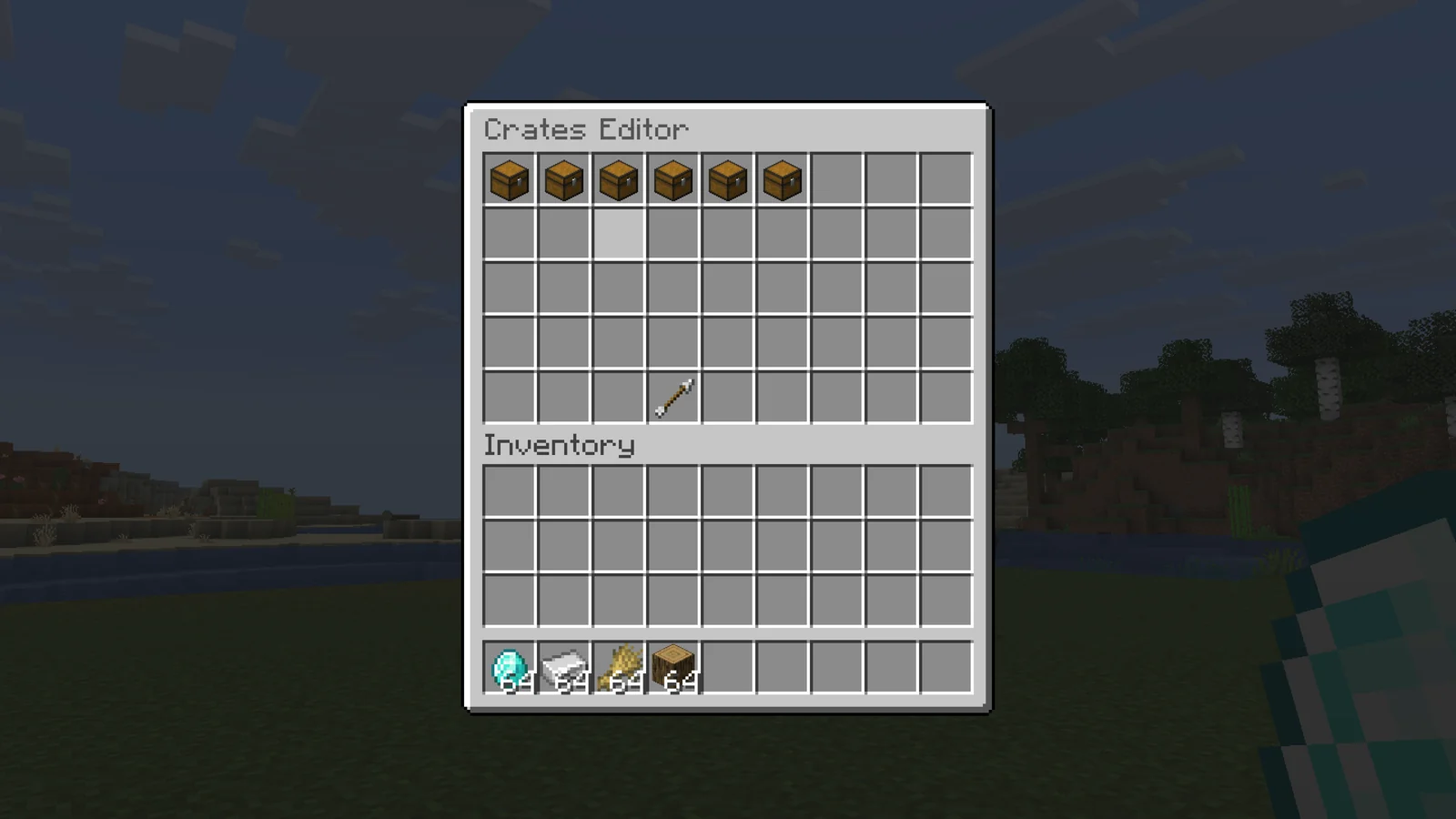
/crates editor lists every crate. Click one, then Edit Rewards:
- Add Reward adds any item, with all its data, and lets you pick its slot.
- Click a reward to replace its item, add or remove commands, or delete it.
Changes are saved to the crate file.
To remove a placed crate, break its block.
Placeholders#
| Placeholder | Returns |
|---|---|
%easycrates_<crate>% | How many virtual keys the player has for that crate. |
%easycrates_keyall_countdown% | Time until the next automatic key-all. |
Every placeholder also works with donut in place of easycrates.
Developer API#
EasyCrates fires two Bukkit events from net.luxcube.minecraft.api.event.
| Event | Cancellable | Fires when |
|---|---|---|
CrateOpenEvent | Yes | A player opens a crate, before any key is used. Cancelling stops the open and no key is spent. getPlayer(), getCrateName(), getOpenType() (CHOOSE, SPIN or MULTI), getAmount(). |
CrateRewardEvent | No | A reward, bonus rewards included, was given. getPlayer(), getCrateName(), getRewardName(), getRewardIcon(), getCommands(). |
Add softdepend: [EasyCrates] to your plugin.yml.
Troubleshooting#
- A crate is missing after
/crates reload: the console names the file, line and key that couldn't be read. A broken reward shows as a barrier and the rest of the crate still loads. - Players can't preview or multi-open with commands: those commands are admin-only. Players use the buttons in the crate menu.