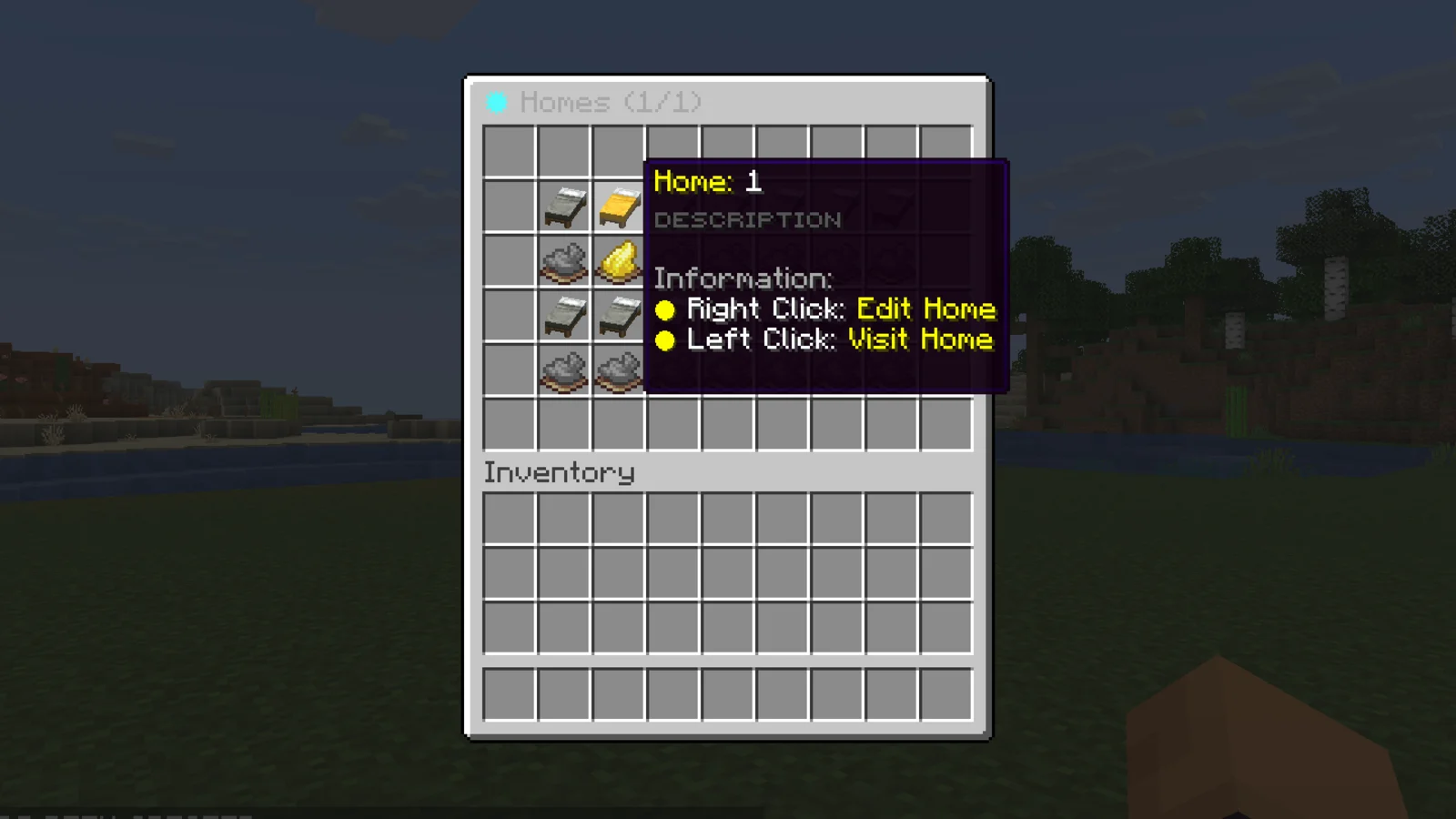
LiteHome replaces /home with a menu. Each home has its own slot: click it to teleport, right-click it for its settings. From the settings a player can give a home a private vault, make it public for visitors, pick who may visit, and see who came by.
It works on Folia, can share homes across the servers of a network, speaks 7 languages that each player picks for themselves, and imports homes from Essentials, HuskHomes and ModernHome.
Permissions#
| Permission | Lets a player | Default |
|---|---|---|
home.teleport.<number> | Have that many homes. The highest one a player has counts. | None |
litehome.visit | Use /visit. | OP |
litehomes.admin | Use every /litehome and /homeadmin command. | OP |
Warning
Players without a home.teleport.<number> permission can't set any home. Give your default group one, for example /lp group default permission set home.teleport.3 true. OPs have no limit.
Commands#
| Command | What it does | Permission |
|---|---|---|
/home | Opens your homes menu. Aliases /h and /homes. | None |
/home <number> | Teleports to that home. | None |
/sethome [number] | Sets a home where you stand, in the first free slot or the one you name. Naming a slot you already use moves that home. | home.teleport.<number> |
/delhome <number> | Deletes a home. | None |
/publichomes | Opens a menu of every public home. | None |
/visit <player> | Opens another player's homes to visit them. | litehome.visit |
/homelanguage | Picks your language for menus and messages. | None |
/litehome | Shows the admin commands. /homeadmin works the same. | litehomes.admin |
/litehome see <player> | Opens another player's homes. | litehomes.admin |
/litehome tp <player> <home> | Teleports you to a player's home. | litehomes.admin |
/litehome rename <player> <home> <name> | Renames a player's home. | litehomes.admin |
/litehome delete <player> <home> | Deletes a player's home. | litehomes.admin |
/litehome voucher <player> <amount> | Gives a voucher that adds home slots when right-clicked. | litehomes.admin |
/litehome migration <essentials|huskhomes|modernhome> | Imports homes from another plugin. | litehomes.admin |
/litehome reload | Reloads the config and language files. | litehomes.admin |
Configuration#
| File | What it controls |
|---|---|
config.yml | Home features, teleport delay, slots, cross-server, storage and sounds. |
languages/<language>.yml | Every message, one file per language. |
inventories/<language>/ | Every menu, one folder per language. |
license.yml | Your license key. |
config.yml#
| Key | Default | What it does |
|---|---|---|
language | english | Default language. Also french, german, greek, mandarin-chinese, russian and spanish. |
settings.delay-to-teleport-in-seconds | 3 | Countdown before a home teleport. |
settings.use-smooth-countdown | true | Show the countdown with decimals instead of whole seconds. |
world-blacklist | world_the_end | Worlds where players can't set homes. |
recent-home.enabled | true | Show a button for the last home used, at slot (default 49). |
home-slots | 14 homes | Which menu slot shows each home and its button. |
database.type | sqlite | sqlite, or mysql with database.sql filled in. |
placeholder-api.enabled | false | Register the placeholders when PlaceholderAPI is installed. |
In a WorldGuard region where the player can't build, /sethome is refused.
Home settings#
Right-clicking a home in the menu opens its settings. The owner and whitelisted players can open them. home-settings.contents turns each part on or off:
| Key | What the player gets |
|---|---|
rename | Rename the home in an anvil. |
private-vault | A storage menu tied to that home. |
visit-switch | Make the home public, so it shows in /publichomes and /visit. |
whitelist | Pick which players may visit. |
activities | A log of when the home was made or renamed, who visited and who opened the vault. |
home-settings.enabled: false removes the settings menu. instant-rename-on-right-click: true makes a right-click open the rename directly.
Vouchers#
/litehome voucher Steve 2 gives Steve a book that adds 2 home slots when he right-clicks it. The item's look is under home-voucher, where %amount% is the number of slots.
BetterTeams#
With BetterTeams installed and team-support.allow: true, the homes menu shows the team home at bed-slot (default 9), with its button at dye-slot (default 18).
Install#
- Put the LiteHome jar in
plugins/and start the server once. It createsplugins/LiteHome/with the files above. - Paste your license key into
license-keyinlicense.yml. Your key is under My Licenses on the BlazeZ portal; licenses linked to your Discord account show up there automatically. If yours is missing, open a License Key ticket in the BlazeZ Discord. - Grant
home.teleport.<number>to your players (see Permissions). - Restart the server.
- After editing files, run
/litehome reload.
LiteHome loads before Essentials. If Essentials is installed, the console explains how to stop its /home and /sethome from taking over.
Moving from another plugin#
With the old plugin still installed, run /litehome migration essentials, huskhomes or modernhome once in game. Its homes are copied into LiteHome.
Cross-server homes#
Players can set a home on one server and teleport to it from another.
- Set
database.type: mysqland fill indatabase.sqlon every server, all pointing at the same database. - On each server, set
cross-server-support.enabled: true,server-nameto that server's name in your proxy config, andproxy-typetoVelocityorBungeecord. - Restart every server.
Placeholders#
Set placeholder-api.enabled: true and install PlaceholderAPI.
| Placeholder | Returns |
|---|---|
%litehome_homes% | Homes the player has set. |
%litehome_max_homes% | Homes the player is allowed, from their highest home.teleport.<number> permission, up to the number of home slots. |
%litehome_homes_left% | Homes the player can still set. |