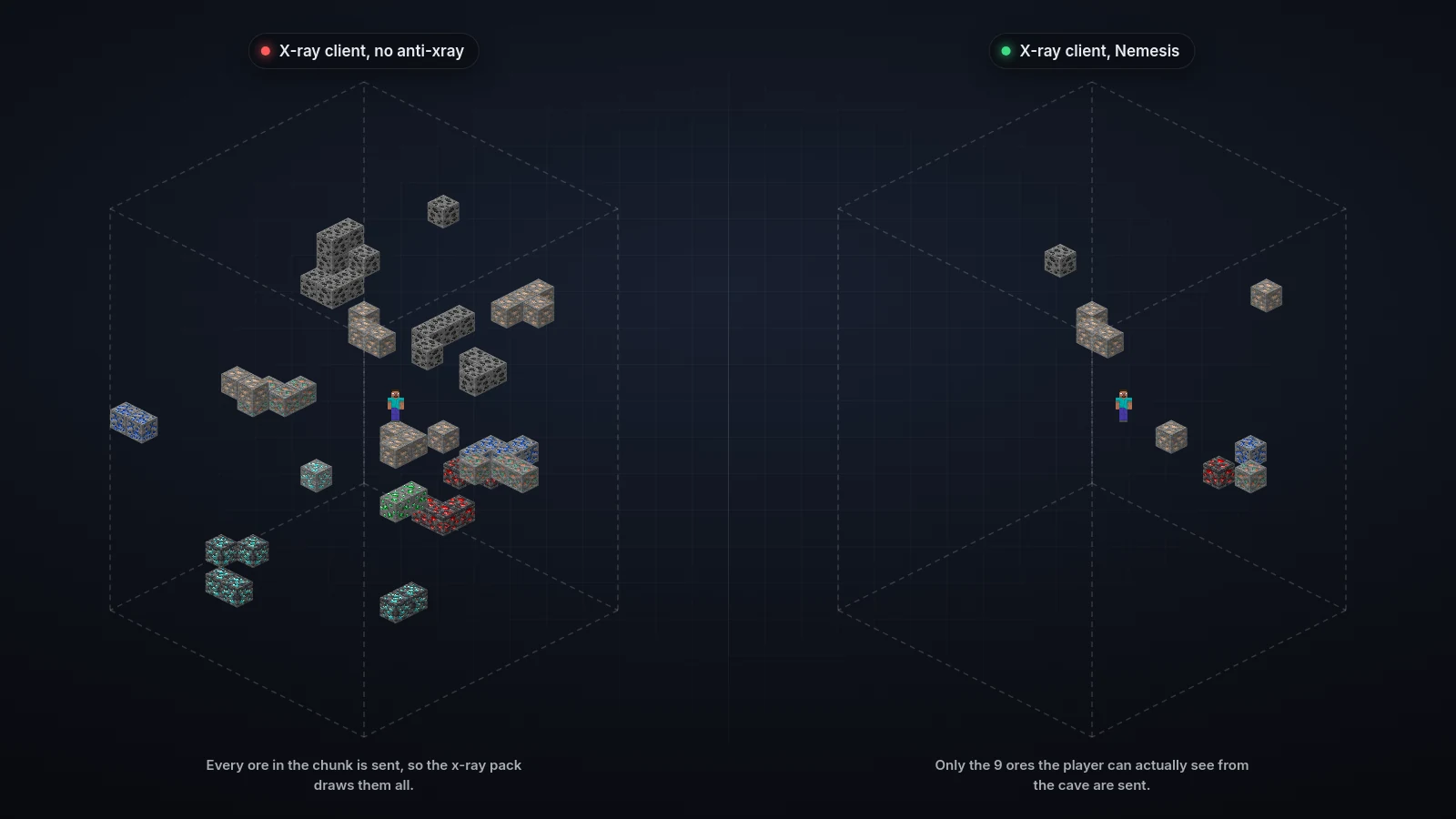
Nemesis edits the chunk and entity packets each player receives. The world on disk never changes. An x-ray client gets stone where your diamonds are, empty rock where your chests are, and nothing where other players stand behind a wall. A player only gets the real block or entity once they could actually see it, so legit players don't notice anything.
On top of the anti-xray core, Nemesis hides the underground from freecam mods, buries structures and caves in fake rock, keeps skybases out of long-range view, protects your world seed and can bury honeypot stashes that alert staff when someone tunnels straight to them.
Features#
Anti-xray
Ores, chests, spawners and other storage are swapped for rock or air in the chunk packet. The world on disk never changes. Anti-xray
Revealed by line of sight
A player gets the real block only once they can see it, and seeing one ore sends its whole vein, so legit mining feels normal. Anti-xray
Anti-freecam
Below each world's hide level, the underground is replaced with a fake floor until the player goes down there, so a freecam has nothing to look at. Anti-Freecam add-on. The fake floor
Entity hiding
Players and mobs a viewer can't see aren't sent to them, while name tags still draw through walls like vanilla. Hide Entity add-on. Entity hiding
Matching disguises
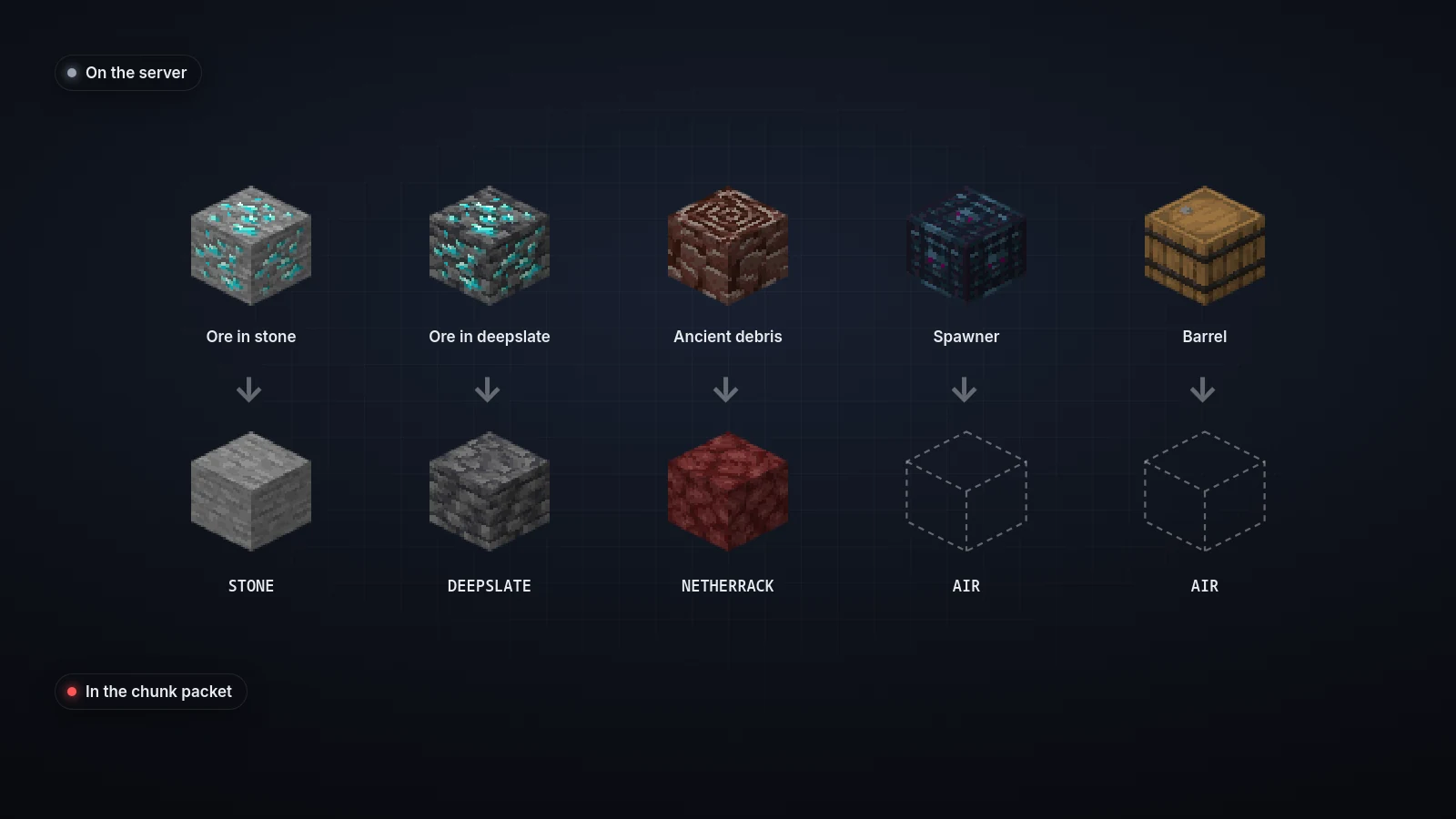
A diamond in granite becomes granite, and particles at hidden blocks are cancelled, so nothing gives a position away. What gets hidden
Air pockets
Sealed rooms of fake air make an x-ray view look like caves everywhere, hiding the real ones in noise. Air pockets
Structures, dungeons and caves
Mineshafts, strongholds, trial chambers, monster rooms and natural caves are buried in rock until a player finds them. Hide Structures add-on. Structures
SeedVeil
Faked seed hashes, shifted ore veins, moved map markers and fake /locate answers stop clients from cracking your seed. On by default. SeedVeil
Spawn Stash honeypots
Buried rooms full of loot that nobody finds without x-ray or freecam. Tunnel to one and staff get an alert. Spawn Stash
Built for busy servers
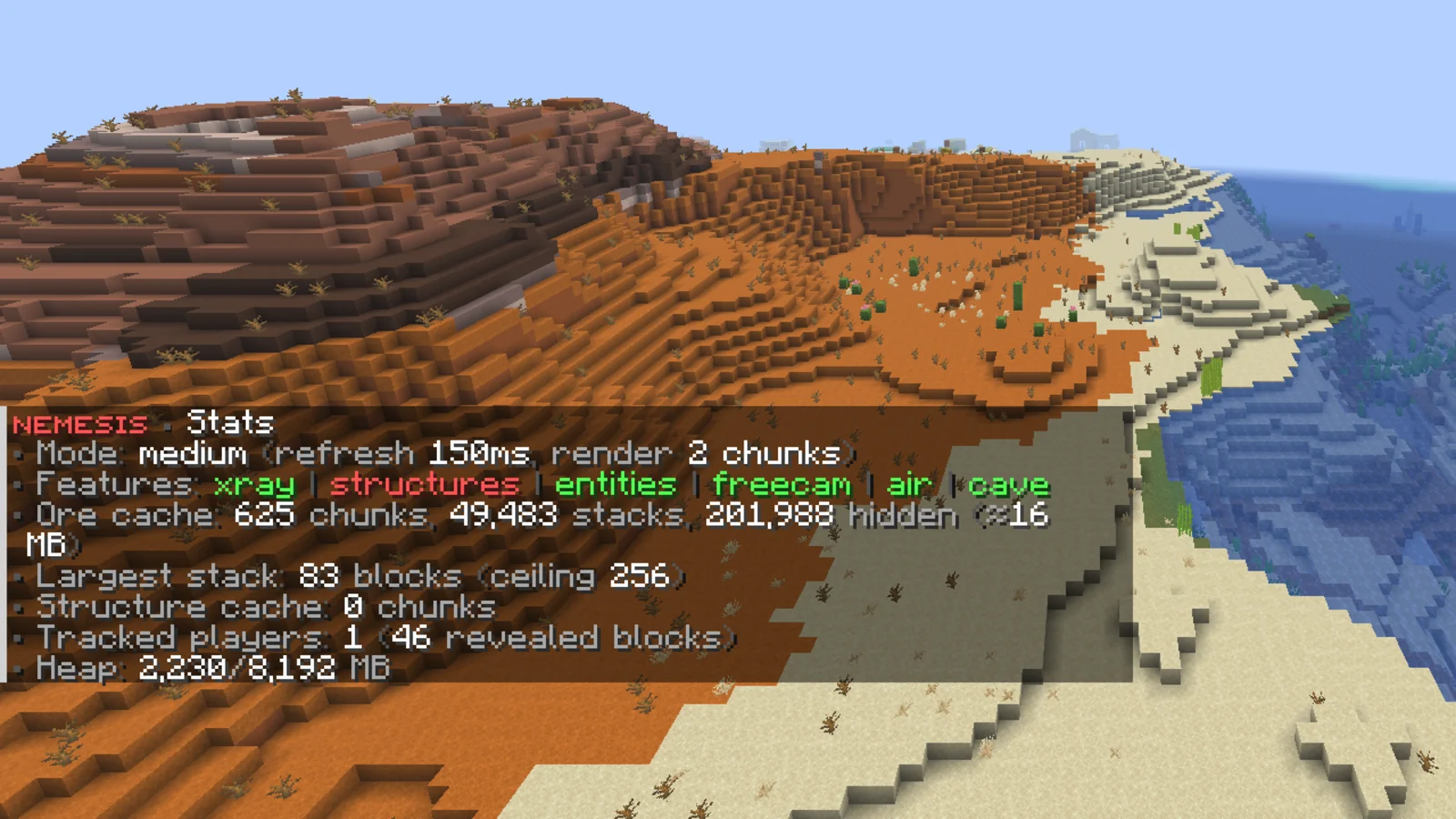
Chunk disguising runs on background threads, with performance modes that set how often and how far reveals are checked. Performance modes
Skybase protection
Builds above the ceiling level are cut out of distant chunks, so a freecam sweeping the map sees empty sky. Skybase protection
Camera guard
An optional texture pack turns the whole screen black the moment a player's camera leaves their body, with a quick check that catches clients faking the pack. Camera guard
Xray alerts
Staff are warned when a player mines too many valuable ores too fast, with the ore, the count and the time window. Xray alerts
Permissions#
| Permission | Lets a player | Default |
|---|---|---|
nemesis.admin | Use every /nemesis command. | OP |
nemesis.vision.bypass.* | See through every hiding feature. Includes the five below. | OP |
nemesis.vision.bypass.hide-ores | See real ores and hidden blocks. | OP |
nemesis.vision.bypass.hide-entities | See hidden players and mobs. | OP |
nemesis.vision.bypass.hide-structure | See real structures. | OP |
nemesis.vision.bypass.air-pockets | See terrain without air pockets. | OP |
nemesis.vision.bypass.cave-hide | See real caves. | OP |
nemesis.freecam.alert | Get freecam detection alerts. | OP |
nemesis.freecam.bypass | Never be checked by freecam detection. | OP |
nemesis.cameraguard.alert | Get camera guard verification alerts. | OP |
nemesis.cameraguard.bypass | Never get the camera guard pack or verification. | Nobody |
nemesis.stash.alert | Get Spawn Stash alerts. | OP |
nemesis.stash.bypass | Never trip a Spawn Stash. | OP |
nemesis.piechart.alert | Get alerts when a player mines a pie chart decoy chest. | OP |
nemesis.xray.alert | Get mined-ore alerts. | OP |
nemesis.xray.bypass | Never trigger mined-ore alerts. | OP |
nemesis.seedveil.bypass | See the real seed and map markers. | OP |
nemesis.minimapguard.bypass | Keep full Xaero's minimap features. | OP |
blazez.updates | Get the update alert on join. | OP |
Note
The nemesis.vision.bypass permissions only work when the matching switch under admin-bypass in config.yml is true. All of them are false by default, so OPs see the same hidden world as everyone else until you turn one on.
Commands#
All subcommands except reload must be run in game.
| Command | What it does | Permission |
|---|---|---|
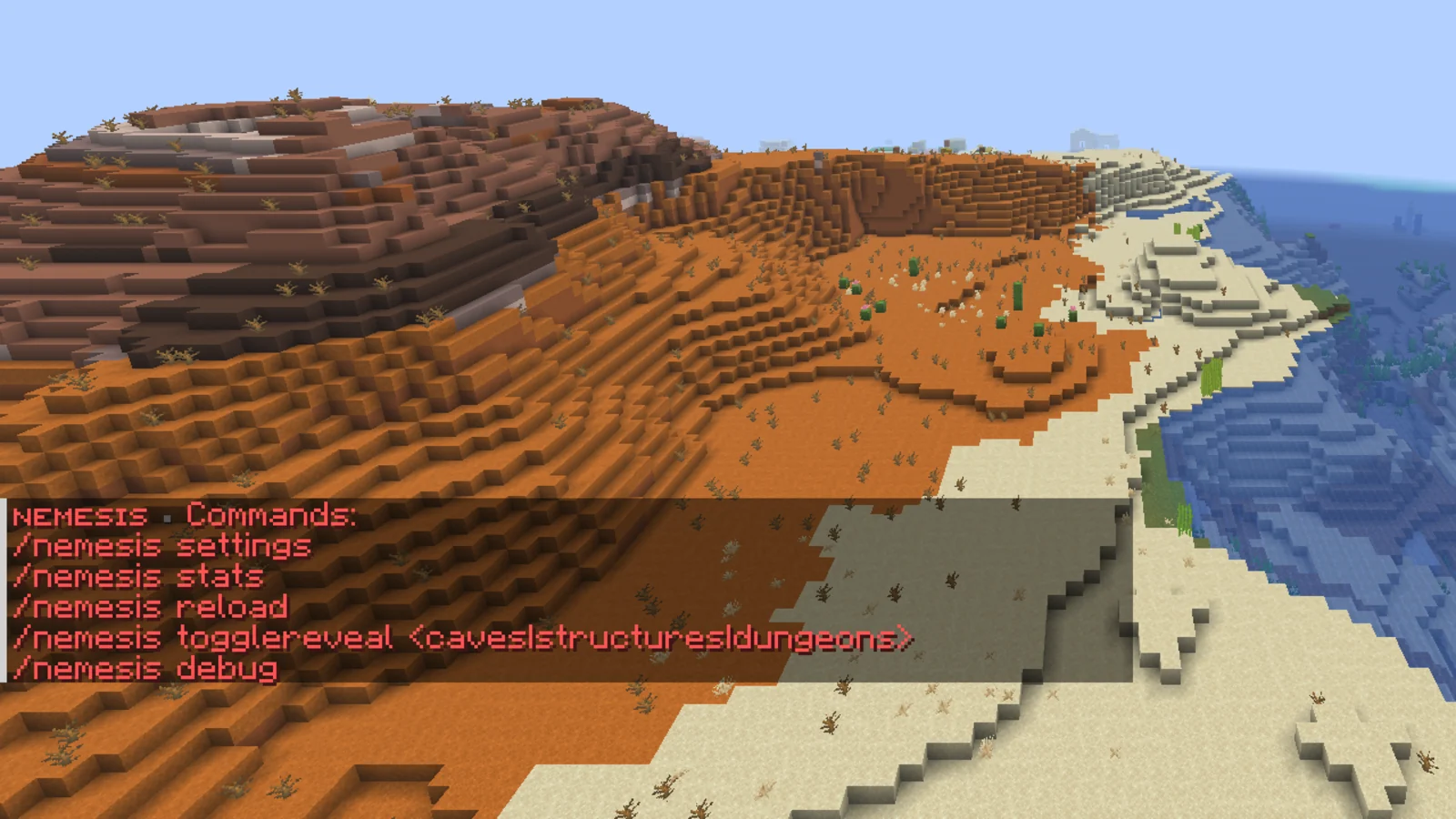
/nemesis | Shows the command list. | nemesis.admin |
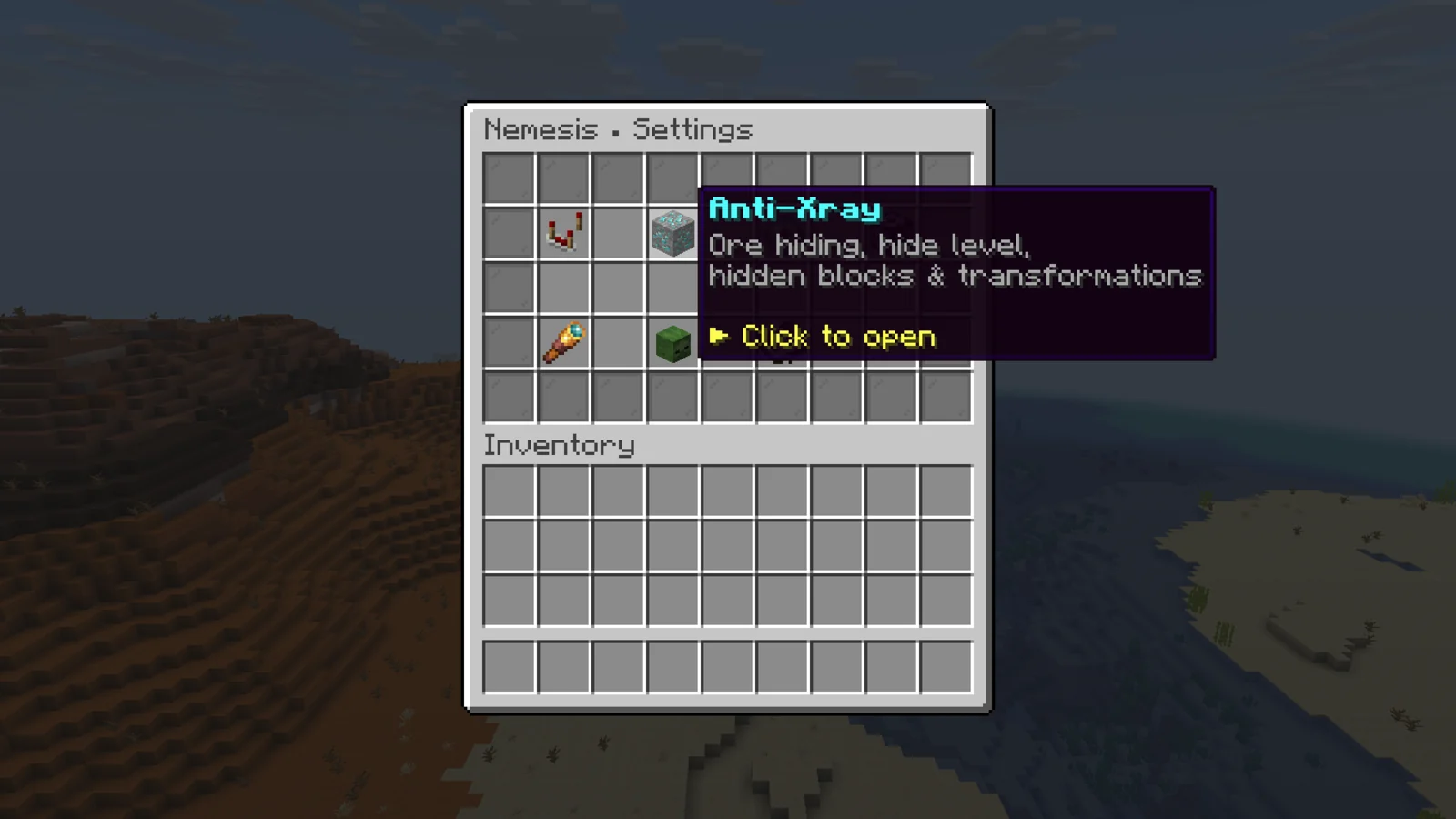
/nemesis settings | Opens the settings menu for blocks, entities, anti-xray, anti-freecam, disguises and worlds. | nemesis.admin |
/nemesis reload | Reloads every config file. Works from console. | nemesis.admin |
/nemesis stats | Shows the performance mode, active modules, ore cache size, tracked players and memory use. | nemesis.admin |
/nemesis togglereveal <caves|structures|dungeons> | Shows or re-hides one feature for you only, until you log out. Without an argument it shows your current state. | nemesis.admin |
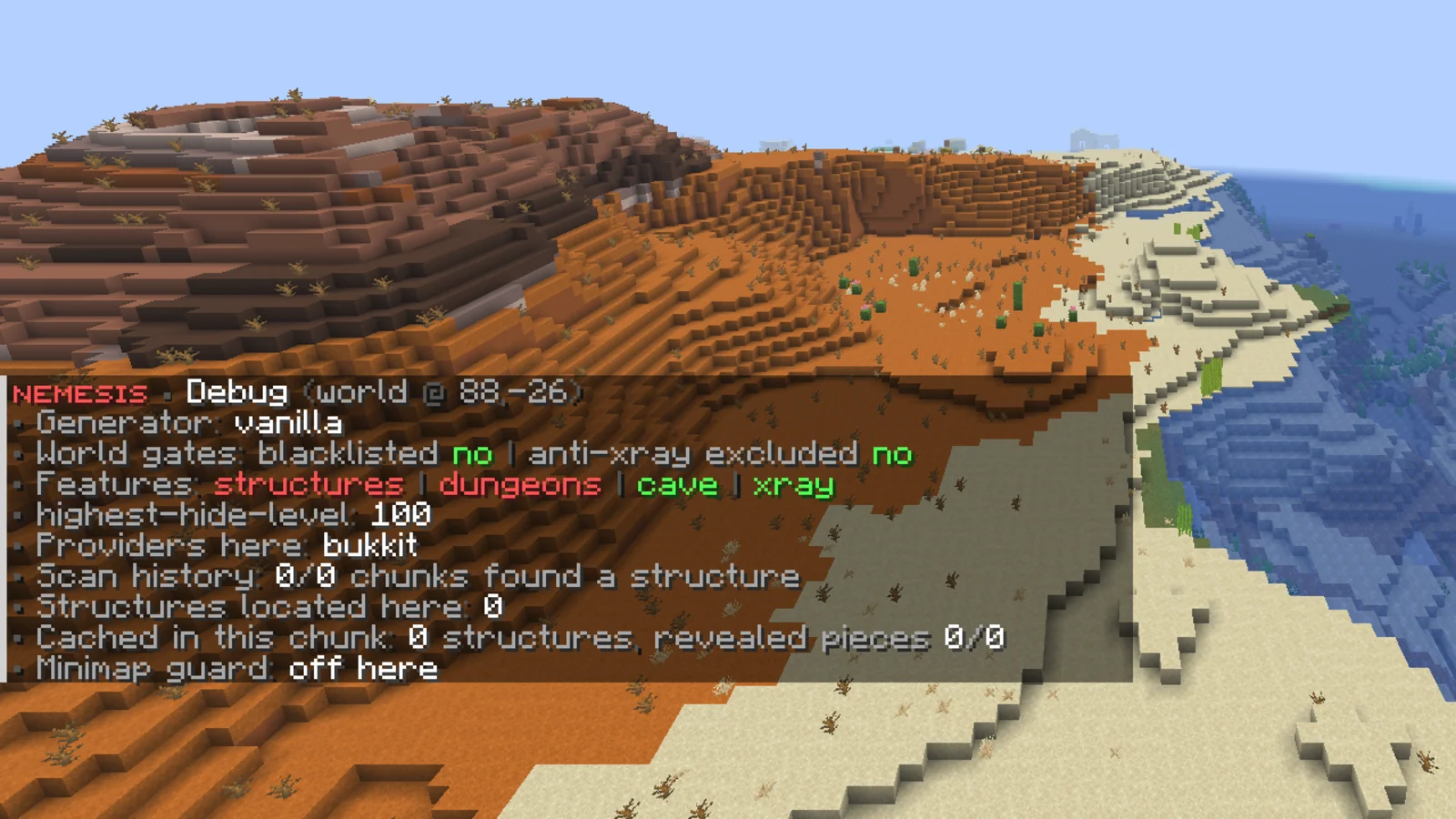
/nemesis debug | Reports structure hiding for the chunk you're in. | nemesis.admin |
/nemesis verify <player> | Makes a player redo the camera guard verification. Works from console. | nemesis.admin |
/nemesis stash <type|list|clear> | Buries a stash where you're looking, lists stashes or forgets them. | nemesis.admin |
Configuration#
| File | What it controls |
|---|---|
config.yml | Anti-xray, hidden blocks and disguises, performance mode, staff bypass, SeedVeil, minimap guard, Spawn Stash, the panel link and messages. |
anti-freecam.yml | Fake floor, adaptive reveal, air pockets, vertical mode, skybase protection and freecam detection. |
hide-entity.yml | Entity hiding and name tags. |
hide-structure.yml | Structure, dungeon and cave hiding. |
gui.yml | The /nemesis settings menus. |
license.yml | Your license key and update alerts. |
Worlds#
blacklisted-worlds in config.yml turns all of Nemesis off in a world (default otherside). To turn off one module per world, use anti-xray.excluded-worlds, excluded-worlds or excluded-environments in anti-freecam.yml, or the excluded-worlds of skybase protection or the minimap guard.
Staff bypass#
admin-bypass:
  everything: false
  hide-structure: false
  hide-entity: false
  hide-ores: false
  air-pockets: false
  cave-hide: false
Each switch works together with its permission. everything pairs with nemesis.vision.bypass.*. For a quick look without changing config, use /nemesis togglereveal.
Bedrock and older clients#
Nemesis works with ViaVersion, ViaBackwards and ViaRewind, and checks at startup that its packet handling runs in the right order next to them (via-compatibility). Bedrock players are detected automatically through Floodgate or Geyser, including Floodgate running only on the proxy. Players whose name starts with bedrock-ignore.bedrock-prefix (default .) count as Bedrock too.
| Option | Default | What it does |
|---|---|---|
bedrock-ignore.skip-anti-freecam | true | Bedrock players skip anti-freecam (fake floor, reveal refreshes, vertical window, freecam detection). Bedrock rebuilds every resent chunk from scratch, so anti-freecam makes their screen flicker. Ore hiding still applies to them. |
bedrock-ignore.enabled | false | Bedrock players get the real world with nothing hidden. |
Update alerts#
Staff with blazez.updates (OPs by default) get one chat message when they join, listing every installed BlazeZ plugin that has an update waiting. It stays off until you set check-for-updates: true in Nemesis's license.yml.
Install#
- Install PacketEvents. Nemesis doesn't load without it.
- Put the Nemesis jar in
plugins/and start the server once. Nemesis createsplugins/Nemesis/withconfig.yml,anti-freecam.yml,hide-entity.yml,hide-structure.yml,gui.ymlandlicense.yml. - Paste your license key into
license-keyinlicense.yml. Your key is under My Licenses on the BlazeZ portal; licenses linked to your Discord account show up there automatically. If yours is missing, open a License Key ticket in the BlazeZ Discord. - Restart the server.
- Apply later config edits with
/nemesis reload, which also works from the console.
Add-ons#
Anti-xray, anti-ESP for blocks, SeedVeil, Spawn Stash and the minimap guard come with every license. Three modules are add-ons that your license may or may not include:
| Add-on | Covers |
|---|---|
| Anti-Freecam | The fake floor, air pockets, vertical mode and skybase protection (anti-freecam.yml). |
| Hide Entity | Hiding players and mobs you can't see (hide-entity.yml). |
| Hide Structures | Structure, dungeon and cave hiding (hide-structure.yml). |
If an add-on is missing from your license, its module stays off whatever the config says, and the console tells you which one on every load. Set silence-missing-access-warnings: true in config.yml to hide that warning.
Anti-xray#
Every block type in hidden-block-types is swapped for a disguise block before the chunk is sent. Ores become the rock around them, and containers, spawners and other block entities become air. When a player has a clear line of sight to a hidden block, Nemesis sends them the real one.
A few details keep this invisible to legit players:
- Once an ore is revealed it stays revealed until the player is 3 chunks away (
keep-ores-in-view), so turning your head doesn't make ores flicker. - Seeing one ore reveals its whole vein (
reveal-whole-ore-stack). - The disguise matches the stone next to the ore when
transformations.sample-neighbour-stoneis on, so a diamond in granite becomes granite, not a lone block of deepslate. - Particles at a hidden block's position are cancelled, so they don't give its position away.
- After a WorldEdit or FastAsyncWorldEdit edit (
//set,//pasteand so on) the affected chunks are scanned again (world-edit-support).
What gets hidden and what it turns into#
hidden-block-types hides a block at every height. The default list covers every ore, ancient debris, chests, barrels, shulker boxes of every color, spawners, furnaces, hoppers and the other storage blocks an ESP client looks for.
hidden-block-types-below-level hides a block only below a Y level. Use it for blocks that are only suspicious deep down, like cobblestone at Y 8:
hidden-block-types-below-level:
  COBBLESTONE: 40
  STONE_BRICKS:
    level: 30
    worlds:
      - world
transformations decides the disguise. environment-default sets the fallback per dimension (DEEPSLATE in the overworld, NETHERRACK in the nether, END_STONE in the end), and other sets it per block:
transformations:
  sample-neighbour-stone: true
  environment-default:
    normal: DEEPSLATE
    nether: NETHERRACK
    the_end: END_STONE
  other:
    DIAMOND_ORE: STONE
    ANCIENT_DEBRIS: NETHERRACK
    CHEST: AIR
max-hide-section (default 10) is how many 16-block sections, counted up from the bottom of the world, get hidden. Raise it if you want blocks higher up covered.
Proximity hiding#
Line of sight is a weak rule in the open. A player on the nether roof or in an air base can see everything within their render distance, so an ESP client gets every chest and spawner out there. With anti-xray.proximity-hiding.enabled: true, a hidden block also has to be within distance blocks (default 20) before it's revealed. Line of sight still applies on top.
Off by default, because legit players then stop seeing their own base from across the valley.
| Key | Default | What it does |
|---|---|---|
distance | 20 | Reveal range in blocks, from the eyes. 1 to 256. |
ignore-y | false | Measure horizontally only. |
rehide | true | Hide the block again when the player walks out of range. With false, range only decides when a block first appears. |
distances | empty | Per-block overrides, for example SPAWNER: 8. |
Pie chart compatibility#
Hiding containers also flattens the blockentities slice of the F3 pie chart, so players can no longer use it to find bases. Turn on anti-xray.pie-chart-compat.enabled if you want the pie chart to keep working.
For every hidden chest, shulker, spawner, sign or other rendered block entity, Nemesis sends a decoy chest to a random buried spot in the same 16x16x16 section. The pie chart reacts the same way it would to the real one, but an ESP client only sees decoys, so it can't find the base any more precisely than the pie chart can. Decoys only go into solid rock that Nemesis hasn't changed, and each one stays in the same spot every time the chunk loads. A decoy turns back into its real block when a player gets within reveal-distance, when a block next to it is broken or blown up, or when the real container is broken.
A legit player has no reason to dig into a decoy. When someone mines one, staff with nemesis.piechart.alert get an alert with the player, position and how many decoys that player has mined this session. One hit can be bad luck while strip mining. Several are a strong sign of x-ray or ESP. Nothing is punished automatically.
Off by default, because ESP users still learn roughly which section each hidden container is in.
| Key | Default | What it does |
|---|---|---|
enabled | false | Send decoy chests so the pie chart keeps working. |
reveal-distance | 4 | Range in blocks at which a decoy turns back into its real block. 1 to 32. |
alert.enabled | true | Alert staff when a player mines a decoy. |
alert.permission | nemesis.piechart.alert | Who gets the alert. |
alert.message | see config | Alert text. Placeholders: %player%, %x%, %y%, %z%, %world%, %count%. |
Performance modes#
vision-mode.selected-mode sets how often Nemesis checks for blocks to reveal, and how many chunks around each player it checks.
| Mode | Check every | Chunk radius |
|---|---|---|
performance | 1000 ms | 2 |
medium (default) | 150 ms | 2 |
hard | 100 ms | 3 |
Chunk disguising runs on background threads (anti-xray.obfuscation-threads, 0 means half the CPU cores). If a chunk takes longer than obfuscation-timeout-millis (default 10000), the real chunk is sent instead so nobody is left waiting.
anti-xray.excluded-worlds turns anti-xray off in some worlds while everything else keeps running. The end is in it by default, since it has no ores.
Anti-freecam#
A freecam mod detaches the camera from the body, so a player can fly it through the ground and look at every tunnel and base below them. Anti-freecam stops that by never sending the underground in the first place.
The fake floor#
Below each world's hide-level, the chunk data a player receives is replaced with the fill-out block. When the player goes below reveal-level, the real world is sent back around them within reveal-radius chunks (default 8). When they climb back above it, the floor returns (rehide-section: true).
worlds:
  1:
    world: 'world'
    hide-level: 16
    reveal-level: 30
    fill-out: 'DEEPSLATE'
    enabled: true
Worlds without an entry use the default block (same values) as long as default-enabled is true. To turn anti-freecam off in one world, give it an entry with enabled: false, or add it to excluded-worlds. Deleting a world's entry only makes it fall back to the defaults.
excluded-environments turns anti-freecam off in every world of a dimension, whatever the world is called. It holds THE_END by default, so End worlds keep their real floor while anti-xray, entity hiding and hide-structure keep running there. Remove it to protect the End too, or add NETHER or NORMAL.
Block updates below the floor are dropped (cancel-block-update-below) so a freecam can't watch someone mining down there. cancel-fall-damage-on-hidden-layer protects a player who lands on the fake floor during lag, and fast-fall-reveal resends chunks right away when someone falls fast, so they don't rubber-band on it.
refresh-chunks-per-tick (default 5) caps how many chunks a reveal resends per tick per player. Lower it if players report FPS drops when crossing the reveal level.
Adaptive reveal#
With adaptive-reveal.enabled: true, a player below reveal-level only gets the area they can actually see sent back, instead of every chunk within reveal-radius. A player in a sealed pocket gets the chunks right around them, a long tunnel reveals a strip along it, and a big cave reveals as far as its walls reach. Everything else stays behind the fake floor, so a freecam flown out of the cave finds nothing.
adaptive-reveal:
  enabled: false
  min-radius: 1
  max-radius: 8
  scan-interval-ticks: 10
  keep-until-surface: false
refresh-all-chunks: false| Key | Default | What it does |
|---|---|---|
enabled | false | Turn adaptive reveal on. |
min-radius | 1 | Chunks around the player that are always real, so they never walk into the fake floor. 1 is a 3x3. |
max-radius | 8 | Furthest a visible area can reach, in chunks. Never more than the player's view distance. |
scan-interval-ticks | 10 | How often the visible area is measured again (20 is 1 second). |
keep-until-surface | false | Keep every chunk the player has seen real until they climb back above reveal-level, instead of hiding it again once it is out of sight. |
refresh-all-chunks | false | When the player goes below reveal-level, resend every chunk in their view: the visible area real, the rest refilled with the fake floor. Off means only the visible area is resent. |
Adaptive reveal replaces reveal-radius underground. It stands down while hide-all-sections or vertical mode is on.
Air pockets#
Air pockets carve sealed cubes of fake air into solid stone. An x-ray client draws them like caves, which hides the real caves in noise. The cubes follow a set grid, so the same chunk always gets the same pockets.
| Key | Default | What it does |
|---|---|---|
shape | CUBE | CUBE for solid boxes, CLUSTER for random 2x2x2 shapes. |
cube-size | 8 | Edge length of a cube. 2, 4, 8 or 16. |
min-y / max-y | -120 / 96 | Height band that gets pockets. |
source-blocks | stone types and dirt | Blocks that may be carved. |
reveal-on-external-break | true | Refill a pocket with real rock when someone mines into it, so nobody falls into fake air. |
reveal-layers | 2 | How far that refill reaches. 2 refills ahead of the player, which matters on high ping. |
Vertical mode#
With vertical.enabled: true, a player underground only receives real chunks in a box around them: chunk-distance (default 5, an 11x11 box). Outside it, the bottom max-hide-section sections are cut out and shown as fill-out-block (AIR for void, or a solid block). The box moves with the player.
sticky-reveal: true keeps a chunk real once the box has shown it, so terrain stops shifting as the box moves. It's off by default because a player who walks the map keeps every chunk they passed.
Skybase protection#
The same idea pointed up. With skybase-protection.enabled: true, everything at or above ceiling-level (default 200) is cut out of chunks outside a box around the player. A freecam sweeping the map sees empty sky, while anyone near a base sees it normally. The cut includes block light and live block updates up there, and it stands down when the player flies within reveal-margin (default 16) blocks of the ceiling.
Warning
Set ceiling-level above your tallest natural terrain. Anything above it disappears for distant players, so a ceiling below your mountain peaks flattens them on the horizon.
worlds sets a ceiling per world, and excluded-worlds skips worlds.
Freecam detection#
A freecam user mines and opens containers through walls and behind their own head, which no vanilla client can do. With freecam-detection.enabled: true, Nemesis checks each interaction against the player's recent eye positions and look directions. A player is flagged after min-hits (default 4) impossible interactions within window-seconds (default 10).
Staff with nemesis.freecam.alert get a chat alert, at most once every cooldown-seconds (default 60) per player. Nemesis never punishes on its own. With enforcement.enabled: true, a flagged player's line of sight stops revealing the underground for duration-seconds (default 120).
Creative and spectator players, Bedrock players (while skip-anti-freecam is on) and anyone with nemesis.freecam.bypass are never checked. Off by default. Tune fov-degrees and min-hits on a test server before turning it on.
Camera guard#
Camera guard sends players a small texture pack. Played normally nothing looks different, but as soon as the camera leaves the body (freecam), the whole screen turns black. Third person (F5) still works. It works in anti-freecam worlds on Java clients 1.21.6 or newer. Bedrock players, older clients and anyone with nemesis.cameraguard.bypass don't get the pack, and spectators are never blacked out.
camera-guard:
  enabled: false
  third-person: true
  required: true
  host: ''
  port: 8164
  url: ''
  skip-client-brands: []
  console-feedback: false
  response-timeout-seconds: 0
  custom-pack: ''
required-failed-message: "&#FF0000&lNEMESIS\n&7A required resource pack was declined."| Key | What it does |
|---|---|
enabled | Turns camera guard on. Off by default. |
third-person | Keeps the F5 camera working. false blacks out third person too. |
required | Players who decline the pack, or never load it, are disconnected with required-failed-message. Players can't chat or use commands until the pack has loaded. |
host | The address players download the pack from. Empty uses the address they joined with. |
port | Nemesis serves the pack itself on this port. Open it in your firewall. |
url | Send the pack from your own web host instead. With url empty and port: 0, merge plugins/Nemesis/camera-guard-pack.zip into your own server pack. |
skip-client-brands | Client brands that never get the pack or verification, for example [lunarclient]. |
console-feedback | Logs pack and verification results to the console. Off by default. |
response-timeout-seconds | Kicks players who never answer the pack request within this many seconds. 0 turns it off. Needs required: true. |
custom-pack | A zip in plugins/Nemesis/ to use as the base pack instead of the built-in one, for your own camera guard pack with verification. It needs pack.mcmeta in its root. Empty uses the built-in pack. |
required-failed-message | The kick message for players who decline or never load a required pack. |
Verification#
Hacked clients can tell the server the pack loaded without ever loading it. Verification catches that. It only runs when Nemesis serves the pack itself (url empty, port above 0).
- Every player gets their own copy of the pack from a private link. A client that says the pack loaded but never downloaded it fails right away.
- Players who really loaded it get a short menu: click every item that matches the one at the bottom. The items only look different with that player's own pack, so without it every slot looks the same.
- Until they pass, players can't use commands, chat, break or place blocks, interact, attack or drop items. Escape closes the menu, and any of those actions opens it again.
- On a fail, staff with
nemesis.cameraguard.alertget an alert, or the player is kicked withfail-action: KICK. This also covers clients that fake having loaded the pack.
camera-guard:
  verification:
    enabled: false
    load-timeout-seconds: 60
    timeout-seconds: 45
    attempts: 3
    targets: 4
    remember-minutes: 30
    open-delay-ticks: 20
    fail-action: ALERT
alert-permission: nemesis.cameraguard.alert| Key | What it does |
|---|---|
load-timeout-seconds | How long a player has to load the pack before the check fails. |
timeout-seconds | How long the menu can stay open before the check fails. Time with the menu closed doesn't count. |
attempts | Wrong clicks allowed before the check fails. |
targets | How many matching items are in the grid (1 to 8). |
remember-minutes | Skips the menu for players who passed within this time. The private-link check still runs. 0 asks every join. |
open-delay-ticks | Wait after the pack loads before the menu opens. |
fail-action | ALERT warns staff, KICK also kicks the player. |
The messages and gui sections under verification hold every chat line and menu text. Use /nemesis verify <player> to make someone redo the check.
Entity hiding#
Players and mobs in hidden-entity-types are removed from a viewer's packets until the viewer could see them. Visibility is checked from up to 3 points, set in hide-entity-check-types:
| Check | Looks from |
|---|---|
PLAYER_EYE_VIEW | The player's eyes. |
THIRD_PERSON_VIEW | 5 blocks behind the eyes, like the F5 camera. |
PLAYER_EYE_VIEW_MINUS_1Y | Slightly lower eyes, the height of a sneaking player. |
By default an entity stays visible once seen. re-hide-entities: true hides it again when it breaks line of sight, but only beyond re-hide-entities-min-distance blocks (default 30), so nobody pops out of view mid-fight.
Vanilla draws player names through walls. So that a hidden player's name doesn't vanish and give the feature away, Nemesis draws the name tag back for the players they're hidden from (hidden-player-nametags). It follows team prefixes, colors and sneaking like a normal name tag.
disable-hide-entity-completely: true turns the module off.
Structures, dungeons and caves#
With enabled: true in hide-structure.yml, structures in whitelist are replaced with rock in the chunk packet. A player gets each piece back when they can see it within reveal-distance blocks (default 48). Walking into a structure's bounding box reveals the whole thing and everything hidden inside it for the rest of that world visit (reveal-on-entry). Ores and chests inside still follow anti-xray.
enabled: false
highest-hide-level: 100
reveal-distance: 48
reveal-on-entry: true
fill-mode: SMART
whitelist:
  - 'BURIED_TREASURE'
  - 'MINESHAFT'
  - 'STRONGHOLD'
  - 'TRIAL_CHAMBERS'
Structures that reach above highest-hide-level stay visible, so villages and other surface builds are untouched. fill-mode is SMART (fills the structure and blends into the terrain around it), SOLID or NONE.
Whitelist entries take the vanilla name (MINESHAFT) or a namespaced key from a custom generator (terraform:catacombs). On TerraformGenerator worlds, a plain MINESHAFT also covers its mineshafts.
hide-dungeons: true also buries vanilla monster rooms, which aren't registered structures. It finds them by their spawner and fills dungeon-radius blocks (default 4) around it.
Cave hiding#
cave-hide fills natural caves with rock until a player is inside one or sees it. It's on by default, needs anti-xray on, and is part of the Hide Structures add-on. The area within presence-radius-blocks (default 6) of the player is always real, so nobody ends up standing inside fake rock. A reveal spreads through the connected cave up to reveal-spread-radius-blocks (default 96). Once a player is standing inside a cave, every hidden cave in the chunks within enter-reveal-chunk-radius (default 2, so 5x5 chunks) opens at once instead of piece by piece as they look around. Set it to 0 to turn that off.
Run /nemesis debug in a chunk where structure hiding seems to do nothing. It prints the world's generator, the structures found in that chunk and why each one is or isn't hidden.
SeedVeil#
SeedVeil stops clients working out your world seed, which would let them find ores and structures without exploring. It's on by default and needs no setup.
- The hashed seed sent at login and respawn is replaced with a fake one. It stays the same for each dimension, so LOD mods like Distant Horizons and Voxy keep their saved terrain.
- Ore veins and the fingerprints of structures like end cities and ocean monuments are shifted off their seed-based positions.
- Map markers are moved and
/locateanswers with a believable fake. - Seed-cracking commands such as
/seedcrackerare blocked, and a player who keeps trying gets disconnected. Plain/seedstill works.
Eyes of Ender point at the real stronghold by default. With seedveil.protect-eye-of-ender: true, they lead to a made-up stronghold first, then switch to a real one close by when the player gets there. It's off by default because players can notice it.
nemesis.seedveil.bypass exempts staff from the fake seed, map markers, command blocking and the Eye of Ender decoy. Set seedveil.enabled: false if it conflicts with another plugin that changes world generation or maps.
Spawn Stash#
Spawn stashes are honeypots: a small buried room with valuable blocks, a spawner and a loot chest. Nobody should find one without x-ray or freecam, so when a player mines within catch-radius blocks (default 4), staff with nemesis.stash.alert get an alert with the player, position and stash type, and the stash turns back into solid rock. Nothing is punished automatically.
Place one by looking at a block and running /nemesis stash <type>. Types: diamond, netherite, emerald, gold, amethyst. /nemesis stash list shows every stash and whether it was caught, and /nemesis stash clear forgets them all (their blocks stay in the world).
With spawn-stash.auto-scatter.enabled: true, Nemesis keeps count stashes (default 5) buried within radius blocks (default 500) of spawn in the listed worlds, between min-y and max-y, and buries a replacement when one is caught.
Spawn Stash is off by default. Turn it on with spawn-stash.enabled: true. Staff with nemesis.stash.bypass never trip a stash.
Xray alerts#
Xray alerts warn staff when a player mines too many valuable ores too fast. When a player breaks alert-at ores of one group within window-minutes (default 5), staff with nemesis.xray.alert get a chat alert with the player, the ore, the count and their Y level. The same player and ore won't alert again for cooldown-seconds (default 120). Nothing is punished automatically, and players with nemesis.xray.bypass are never counted.
Off by default. Turn it on with xray-alerts.enabled: true.
| Key | Default | What it does |
|---|---|---|
window-minutes | 5 | How far back mined ores are counted. |
cooldown-seconds | 120 | Wait before the same player and ore alert again. |
log | true | Also log every alert to console. |
permission | nemesis.xray.alert | Who gets the alert. |
message | see config | Alert text. Placeholders: %player%, %count%, %ore%, %minutes%, %y%. |
excluded-worlds | empty | Worlds where nothing is counted. |
ores | diamond 10, ancient debris 6, emerald 6, gold 24 | Ore groups, each with a display name, an alert-at count and its blocks. |
Minimap guard#
Xaero's Minimap and World Map obey fair-play flags a server can send. With minimap-guard.enabled: true, Nemesis sends them on join and world change:
FAIR(default) turns off cave mode and the entity radar.nether-cave-mode-allowed: truekeeps world-map cave mode in the nether.FULLturns the minimap off.
Players without the mod see at most one blank chat line when they join. excluded-worlds skips worlds, and staff with nemesis.minimapguard.bypass never get the flags.
Web panel#
Nemesis links your server to the Nemesis panel on its own, using your license key. The connection is outgoing only, so you don't open any ports. Open the panel from the BlazeZ portal to edit settings, turn modules on and off, and reload without joining the server.
Turn the link off with cloud.enabled: false in config.yml.
Troubleshooting#
- A module does nothing even though it's enabled: check the console on startup for a missing add-on warning, see Add-ons.
- Structure hiding does nothing:
enabledinhide-structure.ymlisfalseby default. If it's on, stand in the chunk and run/nemesis debug. - OPs still see fake blocks: the bypass needs both the permission and the
admin-bypassswitch. - Players see terrain pop in or FPS drops near the reveal level: lower
refresh-chunks-per-tickinanti-freecam.yml. - Mountains look cut off in the distance: raise
skybase-protection.ceiling-level.