FastRTP sends players to a random safe spot in the world they pick. It finds safe spots in the background before anyone asks, so /rtp lands instantly even with many players online, and if the stock ever runs dry it finds one on the spot instead of failing.
Around that core it has a menu of worlds with prices and permissions, WorldGuard zones that teleport everyone standing in them on a timer, a queue that pairs players up for a fight, /duel requests, and random teleport across the servers of a network.
Permissions#
| Permission | Lets a player | Default |
|---|---|---|
donutrtp.admin | Use /rtp admin and /donutrtp reload. | OP |
donutrtp.cooldown.bypass | Skip the teleport cooldown. | OP |
donutrtp.cooldown.bypass.<world> | Skip the cooldown for one destination world. | OP |
donutrtp.rtpqueue.cooldown.bypass | Skip the cooldown between queue joins. | OP |
donutrtp.wait.bypass | Skip standing still before the teleport. | Nobody |
donutrtp.rtpforce | Use /rtpforce. | Nobody |
donutrtp.1v1.use | Send duel requests. | OP |
donutrtp.1v1.accept | Accept duel requests. | OP |
donutrtp.1v1.toggle | Turn duel requests off or on. | OP |
blazez.updates | Get the update alert on join. | OP |
/rtp and /rtpqueue need no permission. Cooldown and wait tiers use your own permission names, see Cooldowns and waiting.
Note
The duel permissions are OP-only by default. Grant donutrtp.1v1.use, donutrtp.1v1.accept and donutrtp.1v1.toggle to your players to let them duel.
Commands#
| Command | What it does | Permission |
|---|---|---|
/rtp | Opens the world menu. | None |
/rtp <world> [biome] | Teleports to a random spot in that world, optionally in one biome. | None, or the world's permission |
/rtpqueue [world] | Joins the fight queue, or opens the queue menu. Run it again to leave. Alias /rtpq. | None |
/rtpqueue leave | Leaves the queue. | None |
/rtpqueue toggle | Hides or shows the queue broadcasts for you. | None |
/duel <player> <world> | Challenges a player to a duel in a world. Alias /1v1. | donutrtp.1v1.use |
/1v1 accept <player> | Accepts a duel request. | donutrtp.1v1.accept |
/duel toggle | Turns incoming duel requests off or on. | donutrtp.1v1.toggle |
/fastercrystal toggle | Turns FasterCrystal off or on for you, when it's installed. | None |
/rtpforce <player> [world] [biome] | Makes another player random teleport, or opens the menu for them. | donutrtp.rtpforce |
/rtp admin <player> <min> <max> [world] | Teleports a player to a spot between min and max blocks from the world center. Works from console. | donutrtp.admin |
/donutrtp reload | Reloads every config and menu file. | donutrtp.admin |
World names in commands use the names from world-name-mappings, so players type /rtp nether instead of /rtp world_nether. The queue commands only exist while rtp-queue.enabled is true, and the duel commands while duel-system.enabled is true. rtp-command.enabled: false removes /rtp, /rtp admin, /rtpforce and /donutrtp reload if you only use the queue.
Configuration#
| File | What it controls |
|---|---|
config.yml | Regions, blacklists, cooldowns, pre-finding, zones, queue, duels, database and sounds. |
random-teleport-gui.yml | The /rtp world menu. |
random-teleport-queue-gui.yml | The /rtpqueue menu. |
cross-server-teleport-gui.yml | The world and server menu on a network. |
lang.yml | Every message. |
license.yml | Your license key and update alerts. |
Where players land#
random-teleport-regions sets the X and Z range per world. Each region names its world, and default-region is used for any world without a region of its own.
random-teleport-regions:
  default-region:
    min-x: -15000
    max-x: 15000
    min-z: -15000
    max-z: 15000
  nether-region:
    world: world_nether
    min-x: -7000
    max-x: 7000
    min-z: -7000
    max-z: 7000
Players never land on a block from blacklisted-blocks (default LAVA) or in a biome from blacklisted-biomes (default BEACH). With worldguard.avoid-pvp-denied-regions: true, they also never land in a WorldGuard region that denies PvP, such as spawn protection.
| Key | Default | What it does |
|---|---|---|
blacklisted-worlds | overworld | Destinations players can't pick. The menu shows disabled-icon for them. |
disabled-source-worlds | empty | Worlds where /rtp can't be used at all, such as a duel arena or lobby. |
allow-specific-biome-teleport | true | Allow the [biome] argument. |
first-join.random-teleport | false | Random teleport new players into random-teleport-world on their first join. |
death-without-bed.enabled | false | Random teleport players who die without a bed or anchor, instead of sending them to spawn. |
effects-on-random-teleport | Absorption 10 for 10s | Potion effects given after landing. Each has its own enabled. |
rtp-system.use-generated-chunks-only | false | Only land in chunks that already exist. Lowest CPU, but a fresh world may run out of spots. |
Cooldowns and waiting#
The cooldown and the stand-still wait come from permission tiers you name yourself:
teleport-cooldown-seconds-permissions:
  30: 'teleport.cooldown.30'
  60: 'teleport.cooldown.60'
per-world-cooldowns:
  world_nether: 45
  world_the_end: 60
teleport-wait-seconds-permissions:
  3: 'teleport.wait.3'
  5: 'teleport.wait.5'
A player with teleport.cooldown.30 waits 30 seconds between teleports. A world in per-world-cooldowns uses that flat time instead of the tiers. During the wait, moving more than allowed-walk-range blocks (default 1) cancels the teleport. smooth-countdown-decimals (0 to 2) sets the decimals on the countdown.
Pre-finding safe spots#
FastRTP keeps pregenerate-location-amount safe spots (default 5) ready per world and refills them in the background. Raise it before a busy launch, or if players see a message that no safe spot was found.
Key under pregeneration | Default | What it does |
|---|---|---|
prefer-generated-chunks | true | Look in chunks that already exist first, which costs far less CPU. |
max-generations-per-second | 4 | Cap on new chunks generated per second while searching. |
threads | 2 | Background threads doing the search. |
persist | true | Save found spots to pregenerated-locations.yml so they survive a restart. |
on-demand-fill | true | Find a spot on the spot when none are ready, instead of failing. |
reservoir-max-size | 1000 | Most spots kept per world. |
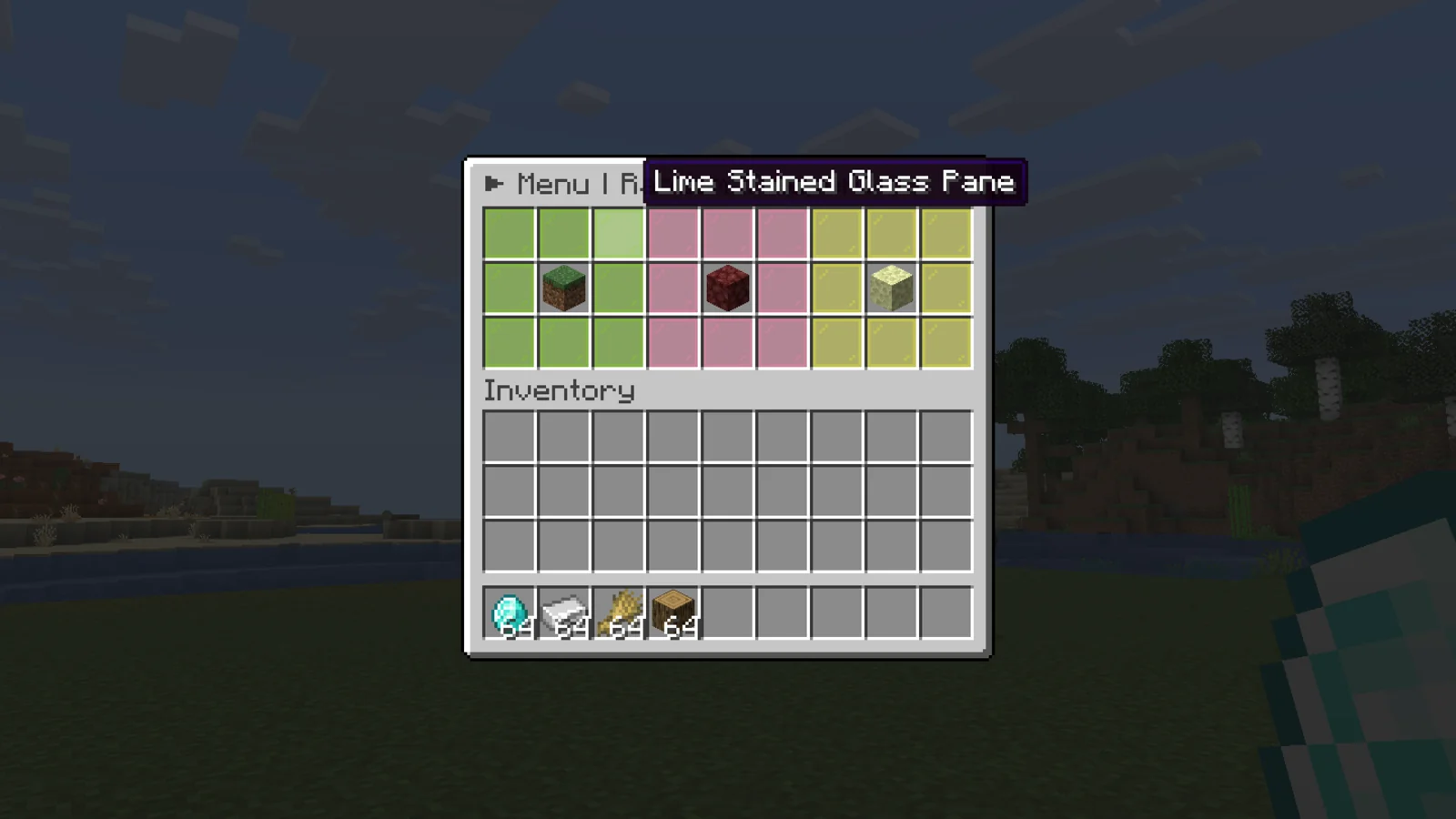
The world menu#
Each entry under worlds in random-teleport-gui.yml is one icon:
worlds:
overworld:
slot: 10
world: world
material: GRASS_BLOCK
name: '7FF55&lOVERWORLD'
permission: ''
price: -1permission locks the world and price charges Vault money (-1 is free). Any icon can show a HeadDatabase head with material: 'hdb:1234'. disable-rtp-gui: true turns the menu off while /rtp <world> and /rtp admin keep working, for servers that build their own menu in another plugin.
Update alerts#
Staff with blazez.updates (OPs by default) get one chat message when they join, listing every installed BlazeZ plugin that has an update waiting. It stays off until you set check-for-updates: true in this plugin's license.yml.
Install#
- Put the FastRTP jar in
plugins/and start the server once. It createsplugins/DonutRTP/with the files above. - Paste your license key into
license-keyinlicense.yml. Your key is under My Licenses on the BlazeZ portal; licenses linked to your Discord account show up there automatically. If yours is missing, open a License Key ticket in the BlazeZ Discord. - Set
random-teleport-regionsto fit inside your world border, and match the icons inrandom-teleport-gui.ymlto your worlds. - Restart the server.
- After editing files, run
/donutrtp reload.
RTP zones#
An RTP zone is a WorldGuard region that sends everyone inside it to a random spot every cooldown-time seconds, if at least minimum-players are in it. Use it for a "jump in to leave spawn" area.
rtp-zones:
 1:
   enabled: true
   zone-region: 'rtpzone'
   zone-world: 'world'
   cooldown-time: 60
   minimum-players: 1
   rtp-worlds:
   - 'world'
%donutrtp_zone_countdown_<zone>% shows the time left on a hologram or scoreboard. With keep-players-together: true, a cross-server zone lands the whole group around one spot, within group-spread blocks.
rtp-drop works the same way for a single region: a player who enters drop-region is sent to a random spot in rtp-world.
Fight queue#
/rtpqueue <world> puts a player in a queue for that world. When a second player joins, both are sent to a random spot close to each other to fight, after a short countdown. The server sees a broadcast when someone joins, and players can hide those with /rtpqueue toggle. rtp-queue.join-cooldown-seconds (default 3) stops players from spamming joins. Matched players land within a few blocks of each other. Ender pearls are blocked while a player is in the queue or in the countdown.
Duels#
/duel Steve nether sends Steve a request. When Steve runs /1v1 accept <name>, both players are sent to a random spot in that world, close to each other. Players in the fight queue can't duel. /duel toggle blocks incoming requests.
Cross-server#
- On every server, set
database.enabled: trueand fill indatabase.sqlwith the same MySQL database. - Set up
cross-server-teleport-gui.yml: each world icon has aserverslist, and each entry names the proxyserverand itsworld. Useserver: 'null'for the server the menu is on. - Restart every server.
The server names are the ones in your proxy config. RTP zones can also send players to another server by listing server and world pairs in rtp-worlds.
Placeholders#
| Placeholder | Returns |
|---|---|
%donutrtp_zone_countdown% | Seconds until the first zone fires. |
%donutrtp_zone_countdown_<zone>% | Seconds until a named zone fires. |
%donutrtp_zone_current_world% | The destination world of the first zone. |
%donutrtp_rtpqueue_messages% | Whether the player sees queue broadcasts (text from lang.yml). |
%donutrtp_rtpqueue_messages_raw% | The same as true or false. |
%donutrtp_rtpqueue_toggle% | The same as Yes or No. |
%donutrtp_1v1_toggle% | Whether the player accepts duel requests, Yes or No. Also %donutrtp_duel_toggle%. |
%donutrtp_faster_crystals% | Whether FasterCrystal is on for the player. _raw gives true or false. |
%donutrtp_cooldown% | Seconds left on the player's RTP cooldown. 0 when ready or with the bypass. |
%donutrtp_cooldown_<world>% | The same for one world, using that world's own cooldown. Display names such as nether work too. |
%donutrtp_queue_position% | The player's place in their RTP queue, starting at 1. 0 when not queued. |
Developer API#
net.luxcube.minecraft.api.DonutRTPAPI reads and changes the same toggles as the commands: isRtpQueueMessagesEnabled / setRtpQueueMessagesEnabled and isDuelRequestsEnabled / setDuelRequestsEnabled, each for a Player or UUID. setDuelRequestsEnabled returns a CompletableFuture, since on a network it saves to the shared database.
Events#
FastRTP fires two Bukkit events from net.luxcube.minecraft.api.event, on the player's own thread.
| Event | Cancellable | Fires when |
|---|---|---|
PreRandomTeleportEvent | Yes | Right before a random teleport. getDestination(), setDestination(Location) (any world), getTargetWorld(), getCause(). Cancelling stops the teleport. |
PostRandomTeleportEvent | No | After the player landed. getLocation() is the real landing spot, plus getCause(). |
getCause() returns a RandomTeleportCause: STANDARD (/rtp, the menu and /rtpforce), QUEUE, ZONE, DROP_ZONE or DUEL.
Add softdepend: [DonutRTP] to your plugin.yml.