Cosmos is a server jar built on Leaf, with builds for Minecraft 1.21.4, 1.21.8, 1.21.11, 26.1.2, 26.2 and 26.3. It loads Paper and Bukkit plugins and reads the same config files, so you swap the jar and keep your worlds, plugins and configs. Versions lists the builds and the few things that differ between them.
On top of Leaf it cuts the tick cost of packed mobs, villagers and redstone, and uses less memory. Measured against Paper 26.2 with the same JVM flags, a villager farm ticked 9.9 times faster and redstone 6.5 times faster. The numbers and what was changed are under Performance.
It also includes admin tools you would otherwise add as plugins: a setup wizard that tunes your configs on first start, a lag analyzer that shows what is using the tick, a laggy chunk finder, a lag shield that trims view distance while the server struggles, a gamerules menu, a plugin manager that reloads plugins without a restart, a resource pack reload, a config check, a staff disguise and a world downloader block. Mob profiles, check intervals and per-world settings let you tune how much work each kind of mob and each world gets.
Permissions#
| Permission | Lets a player | Default |
|---|---|---|
leaf.command.ping | Use /ping, for themselves or another player. | Everyone |
leaf.command.leaf.setup | Use /setup. Players with it get the first-run intro or a setup reminder on join until setup is done. With no operators set, the first player to join gets it until setup is done. | OP |
bukkit.command.tps | Use /tps. | OP |
leaf.command.lagshield | Use /lagshield. | OP |
leaf.lagshield.notify | See a chat message when the lag shield lowers or restores distances. | OP |
leaf.command.gamerules | Open /gamerules. | OP |
leaf.command.killentities | Use /killentities. | OP |
leaf.command.setslots | Use /setslots. | OP |
leaf.command.save | Use /save. | OP |
leaf.command.plugman | Use /plugman and its menu. | OP |
leaf.pluginmanager.notify | See a chat message with a click to reload when a plugin jar changes in the plugins folder. | OP |
leaf.command.disguise | Use /disguise <username>. | OP |
leaf.command.disguise.others | Disguise and undisguise other players. Only works with misc.disguise.allow-others: true. | OP |
leaf.command.undisguise | Use /undisguise. | OP |
leaf.antimapstealer.notify | See a chat message when a player joins with a world downloader. | OP |
leaf.antimapstealer.bypass | Join with a world downloader without being kicked or blocked. | Nobody |
leaf.perfwatcher.notify | See lag spike alerts from the perf watcher in chat. | OP |
leaf.itemshadowing.use | Make ghost items while item shadowing is on. | Everyone |
leaf.command.leaf | Open /leaf admin. The player also needs at least one of the leaf.command.leaf.<tool> permissions below. | OP |
leaf.command.leaf.analyze | Run the lag analyzer. | OP |
leaf.command.leaf.lagchunks | Run the laggy chunk finder. | OP |
leaf.command.leaf.check | Run the config check with /leaf admin check. | OP |
leaf.command.leaf.perf | Open the perf watcher with /leaf admin perf. | OP |
leaf.command.leaf.resourcepack | Reload, show and resend the server resource pack with /leaf admin resourcepack. | OP |
leaf.command.leaf.pregen | Pregenerate worlds. | OP |
leaf.command.leaf.reload | Reload config/leaf-global.yml. | OP |
leaf.command.leaf.mspt | Use /leaf admin mspt. Still needs leaf.command.leaf. | Everyone |
leaf.command.leaf.version | Use /leaf admin version. Still needs leaf.command.leaf and bukkit.command.version. | Everyone |
Commands#
| Command | What it does | Permission |
|---|---|---|
/leaf | Lists every Cosmos command you can use. Each command below also works as /leaf <command>. | None |
/setup [preset|skip|undo] [vanilla|balanced|max|practice|large-smp] | Opens the setup wizard, applies a preset, turns off the setup reminder or restores the last config backup. | leaf.command.leaf.setup |
/tps | Shows TPS, tick times, CPU, memory, worlds and the lag shield state. | bukkit.command.tps |
/ping [player] | Shows your ping or another player's. Aliases /ms and /latency. | leaf.command.ping |
/lagshield <status|on|off|reset> | Shows the lag shield, turns it on or off (saved to the config), or restores normal distances right away. | leaf.command.lagshield |
/gamerules [world] | Opens a menu with every gamerule of a world. | leaf.command.gamerules |
/killentities [all|type] | Removes entities in every world. Alias /clearentities. | leaf.command.killentities |
/setslots <amount> | Sets the max player count and saves it to server.properties. On 1.21.4 and 1.21.8 it lasts until the next restart. Aliases /setmaxslots and /slots. | leaf.command.setslots |
/save <world|all> | Saves one world or every world right away. Worlds with manual chunk saving only save this way. | leaf.command.save |
/plugman | Opens the plugin manager menu. | leaf.command.plugman |
/plugman list | Lists every plugin and the jars in plugins/ that are not loaded. | leaf.command.plugman |
/plugman info <plugin> | Shows a plugin's version, jar, dependencies, the plugins that need it and its commands. | leaf.command.plugman |
/plugman reload <plugin> | Reloads a plugin from its jar, together with the plugins that hook into it. | leaf.command.plugman |
/plugman load <jar> | Loads a jar from the plugins folder, by file name or plugin name. | leaf.command.plugman |
/plugman unload <plugin> | Unloads a plugin and the plugins that hook into it, so its jar can be replaced or removed. | leaf.command.plugman |
/plugman enable <plugin> | Enables a disabled plugin, loaded fresh from its jar. | leaf.command.plugman |
/plugman disable <plugin> | Disables a plugin and the plugins that hook into it. | leaf.command.plugman |
/plugman changes | Lists jars that changed on disk since they loaded, with a click to reload or load each one. | leaf.command.plugman |
/plugman lookup <command> | Shows which plugin owns a command. | leaf.command.plugman |
/disguise <username> | Switches you to another account on this server. | leaf.command.disguise |
/disguise <player> <username> | Does the same for another player. | leaf.command.disguise.others |
/undisguise [player] | Switches back to your own account, or another player's. | leaf.command.undisguise |
/leaf admin analyze [seconds|open|share|cancel] | Profiles the server and opens a lag report with a share link. 30 seconds by default, 5 to 300. | leaf.command.leaf.analyze |
/leaf admin lagchunks [seconds|open|tp] | Finds the chunks that cost the most tick time. 10 seconds by default, 1 to 120. | leaf.command.leaf.lagchunks |
/leaf admin perf [plugins|history|spikes|savings] | Opens the perf watcher: live and past tick times, plugin costs, lag spikes and the work Cosmos skipped. | leaf.command.leaf.perf |
/leaf admin check | Lists risky or conflicting settings, per world. | leaf.command.leaf.check |
/leaf admin resourcepack [reload] | Reads the resource pack lines in server.properties again and sends the pack to everyone online. See Resource pack reload. | leaf.command.leaf.resourcepack |
/leaf admin resourcepack info | Shows the active resource pack's link, id, sha1 and whether it is required. | leaf.command.leaf.resourcepack |
/leaf admin resourcepack send <player> | Sends the active resource pack to one player again. | leaf.command.leaf.resourcepack |
/leaf admin pregen <radius|status|cancel> [world] | Pregenerates a square around block 0, 0. Radius in blocks, 16 to 1000000. | leaf.command.leaf.pregen |
/leaf admin setup [preset|skip|undo] [vanilla|balanced|max|practice|large-smp] | Same as /setup. | leaf.command.leaf.setup |
/leaf admin mspt [compact] | Tick times per world. Only works with parallel world ticking turned on. | leaf.command.leaf.mspt |
/leaf admin reload | Reloads config/leaf-global.yml. | leaf.command.leaf.reload |
/leaf admin version | Shows the server version. Alias ver. | leaf.command.leaf.version |
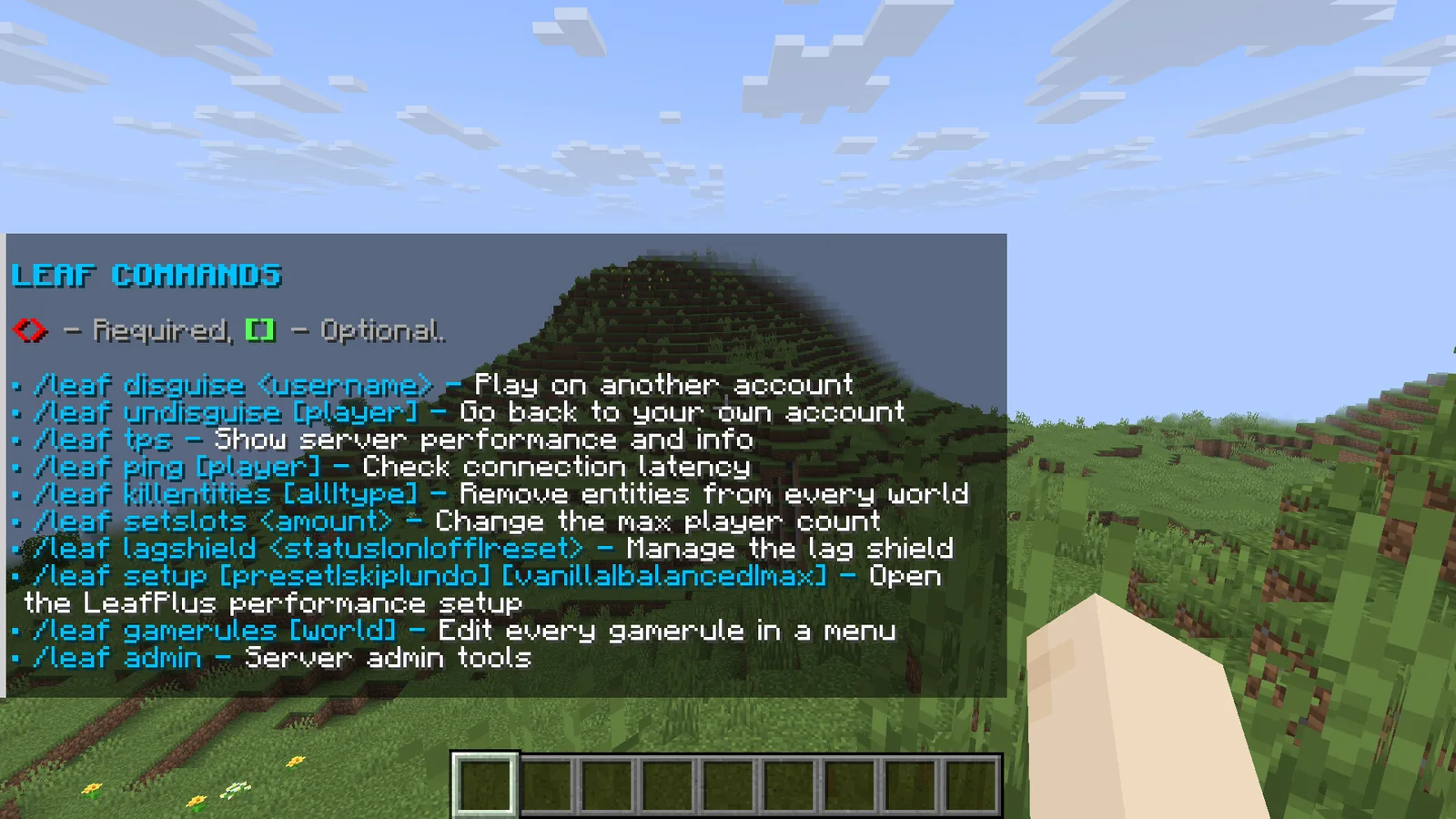
If a plugin already owns /tps, /ping, /disguise, /plugman or another of these names, the plugin keeps it and the console logs which one. The Cosmos command still works as /leaf <command>, for example /leaf disguise Notch.
Configuration#
Cosmos reads the same files as Leaf and Paper: server.properties, bukkit.yml, spigot.yml, purpur.yml, config/paper-global.yml, config/paper-world-defaults.yml and config/leaf-global.yml. Its own settings are in config/leaf-global.yml, next to Leaf's.
| File | What it holds |
|---|---|
config/leaf-global.yml | Leaf settings and the Cosmos sections below. |
config/leaf-intro.yml | All text of the first-run intro, and enabled to turn the intro off. |
license.yml | Your license key, as license-key: <key>. |
config/leaf-disguises.json | Active disguises. The server rewrites it on every change, so don't edit it while the server runs. |
config/leaf-ghosts.json | Which containers hold ghosts of which items, see Item shadowing. The server rewrites it on every change, so don't edit it while the server runs. |
leaf-setup-backups/ | Copies of every config file the setup wizard changed, one folder per apply. |
plugin-backups/ | Plugin jars the auto-updater replaced. |
cache/cosmos-plugins/ | The private plugin jar copies the server runs from. Cleared on every start, don't edit it. |
config/leaf-worlds.yml | Optional per-world overrides, see Per-world settings. |
/leaf admin reload applies most Cosmos settings without a restart. The exceptions are marked "Restart" in the tables. Changes to server.properties, bukkit.yml, spigot.yml, purpur.yml and the Paper files need a restart, except the resource pack lines in server.properties, which /leaf admin resourcepack reload applies.
Loader settings#
cosmos-loader.yml sits next to CosmosLoader.jar and is created on the first start.
| Key | Default | What it does |
|---|---|---|
license-key | "" | Your Cosmos license key. If it is empty and a license.yml with a key exists, the loader copies that key over. |
minecraft-version | "" | The Minecraft version to run, for example "26.3". When empty, the loader reads it from version_history.json or asks in the console once, then saves it here. |
auto-update | true | Install the newest Cosmos build for your Minecraft version on every start. With false the loader keeps booting the build it already installed. |
auto-update-loader | true | Replace CosmosLoader.jar with the newest loader when one is out. The new loader runs from the next restart. |
Environment variables override the file: COSMOS_LICENSE for the key, COSMOS_MINECRAFT_VERSION, COSMOS_AUTO_UPDATE and COSMOS_LOADER_AUTO_UPDATE. The key can also be passed as -Dcosmos.license=YOUR-KEY.
Dashboard settings#
misc:
  dashboard:
    enabled: true
    url: "https://cosmos.blazez.lol"
    allow-changes: true
server-name: ""| Key | Default | What it does |
|---|---|---|
enabled | true | Links this server to your dashboard. The server connects out over HTTPS, so no port has to be open. |
url | "https://cosmos.blazez.lol" | Where the dashboard runs. Leave it as it is. |
allow-changes | true | Lets the dashboard change setup choices and leaf-global.yml settings and reload the config. With false the dashboard only shows data, and a lag analysis can still be started from it. |
server-name | "" | Name of this server on the dashboard. Empty uses the first line of the MOTD. You can also rename it on the dashboard. |
Lag analyzer settings#
performance:
  lag-analyzer:
share-link: true| Key | Default | What it does |
|---|---|---|
share-link | true | Uploads each finished lag report to portal.blazez.lol and sends a link to open and share it. |
/leaf admin reload applies changes right away.
Lag shield settings#
performance:
  lag-shield:
    enabled: true
    trigger-mspt: 45.0
    recover-mspt: 30.0
    trigger-seconds: 10
    recover-seconds: 60
    startup-grace-seconds: 60
    step: 1
    min-view-distance: 6
    min-simulation-distance: 4
    notify-staff: true
disabled-worlds: []| Key | Default | What it does |
|---|---|---|
enabled | true | Turns the shield on or off. Turning it off restores normal distances. |
trigger-mspt | 45.0 | Tick time (5-second average) that counts as lagging. |
recover-mspt | 30.0 | Tick time that counts as recovered. Can't be higher than trigger-mspt. |
trigger-seconds | 10 | Seconds in a row above trigger-mspt before distances go down one step. |
recover-seconds | 60 | Seconds in a row below recover-mspt before distances go up one step. |
startup-grace-seconds | 60 | Seconds after startup before the shield reacts, so the heavy first ticks after boot don't lower view distance. |
step | 1 | Chunks removed per step. |
min-view-distance | 6 | View distance never goes below this. |
min-simulation-distance | 4 | Simulation distance never goes below this. |
notify-staff | true | Sends shield changes to players with leaf.lagshield.notify. The console always logs them. |
disabled-worlds | [] | World names the shield leaves alone. |
Auto-update settings#
misc:
  plugin-auto-update:
    enabled: true
    channel: release
    timeout-seconds: 30
    keep-backups: 3
    exclude: []
    install-missing: true
    install:
    - viaversion
    - viabackwards
    - viarewind
    - geyser-spigot
    - floodgate
sources: {}| Key | Default | What it does |
|---|---|---|
enabled | true | Checks for plugin updates on startup. Never runs behind a proxy. Restart. |
channel | release | Modrinth builds to accept: release, beta or alpha. |
timeout-seconds | 30 | Longest the check may hold up startup. Slower downloads are logged as timed out and the server keeps starting. |
keep-backups | 3 | Old jars kept per plugin in plugin-backups/. 0 keeps none. |
exclude | [] | Plugin ids to never touch. |
install-missing | true | Downloads the plugins in install if they are not in plugins/. |
install | Via, Geyser, Floodgate | Plugins to install when missing. |
sources | {} | Extra plugins to keep updated, as <plugin id>: "modrinth:<project>". See Plugin auto-update. |
Plugin manager settings#
misc:
  plugin-manager:
    enabled: true
    safe-jar-replace: true
    watch-jars: true
    auto-reload: false
    include-dependents: true
ignored-plugins: []| Key | Default | What it does |
|---|---|---|
enabled | true | Registers /plugman and watches the plugins folder. Restart. |
safe-jar-replace | true | Loads every plugin from a private copy in cache/cosmos-plugins/, so the jar in plugins/ can be replaced or deleted while the server runs. Restart. |
watch-jars | true | Tells staff with leaf.pluginmanager.notify when a jar in plugins/ changes or a new one appears. |
auto-reload | false | Reloads a plugin on its own once its changed jar has finished uploading. |
include-dependents | true | Reload, unload and disable also handle the plugins that hook into the target. See Plugin manager. |
ignored-plugins | [] | Plugin names /plugman and auto reload never touch, for example [LuckPerms]. |
Mob profile settings#
performance:
  entity-profiles:
    enabled: false
    villagers:
      ai-interval: 1
      dab: true
    hostile:
      ai-interval: 1
      dab: true
    passive:
      ai-interval: 1
      dab: true
    water:
      ai-interval: 1
      dab: true
    bosses:
      ai-interval: 1
      dab: false
    protection:
      enabled: true
      named-mobs: true
      plugin-spawned: true
      pets: true
      npcs: true
      plugin-tagged: false
types: []| Key | Default | What it does |
|---|---|---|
enabled | false | Turns on the AI rates and far mob AI choices below. Protection works even when this is off. |
<profile>.ai-interval | 1 | How much less often mobs in this profile pick new goals and targets. 1 is vanilla, 2 is half as often, 4 a quarter. 1 to 40. |
<profile>.dab | true, false for bosses | Whether far mob AI (performance.dab) slows this profile down. While profiles are on, far mob AI also applies to mobs like zombies and cows, not only villagers, piglins and other brain mobs. |
protection.enabled | true | Keeps protected mobs out of every mob optimization. See Mob profiles. |
protection.named-mobs | true | Mobs with a custom name are protected. |
protection.plugin-spawned | true | Mobs a plugin spawned are protected. |
protection.pets | true | Tamed mobs with an owner are protected. |
protection.npcs | true | Mobs marked as NPCs by Citizens and similar plugins are protected. |
protection.plugin-tagged | false | Mobs that carry any plugin data are protected. Leave it off with mob stacker plugins, which tag every mob. |
protection.types | [] | Entity types that are always protected, for example [iron_golem, wither]. |
The profiles are villagers, hostile, passive, water and bosses. enabled, ai-interval and dab can be set per world. /leaf admin reload applies changes right away.
Check interval settings#
performance:
  check-intervals:
    equipment: 1
    fluid: 1
activation: 1| Key | Default | What it does |
|---|---|---|
equipment | 1 | Ticks between checks of a mob's armor and held items. Players are always checked every tick. 1 to 40. |
fluid | 1 | Ticks between water and lava checks for mobs on dry land. Mobs already in water or lava are checked every tick. 1 to 20. |
activation | 1 | Ticks between activation range passes, the step that wakes up mobs near players. 1 to 20. |
Protected mobs are always checked every tick. All three can be set per world, and /leaf admin reload applies them right away.
Per-world settings#
Cosmos settings apply to every world. To change some of them for one world, create config/leaf-worlds.yml with a section per world folder name and the same keys as in leaf-global.yml:
world_nether:
  performance:
    entity-profiles:
      enabled: true
      hostile:
        ai-interval: 2
lobby:
  gameplay-mechanisms:
    mob-spawning:
      mode: disabled
    hoppers:
      enabled: false
These keys can be set per world:
| Setting | Keys |
|---|---|
| Mob profiles | performance.entity-profiles.enabled, performance.entity-profiles.<profile>.ai-interval, performance.entity-profiles.<profile>.dab |
| Check intervals | performance.check-intervals.equipment, .fluid, .activation |
| Far mob AI | performance.dab.enabled |
| Mob AI | performance.entity-control.disable-mob-ai |
| Limiters | performance.limiters.max-item-merges-per-tick, performance.limiters.redstone.enabled |
| Mob spawning | gameplay-mechanisms.mob-spawning.mode |
| Hoppers | gameplay-mechanisms.hoppers.enabled |
| Leaf decay | gameplay-mechanisms.leaf-decay.speed |
| Combat | gameplay-mechanisms.combat.armor-durability-multiplier |
| Projectiles | gameplay-mechanisms.projectiles.entity-hitbox-margin, gameplay-mechanisms.projectiles.safe-pearl-landing |
Other keys in the file are ignored, and the console and /leaf admin check list them. /leaf admin reload reloads the file. Paper, Purpur and Spigot already have their own per-world settings in their world config files.
Config check settings#
| Key | Default | What it does |
|---|---|---|
misc.config-check.on-startup | true | Runs the config check 2 seconds after startup and logs every warning in the console. |
Disguise settings#
| Key | Default | What it does |
|---|---|---|
misc.disguise.enabled | true | Registers /disguise and /undisguise. Restart. |
misc.disguise.action-bar | false | Shows "Disguised as <name>" in the action bar of disguised players. |
misc.disguise.allow-others | false | Lets staff with leaf.command.disguise.others disguise other players. |
Knockback sync settings#
gameplay-mechanisms:
  knockback-sync:
    enabled: true
    ping-interval-ticks: 5
    combat-ticks: 30
    spike-threshold-ms: 20
    ping-offset-ms: 25
max-ground-distance: 1.3| Key | Default | What it does |
|---|---|---|
enabled | true | Gives grounded knockback to players who already landed on their own screen. |
ping-interval-ticks | 5 | How often players in combat are pinged to measure their latency. |
combat-ticks | 30 | How long after a hit a player counts as in combat and keeps being pinged. |
spike-threshold-ms | 20 | A ping that jumps by this much or more is ignored, and the previous ping is used. |
ping-offset-ms | 25 | Taken off the measured ping before predicting, so borderline hits stay vanilla. |
max-ground-distance | 1.3 | Only players this close to the ground, in blocks, are corrected. |
/leaf admin reload applies changes right away.
Projectile settings#
gameplay-mechanisms:
  projectiles:
    remove-player-spread: true
    wind-charges-hit-projectiles: true
    wind-charge-self-boost: false
    wind-charge-self-boost-min-pitch: 60.0
    entity-hitbox-margin: -1.0
safe-pearl-landing: false| Key | Default | What it does |
|---|---|---|
remove-player-spread | true | Projectiles thrown or shot by players fly exactly where they aim, without vanilla's random spread. Mobs and dispensers keep vanilla spread. |
wind-charges-hit-projectiles | true | Wind charges collide with other projectiles in the air, such as ender pearls, snowballs, potions and arrows, and burst on them. A pearl hit by a wind charge lands on the spot. |
wind-charge-self-boost | false | A player in the air who throws a wind charge while looking down gets the burst at their feet, so they stay in the air longer. |
wind-charge-self-boost-min-pitch | 60.0 | How far down, in degrees, the player has to look for the self boost. 90 is straight down. |
entity-hitbox-margin | -1.0 | How far outside a mob's or player's hitbox an arrow or thrown item still hits, in blocks. Vanilla grows it from 0 to 0.3 during the first 8 ticks of flight. 0 hits only the real hitbox, 0.5 makes hits easier. -1 keeps vanilla. Can be set per world. |
safe-pearl-landing | false | When an ender pearl lands where the player wouldn't fit, like under a low ceiling or in a corner, the player lands at the nearest free spot along the pearl's path instead of inside blocks. Can be set per world. |
/leaf admin reload applies changes right away.
Item shadowing settings#
gameplay-mechanisms:
  item-shadowing:
    enabled: false
    trigger: double-click
    items:
    - totem_of_undying
    containers:
    - barrel
    - chest
    - trapped_chest
max-ghosts-per-item: 3| Key | Default | What it does |
|---|---|---|
enabled | false | Lets players make ghost items. Ghosts made earlier keep working while it is off: they still vanish when their item pops and still can't be taken. |
trigger | double-click | How a ghost is made. double-click: double-click the item in your inventory while a barrel or chest is open. swap-key: hover an empty slot of the open barrel or chest and press the item's hotbar number key, or the swap hands key for the item in your offhand. shift-double-click: shift-click the item in your inventory twice quickly while a barrel or chest is open. both: double-click or swap-key. all: any of the three. |
items | [totem_of_undying] | Items that can get a ghost. Only items that don't stack can be shadowed. An empty list allows every item that doesn't stack. |
containers | [barrel, chest, trapped_chest] | Blocks that can hold ghosts. Only barrels and chests work, other blocks in the list are ignored. |
max-ghosts-per-item | 3 | How many containers can hold a ghost of the same item. Making one more removes the oldest. |
/leaf admin reload applies changes right away.
Anti map stealer settings#
misc:
  anti-map-stealer:
    enabled: true
    action: kick
    notify-staff: true
    kick-message: '&cWorld downloaders are not allowed on this server.'
    blocked-channels:
- 'wdl:'| Key | Default | What it does |
|---|---|---|
enabled | true | Checks every player for a world downloader. |
action | kick | kick disconnects the player. disable lets them stay and turns their downloader off. |
notify-staff | true | Sends a chat message to players with leaf.antimapstealer.notify. |
kick-message | '&cWorld downloaders are not allowed on this server.' | Shown on the kick screen. Supports & and &#RRGGBB colors. |
blocked-channels | ['wdl:'] | Plugin channels that mark a downloader. An entry ending in : matches the whole namespace, any other entry one exact channel. |
/leaf admin reload applies changes right away.
Perf watcher settings#
performance:
  perf-watcher:
    enabled: true
    sample-interval-ms: 50
    listener-timings: true
    history-hours: 24
    alerts:
      enabled: true
      mspt: 50.0
      seconds: 10
      cooldown-seconds: 300
      notify-staff: true
discord-webhook: ''| Key | Default | What it does |
|---|---|---|
enabled | true | Runs the perf watcher in the background. |
sample-interval-ms | 50 | How often the tick threads are sampled, in milliseconds, from 10 to 1000. |
listener-timings | true | Times every plugin event listener and scheduler task on the tick thread. |
history-hours | 24 | How many hours of per-minute history are kept, from 1 to 168. |
alerts.enabled | true | Raises a lag spike alert when ticks stay slow. |
alerts.mspt | 50.0 | Average tick time, in milliseconds, that counts as slow. 50 is the point where TPS drops below 20. |
alerts.seconds | 10 | How many slow seconds in a row raise an alert. |
alerts.cooldown-seconds | 300 | Minimum time between two alerts. |
alerts.notify-staff | true | Sends the alert to players with leaf.perfwatcher.notify. |
alerts.discord-webhook | '' | A Discord webhook URL. Each alert is posted there with its causes. Empty turns it off. |
/leaf admin reload applies changes right away.
Combat settings#
gameplay-mechanisms:
  combat:
    old-knockback:
      enabled: false
      horizontal: 0.4
      vertical: 0.4
      friction: 2.0
      vertical-limit: 0.4
      extra-horizontal: 0.5
      extra-vertical: 0.1
    sword-blocking:
      enabled: false
      damage-reduction: 0.5
    disable-attack-cooldown:
      enabled: false
      attack-speed: 40.0
    old-golden-apples: false
    old-sharpness: false
    old-armor: false
    disable-netherite-knockback-resistance: false
    mace-max-fall-distance: -1.0
    bow-boosting: false
    fix-offhand-ghost-blocks: false
    fix-right-click-attack-cooldown: false
    dont-send-zero-knockback: false
armor-durability-multiplier: 1.0| Key | Default | What it does |
|---|---|---|
old-knockback.enabled | false | Uses 1.8 knockback for hits and the knockback that comes with damage. |
old-knockback.horizontal | 0.4 | Sideways push of a hit. |
old-knockback.vertical | 0.4 | Upward push of a hit, given even when the target is in the air. |
old-knockback.friction | 2.0 | The target's current speed is divided by this before the push is added. Higher keeps less of their own movement. |
old-knockback.vertical-limit | 0.4 | Highest upward speed a hit can leave. |
old-knockback.extra-horizontal | 0.5 | Extra sideways push per level of sprint or Knockback enchantment. |
old-knockback.extra-vertical | 0.1 | Extra upward push when the hit has sprint or Knockback. |
sword-blocking.enabled | false | Right-click with a sword to block, like 1.8. Needs an empty off hand. |
sword-blocking.damage-reduction | 0.5 | Share of the damage a sword block takes away. 0.5 is half. |
disable-attack-cooldown.enabled | false | Removes the 1.9 attack cooldown, so every hit does full damage. |
disable-attack-cooldown.attack-speed | 40.0 | Attack speed given to players while the cooldown is off. Vanilla is 4.0. |
old-golden-apples | false | Enchanted golden apples give the 1.8 effects: Regeneration V for 30 seconds, Absorption I, Resistance I and Fire Resistance I. |
old-sharpness | false | Sharpness adds 1.25 damage per level, like 1.8. |
old-armor | false | Each armor point blocks 4% of the damage and toughness is ignored, like 1.8. |
disable-netherite-knockback-resistance | false | Netherite armor no longer reduces knockback. |
mace-max-fall-distance | -1.0 | Fall distance, in blocks, above which a mace smash stops getting stronger. -1 keeps vanilla. |
bow-boosting | false | Arrows can hit the player who shot them after a quarter second, so a Punch bow can launch you like in 1.8. |
fix-offhand-ghost-blocks | false | Resends the blocks and your inventory when the server drops a block placement, so no ghost blocks are left. |
fix-right-click-attack-cooldown | false | Right-clicking and off hand swings no longer reset your attack cooldown. |
dont-send-zero-knockback | false | A hit that does no knockback, for example on a player with full knockback resistance, no longer stops their movement. |
armor-durability-multiplier | 1.0 | Multiplies the durability players' armor loses when they get hit. 0 means armor never breaks, 2.0 wears it out twice as fast. Can be set per world. |
Critical hit damage is a Purpur setting: gameplay-mechanics.player.critical-damage-multiplier in purpur.yml, 1.5 by default.
/leaf admin reload applies changes right away.
Limiter settings#
performance:
  limiters:
    redstone:
      enabled: false
      max-milliseconds-per-region: 5.0
      region-size: 512
    max-item-merges-per-tick: -1
    excess-vehicles:
      minecarts: false
      boats: false
      limit: 32
    dont-save-snowballs: false
    chunk-unloads:
      min-per-tick: 50
fraction: 0.05| Key | Default | What it does |
|---|---|---|
redstone.enabled | false | Limits how much tick time redstone can use in one area. |
redstone.max-milliseconds-per-region | 5.0 | Tick time, in milliseconds, one area can spend on redstone and block updates per tick. Updates past it are skipped and scheduled ticks are pushed to the next tick. |
redstone.region-size | 512 | Size of one area in blocks. Rounded down to a power of two, at least 16. |
max-item-merges-per-tick | -1 | How many dropped item stacks may try to merge with their neighbours each tick. -1 is no limit. |
excess-vehicles.minecarts | false | Removes an empty minecart that is pushed by more than limit other minecarts in one tick. |
excess-vehicles.boats | false | The same for boats. |
excess-vehicles.limit | 32 | How many vehicles one vehicle can touch before it is removed. |
dont-save-snowballs | false | Flying snowballs are not saved with the chunk. Stops snowball lag machines from surviving a restart. |
chunk-unloads.min-per-tick | 50 | Fewest chunks unloaded per tick when chunks are waiting to unload. Not on 26.3, see Versions. |
chunk-unloads.fraction | 0.05 | Share of the waiting chunks unloaded per tick when that is more than min-per-tick. Not on 26.3. |
/leaf admin reload applies changes right away.
Entity control settings#
performance:
  entity-control:
    frozen-entities: []
    disable-goals: []
    disable-mob-ai: false
    update-intervals: []
    tracking-ranges: []
    chunk-loading-entities: []
Entity types are written like zombie or minecraft:zombie.
| Key | Default | What it does |
|---|---|---|
frozen-entities | [] | Entity types that are never ticked. They stay in the world but don't move, age or act. Players are never frozen. |
disable-goals | [] | Mob types that lose all their AI goals when they spawn or load. They still move, fall and take damage. |
disable-mob-ai | false | Turns off AI for every mob, like nerf-spawner-mobs in spigot.yml but for all mobs. |
update-intervals | [] | How often, in ticks, an entity type sends position updates to players, written as type:ticks, for example armor_stand:20. |
tracking-ranges | [] | How far away, in blocks, players see an entity type, written as type:blocks, for example item:24. Overrides spigot.yml. |
chunk-loading-entities | [] | Entity types that keep their own chunk and the chunk they fly into loaded, for example arrow or snowball. |
/leaf admin reload applies changes right away. update-intervals and tracking-ranges apply to entities that load after the reload.
Packet cut settings#
performance:
  packet-cuts:
    particles:
      fall: false
      death: false
      block-break: false
      bubble-column: false
      spawner: false
    sounds:
      shoulder-parrots: false
      piglin-anger: false
      swimming: false
      shield: false
pistons: false| Key | Default | What it does |
|---|---|---|
particles.fall | false | No dust when an entity lands after a fall. |
particles.death | false | No smoke puff when a mob dies. |
particles.block-break | false | Other players no longer see the cracks or hear the sound of a block you break. You still see your own. |
particles.bubble-column | false | No splashes on top of bubble columns that something is standing in. Only on builds where the server sends them, see Versions. |
particles.spawner | false | No flames when a spawner spawns a mob, and no puff around the new mob. |
sounds.shoulder-parrots | false | Parrots on a player's shoulder stay quiet. |
sounds.piglin-anger | false | No angry piglin sound. |
sounds.swimming | false | No swimming sounds. |
sounds.shield | false | No shield block and shield break sounds. |
sounds.pistons | false | No piston push and pull sounds. |
/leaf admin reload applies changes right away.
Structure settings#
gameplay-mechanisms:
  structures:
    disabled-structures: []
    mineshaft-min-y: 'off'
    stronghold-min-y: 'off'
stronghold-max-y: 'off'| Key | Default | What it does |
|---|---|---|
disabled-structures | [] | Structures that are no longer generated in new chunks, for example trial_chambers. /locate still points to where they would be. |
mineshaft-min-y | 'off' | Mineshafts generated lower than this Y are moved up to it. |
stronghold-min-y | 'off' | Strongholds generated lower than this Y are moved up to it. |
stronghold-max-y | 'off' | Strongholds generated higher than this Y are moved down to it. |
Only chunks generated after the change are affected. /leaf admin reload applies changes right away.
Spawner settings#
These keys sit next to Leaf's own spawner settings and only apply when gameplay-mechanisms.spawner-settings.enabled is true.
gameplay-mechanisms:
  spawner-settings:
    spawn-count: -1
    max-nearby-entities: -1
    required-player-range: -1
spawn-range: -1| Key | Default | What it does |
|---|---|---|
spawn-count | -1 | Mobs spawned per spawn. -1 keeps each spawner's own value (vanilla 4). |
max-nearby-entities | -1 | Spawning stops while this many of the spawner's mob are nearby. Vanilla 6. |
required-player-range | -1 | A player has to be this many blocks away or closer. Vanilla 16. |
spawn-range | -1 | How far from the spawner mobs appear. Vanilla 4. |
A spawner keeps the values it was given the next time it ticks, like Leaf's spawn delays. /leaf admin reload applies changes right away.
Mob spawning settings#
gameplay-mechanisms:
  mob-spawning:
mode: normal| Key | Default | What it does |
|---|---|---|
mode | normal | normal spawns mobs as usual. disabled stops every mob spawn except /summon, plugins and mobs that turn into another mob, like a villager hit by lightning. spawn-eggs-only does the same but lets spawn eggs work. See Practice servers. |
/leaf admin reload applies changes right away. Set the spawn limits in bukkit.yml to 0 as well, so the server skips the natural spawning work. The setup's DISABLED and SPAWN EGGS ONLY options do both.
Hopper settings#
gameplay-mechanisms:
  hoppers:
enabled: true| Key | Default | What it does |
|---|---|---|
enabled | true | With false, hoppers and hopper minecarts never move or pick up items. Players can still open them and take items out. |
/leaf admin reload applies changes right away.
Leaf decay settings#
gameplay-mechanisms:
  leaf-decay:
speed: 100| Key | Default | What it does |
|---|---|---|
speed | 100 | How fast leaves with no log nearby decay, in percent of vanilla. 100 is vanilla, 50 takes twice as long, 25 four times as long and 0 stops leaves from decaying on their own. Can be set per world. |
/leaf admin reload applies changes right away.
Manual chunk saving settings#
misc:
  manual-chunk-saving:
    enabled: false
    worlds:
- '*'| Key | Default | What it does |
|---|---|---|
enabled | false | The worlds in worlds only save their chunks when you run /save. See Manual chunk saving. |
worlds | ['*'] | World names that use manual saving. * matches any text, so arena* covers arena1 and arena2, and '*' alone covers every world. |
/leaf admin reload applies changes right away.
Resource pack settings#
misc:
  resource-pack:
    compute-sha1: true
    save-sha1: true
    send-to-online-players: true
max-download-size-mb: 250| Key | Default | What it does |
|---|---|---|
compute-sha1 | true | /leaf admin resourcepack reload downloads the pack and uses its real sha1. With false it uses resource-pack-sha1 as written. |
save-sha1 | true | Writes the sha1 the reload worked out to resource-pack-sha1 in server.properties, so the next start uses it too. Only that line changes. |
send-to-online-players | true | Sends the reloaded pack to everyone online. With false, players get it the next time they join. |
max-download-size-mb | 250 | Biggest pack the reload downloads, in MB. |
/leaf admin reload applies changes right away.
Network settings#
network:
  transport: auto
proxy-packet-ids: false| Key | Default | What it does |
|---|---|---|
transport | auto | Network transport: auto, io_uring, epoll, kqueue or nio. auto keeps the usual choice. A transport the machine doesn't support falls back to auto. Restart. |
proxy-packet-ids | false | Lets BlazeVelocity forward packets without unpacking them, see Proxy packet IDs. Applies to players who join after the change. |
Fix settings#
fixes:
  load-chunks-from-newer-versions: false
max-pending-chat-messages: 4096| Key | Default | What it does |
|---|---|---|
load-chunks-from-newer-versions | false | Loads chunks saved by a newer Minecraft version instead of stopping the server. Back up the world first, because newer data can be lost. |
max-pending-chat-messages | 4096 | How many chat messages a player's client may leave unacknowledged before they are kicked. -1 never kicks. |
/leaf admin reload applies changes right away.
Performance settings#
| Key | Default | What it does |
|---|---|---|
performance.divinemc.async-chunk-sending.enabled | false | Builds chunk packets on worker threads instead of the main thread. Restart. On 1.21.4, 1.21.8, 1.21.11 and 26.1.2 Leaf's own async.async-chunk-send.enabled does this instead. |
performance.divinemc.async-chunk-sending.max-threads | 0 | Threads for it. 0 uses a quarter of your CPU threads. Restart. |
performance.divinemc.parallel-sensors.enabled | false | Runs mob sensors (what a mob notices around it) on worker threads before the entity tick. Restart. |
performance.divinemc.parallel-sensors.max-threads | 0 | Threads for it. 0 uses a quarter of your CPU threads. Restart. |
performance.divinemc.command-block-parse-results-caching | true | Command blocks reuse the parsed command until its text changes. |
performance.divinemc.structure-layout-optimizer | false | Places jigsaw structures faster. Villages, trial chambers and bastions come out different from vanilla for the same seed. |
performance.divinemc.deduplicate-shuffled-template-pool-element-list | false | Only works with the option above, and also changes layouts. |
performance.divinemc.end-biome-cache.enabled | false | Caches End biome lookups. |
performance.divinemc.end-biome-cache.capacity | 1024 | Entries in that cache per thread. Restart. |
performance.divinemc.chunk-data-cache.soft-limit | 8192 | Chunk saves waiting in memory before the saver starts writing harder. |
performance.divinemc.chunk-data-cache.hard-limit | 32678 | Waiting chunk saves that force a flush and a console warning. |
performance.entities.villager-poi-search-backoff.enabled | true | A villager that finds no bed or job site waits longer before it searches again. A new bed or job block can take up to max-delay-ticks to be noticed. |
performance.entities.villager-poi-search-backoff.max-delay-ticks | 200 | Longest extra wait, in ticks (200 is 10 seconds). |
performance.thread-priority.chunk-worker-nice | 5 | Linux only. Lower OS priority for chunk generation threads, so generation doesn't take CPU from the main thread. 0 turns it off. Restart. |
performance.thread-priority.io-worker-nice | 2 | Linux only. The same for the chunk saving threads. Restart. |
Defaults that differ from Leaf and Paper#
| Setting | File | Cosmos | Leaf and Paper |
|---|---|---|---|
async.async-pathfinding.enabled | config/leaf-global.yml | true | false |
performance.density-function-compiler.enabled | config/leaf-global.yml | true | false (26.2 build only) |
performance.sleeping-block-entity | config/leaf-global.yml | true | false (26.x and 1.21.11 builds) |
misc.redstone-implementation | config/paper-world-defaults.yml | ALTERNATE_CURRENT | VANILLA |
chunk-system.worker-threads: -1 | config/paper-global.yml | Half your CPU threads, at least 2 | A quarter of your CPU threads, often 1 |
The four config defaults only go into files Cosmos creates. If you move a Leaf or Paper server over, your existing files keep their values. Change them by hand, or run the setup wizard for the redstone engine. The worker thread count applies to every server that leaves worker-threads at -1. All five need a restart.
Alternate Current sends redstone updates in a fixed order instead of vanilla's location-based order. Almost every build works the same, but contraptions that rely on vanilla update order can behave differently.
Versions#
Cosmos has a build for Minecraft 26.3, 26.2, 26.1.2, 1.21.11, 1.21.8 and 1.21.4. Each build has every feature on this page. These differences come from the Leaf version underneath:
| Difference | Builds |
|---|---|
| Needs Java 25 | All 26.x builds |
| Needs Java 21 or newer | All 1.21.x builds |
Async chunk sending is performance.divinemc.async-chunk-sending | 26.3, 26.2 |
Async chunk sending is Leaf's async.async-chunk-send | 26.1.2, 1.21.11, 1.21.8, 1.21.4 |
| Density function compiler | 26.2 |
performance.sleeping-block-entity | 26.3, 26.2, 26.1.2, 1.21.11 |
| No Linear region format, pregeneration writes MCA | 1.21.8 |
performance.limiters.chunk-unloads is not there, Paper's chunks.min-chunk-unload-count and min-chunk-unload-fraction in paper-world-defaults.yml do the same | 26.3 |
performance.packet-cuts.particles.bubble-column does nothing, because the server doesn't send these particles | 1.21.4 |
network.transport has no io_uring or kqueue, they fall back to auto | 1.21.4 |
The setup wizard always changes the settings your build has.
Install#
The Cosmos loader is the recommended way to run Cosmos. It is a small jar that checks your license, downloads the Cosmos build for your Minecraft version and starts it. On every restart it installs the newest build on its own, so you never swap jars by hand. See Loader for how it works.
- Install Java 25 for the 26.x builds, or Java 21 or newer for the 1.21.x builds. Cosmos does not start on older Java versions.
- In the BlazeZ Discord, open your edition's channel in the Cosmos category and pick your Minecraft version from the menu. You get your license key there. Your key is also on your dashboard.
- Download CosmosLoader.jar.
- Stop the server and back up your world folders and configs.
- Replace your Paper, Purpur or Leaf jar with
CosmosLoader.jar. Your plugins, configs and worlds stay as they are. - Start the server once. The loader creates
cosmos-loader.ymland stops. Put your key in it aslicense-key: "YOUR-KEY". - Start the server with the recommended start script. The loader picks up your Minecraft version from the world, or asks for it in the console once, then downloads Cosmos and starts it.
- On the first start Cosmos downloads ViaVersion, ViaBackwards, ViaRewind, Geyser and Floodgate into
plugins/if they are missing, unless the server runs behind a proxy. To skip that, createconfig/leaf-global.ymlwithmisc.plugin-auto-update.install-missing: falsebefore the first start. - Join as an op. The intro plays and the setup wizard opens.
To run a Cosmos jar without the loader, pick your version in the Discord channel and use the download link you get with your key, or download it from your dashboard. Start that jar instead of CosmosLoader.jar, and put the key in license.yml next to it as license-key: YOUR-KEY, or pass it as -Dcosmos.license=YOUR-KEY or in the COSMOS_LICENSE environment variable. Without a valid key the server stops during startup. A jar started this way does not update itself.
Recommended start script#
#!/bin/bash
MAX_RAM="${MAX_RAM:-4G}"
export MALLOC_ARENA_MAX=2
exec java -Xms512M -Xmx"$MAX_RAM" \
  -XX:+UseG1GC \
  -XX:+UseCompactObjectHeaders \
  -XX:+UseTransparentHugePages \
  -XX:+UseStringDeduplication \
  -XX:G1PeriodicGCInterval=10000 \
  -XX:MinHeapFreeRatio=10 \
  -XX:MaxHeapFreeRatio=25 \
  -XX:+ParallelRefProcEnabled \
  -XX:MaxGCPauseMillis=130 \
  -jar CosmosLoader.jar --nogui
If you run a Cosmos jar without the loader, change CosmosLoader.jar to that jar. Set the heap with MAX_RAM, for example MAX_RAM=8G ./start.sh. Compact object headers make every object smaller, and together with transparent huge pages they lowered tick time by 14 to 20% in our tests. The periodic GC and the heap free ratios hand unused heap back to the system, so the process uses less memory while the server is quiet.
-XX:+UseTransparentHugePages only exists on Linux, and -XX:+UseCompactObjectHeaders only exists on Java 24 and newer. On Windows or macOS remove the huge pages line, and on Java 21 remove the compact object headers line, because Java refuses to start with an unknown flag.
Loader#
CosmosLoader.jar is what you start. On each start it:
- Reads your key and Minecraft version from
cosmos-loader.yml. - Checks the key with the Cosmos update server and gets the newest build for your version. Your license only unlocks the editions you bought: the 1.21.x edition for 1.21.4, 1.21.8 and 1.21.11, the 26.x edition for 26.1.2, 26.2 and 26.3.
- Downloads the build when it is newer than the installed one, checks it against the signed release and keeps it in
cosmos-loader/cache/. Older builds for that version are deleted. When nothing changed it starts right away. - Starts Cosmos in the same Java process, so your start script flags and the console work as usual. The license check inside Cosmos still runs.
The update server reply is signed, and the loader refuses a reply or a jar that does not match. If the update server cannot be reached, the loader starts the build it installed last. If no build is installed yet, the server stops with a message instead.
To change Minecraft version, set minecraft-version in cosmos-loader.yml and restart. The loader downloads that version's build. Back up your world first, Minecraft cannot load a world saved by a newer version.
Dashboard#
Your dashboard at cosmos.blazez.lol/dashboard puts your key, your builds and your servers on one page. Log in with the Discord account you bought Cosmos with. Without an edition on your account it opens as a demo with sample data.
The same dashboard is also a panel in the BlazeZ portal at portal.blazez.lol/panel/cosmos, next to the panels of your other BlazeZ plugins. Overview, Performance, Settings and Tips are pages in its sidebar, and your linked servers are listed under them. It opens for Discord accounts that own a Cosmos edition or have a Cosmos key.
Every server running Cosmos with your key links to the dashboard on its own within a minute of starting. It connects out over HTTPS, so there is nothing to install and no port to open. Linked servers get the Performance, Settings and Tips tabs. See Dashboard settings to rename a server, stop changes from the dashboard or turn the link off.
| Panel | What it shows |
|---|---|
| Your key | Your license key, the editions on it and how many IP slots are in use. When an edition you bought is not on your key yet, Add to my key adds it. |
| Builds | CosmosLoader and the newest build for every Minecraft version, with its age and size. Builds of the editions you own download straight from here, and the # button copies a build's SHA-256. |
| Server monitor | Up to 5 server addresses of your choice. The dashboard pings them every 5 minutes and shows players, ping, MOTD and version, with 24 hours of player history, peak and uptime. Addresses must be public, private network addresses are refused. |
| Started with the loader | Every machine that started Cosmos through CosmosLoader.jar with your key, with its Minecraft version, Java version, system and whether it runs the newest build. |
| Start script | Builds the recommended start script for your Minecraft version, memory, system and Java version, and a cosmos-loader.yml or license.yml with your key filled in. |
| Performance | Live TPS, tick time, CPU and memory of each linked server, 24 hours of tick time, players, CPU and heap, plugin costs per tick from the perf watcher, lag spikes, worlds and the machine it runs on. |
| Settings | The setup wizard questions with the server's current choice, Survival and Practice presets, every Cosmos setting in leaf-global.yml with its description, and a search over all of them. Changes are backed up in leaf-setup-backups/ and applied within seconds. leaf-global.yml settings reload right away, view distance, simulation distance and mob caps change live, the other files apply on the next restart. |
| Tips | Start a lag analysis from the browser and read its report, plus fixes that fit the server's own numbers, most with a button that applies them. |
A linked server sends its TPS, tick times, CPU, memory, world, chunk and entity counts, perf watcher data, lag analysis reports, setup choices and leaf-global.yml values. Values whose names contain webhook, token, secret, password or dsn are never sent. It also sends its Java version, the -X and -XX start flags, the operating system, and plugin names and versions. Changes from the dashboard are signed, and the server ignores anything that is not.
First-run setup#
Until setup is done, every player with leaf.command.leaf.setup (ops by default) gets a short intro when they join. If the server has no operators yet, the first player to join gets the intro and the setup instead. Only that player can run it, they don't become an operator, and the access ends when setup is done. They are moved to a temporary void world, a camera flies past the Cosmos logo and two boards, and then they stand frozen on a platform while the setup wizard opens. Clicking the hologram or running /setup reopens the wizard. Their game mode is locked while the intro runs, so /gamemode is refused until setup is applied or skipped. When setup is applied or skipped, they return to the spot, game mode and flight state they joined with, and the void world leafplus_intro is deleted.
All intro text is in config/leaf-intro.yml. Set enabled: false there to skip the intro. Ops then get a clickable chat reminder on join instead, until setup is done.
Setup wizard#
/setup opens the wizard. The first screen asks what the server is for:
| Server type | For | Questions |
|---|---|---|
| Survival | SMP, lifesteal, factions, skyblock and other worlds players build in. | 16, on 6 pages |
| Practice | Duels, FFA, kit PvP, lobbies and minigames on fixed maps. | 9, on 3 pages |
| Large SMP | Survival with 50 or more players online at once. | 16, on 6 pages |
Each page shows three questions, one per row, with the recommended option for your server type already picked. The picked option glows. Click another option to pick it instead, or click the question on the left to keep your current setting for it. NEXT PAGE moves on and the last page opens the review. Keeping the recommended picks, a practice server is set up in 5 clicks and a survival server in 7.
Hover an option to see what it changes, how much performance it gains, and whether it is the recommended pick or your current setting. When you run /setup again and choose the same server type, the pages start from your current settings instead of the recommendations.
| Question | Options | Survival pick | Practice pick | Large SMP pick |
|---|---|---|---|---|
| View distance | 12, 10, 8 or 6 chunks | 8 chunks | 6 chunks | 8 chunks |
| Simulation distance | 10, 8, 6 or 4 chunks | 6 chunks | 4 chunks | 6 chunks |
| Chunk saving | Default, Smooth, Leanest, Manual | Smooth | Manual | Smooth |
| Mob spawning | Vanilla limits, Reduced, Low, Spawn eggs only, Disabled | Reduced | Disabled | Reduced |
| Far mob AI | Off, On, Strong | On | Not asked | On |
| Entity activation | Off, Paper default, Tighter, Aggressive | Tighter | Not asked | Tighter |
| Entity tracking | Default, Reduced, Low | Reduced | Default | Reduced |
| Entity collisions | 8, 4 or 2 per tick | 4 per tick | Not asked | 4 per tick |
| Villagers | Default, Lighter, Lobotomize | Lighter | Not asked | Lighter |
| Hoppers | Default, Lighter, Fastest, Disabled | Lighter | Disabled | Lighter |
| Redstone engine | Vanilla, Eigencraft, Alternate Current | Alternate Current | Not asked | Alternate Current |
| Block tick rates | Default, Lighter, Leanest | Lighter | Leanest | Lighter |
| Item and XP merging | Default, Merge more, Merge max | Merge more | Merge more | Merge more |
| Extra threads | Off, Chunk sending, Everything | Chunk sending | Chunk sending | Chunk sending |
| Mob profiles | Off, Balanced, Large SMP, Strong | Balanced | Not asked | Large SMP |
| Check intervals | Every tick, Lighter, Leanest | Lighter | Not asked | Lighter |
Questions a practice server doesn't get keep their current setting. The answers are written to server.properties, bukkit.yml, spigot.yml, purpur.yml, config/paper-world-defaults.yml and config/leaf-global.yml.
The review lists every pick. Click one to go back to its page. CANCEL leaves every file as it is. APPLY copies each file it is about to change into leaf-setup-backups/<date>-<time>/, writes the new values, and applies view distance, simulation distance, mob spawning, far mob AI, whether hoppers run and manual chunk saving right away. Everything else takes effect after a restart, which the chat report tells you.
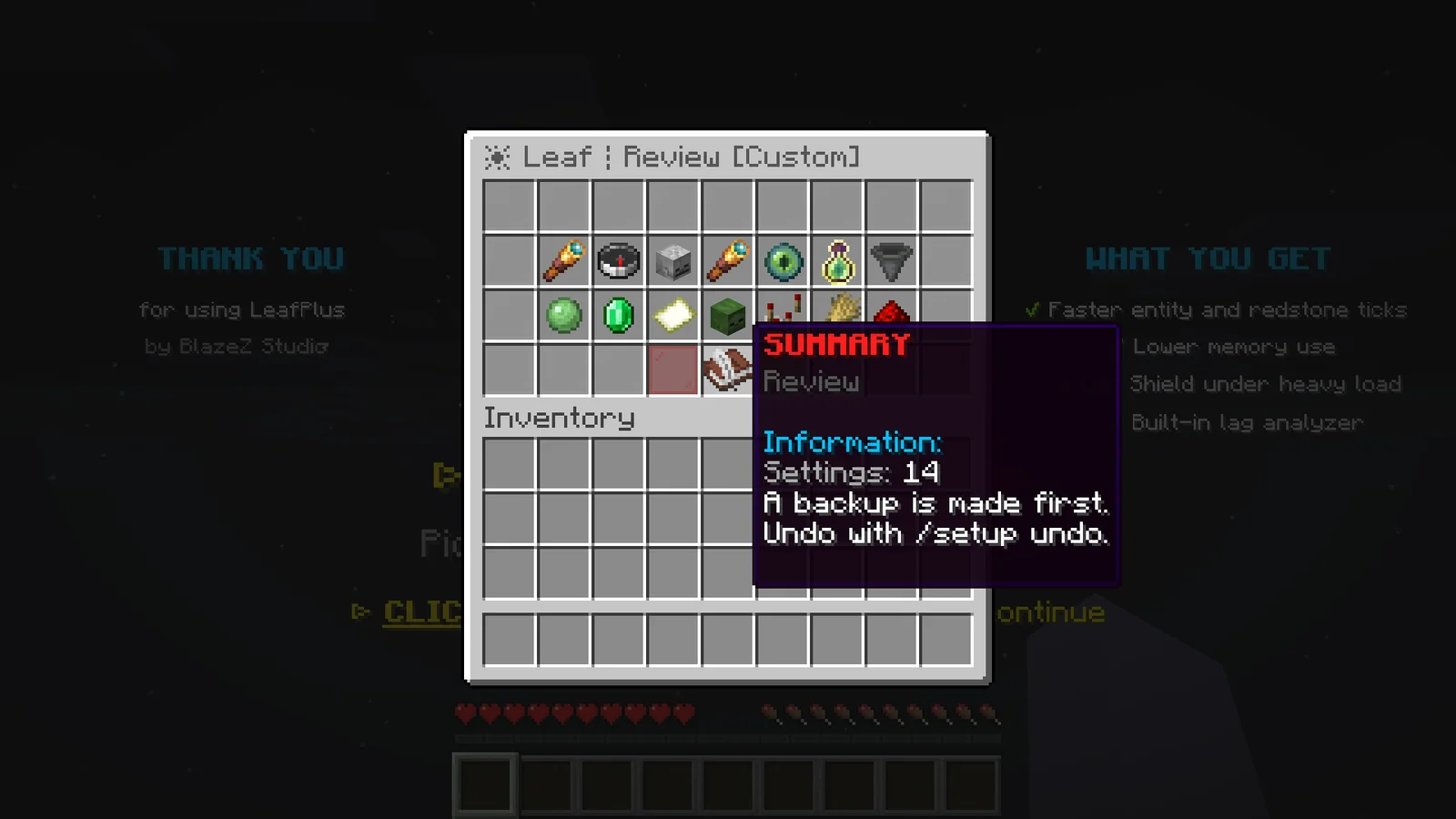
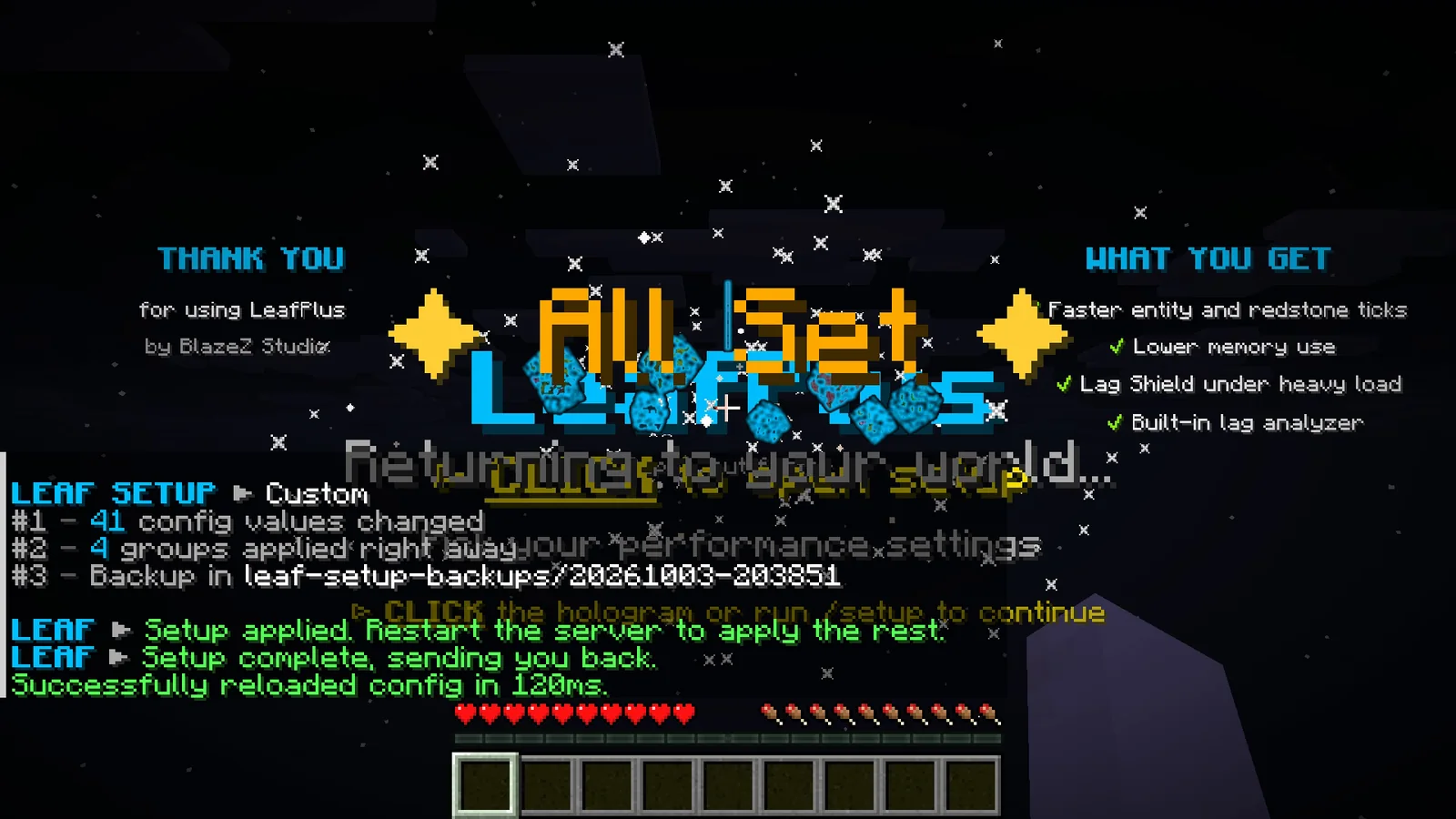
| Command | What it does |
|---|---|
/setup preset balanced | Applies all Survival picks at once, with a backup. |
/setup preset practice | Applies all Practice picks at once, with a backup. |
/setup preset large-smp | Applies all Large SMP picks at once, with a backup. |
/setup preset vanilla | Applies the vanilla value of every question. |
/setup preset max | Applies the Max Performance picks, the strongest options that keep survival gameplay working. |
/setup undo | Copies the newest backup back over your configs. Restart to apply it. Run it again to go one backup further back. |
/setup skip | Marks setup as done without changing anything, which ends the intro and the join reminder. |
Warning
Max Performance turns off hopper move events. Plugins that filter or protect hoppers through those events stop seeing hopper transfers. Pick LIGHTER on the hopper question if you run such a plugin.
Practice servers#
Practice, duel and minigame servers run on fixed maps, so they don't need mob spawning, working hoppers or autosaves. The Practice server type in the setup turns all three off. Each one is its own setting in config/leaf-global.yml:
| Setting | What it does |
|---|---|
gameplay-mechanisms.mob-spawning.mode: disabled | No mobs spawn. Natural spawning, spawners, breeding, golems, raids, spawn eggs and new chunks all stay empty. /summon and plugins can still spawn mobs. |
gameplay-mechanisms.mob-spawning.mode: spawn-eggs-only | The same, except spawn eggs work, from a player's hand or from a dispenser. |
gameplay-mechanisms.hoppers.enabled: false | Hoppers and hopper minecarts stop moving and picking up items. They still open as containers. |
misc.manual-chunk-saving.enabled: true | Worlds only save their chunks when you run /save <world|all>. |
Manual chunk saving#
With manual saving on, autosave, chunk unloading and server stops skip the chunks of the listed worlds and the entities in them. Anything players build or break resets once that area unloads or the server restarts, so arenas clean themselves up. Player data, gamerules, time and the world border still save as usual.
To keep changes to a map, make them, then run /save <world> or /save all before you leave the area. Everything loaded in that world is saved at once. /save-all skips manual worlds and reminds you to use /save, and the console lists the manual worlds at startup.
Warning
Changes you don't save with /save are gone once the area unloads, including a map you are still building. Run /save before you fly away or restart.
Lag analyzer#
/leaf admin analyze records what the server's tick threads are doing every 5 milliseconds for 30 seconds, then opens a report. Run it while the lag is happening. /leaf admin analyze 120 records for two minutes, open shows the last report again, share gives the last report's share link again and cancel stops a running one.
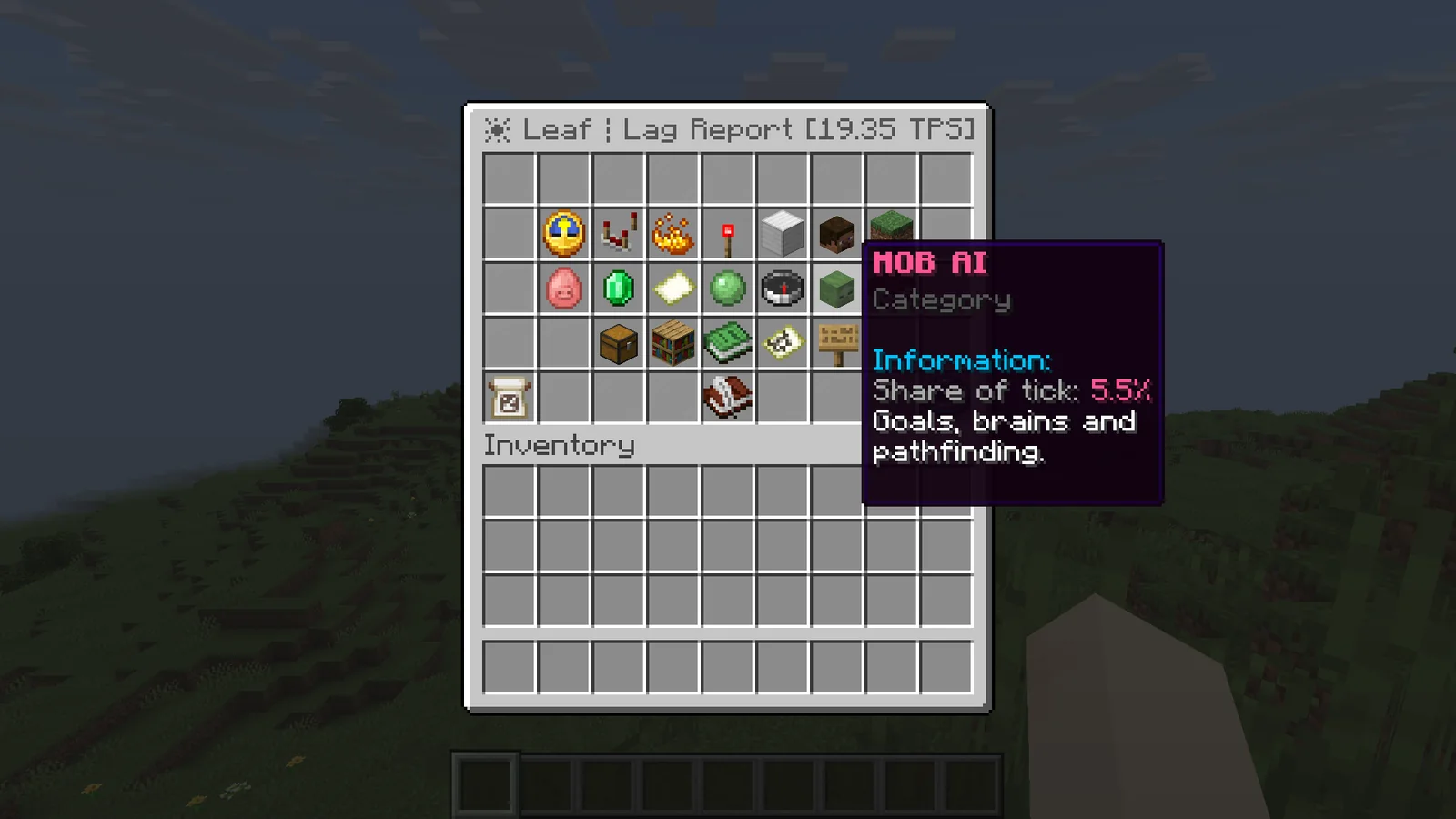
The top row shows TPS, average and peak tick time, how much of the 50 ms tick budget is used, CPU, memory, players and worlds. The second row shows the seven categories that used the most tick time, such as Villagers, Hoppers, Redstone, Collisions or Chunk Generation. Hover one to see its share. Percentages are shares of busy tick time, so idle time between ticks doesn't count.
The buttons below open every category, the plugins that used tick time, the hottest methods, the laggy chunks found during the same run, and suggestions. RUN AGAIN repeats the analysis with the same length.
A plugin is charged for every sample where its code is running, found by its main class package. Time inside a plugin is listed under that plugin, not under the vanilla category around it.
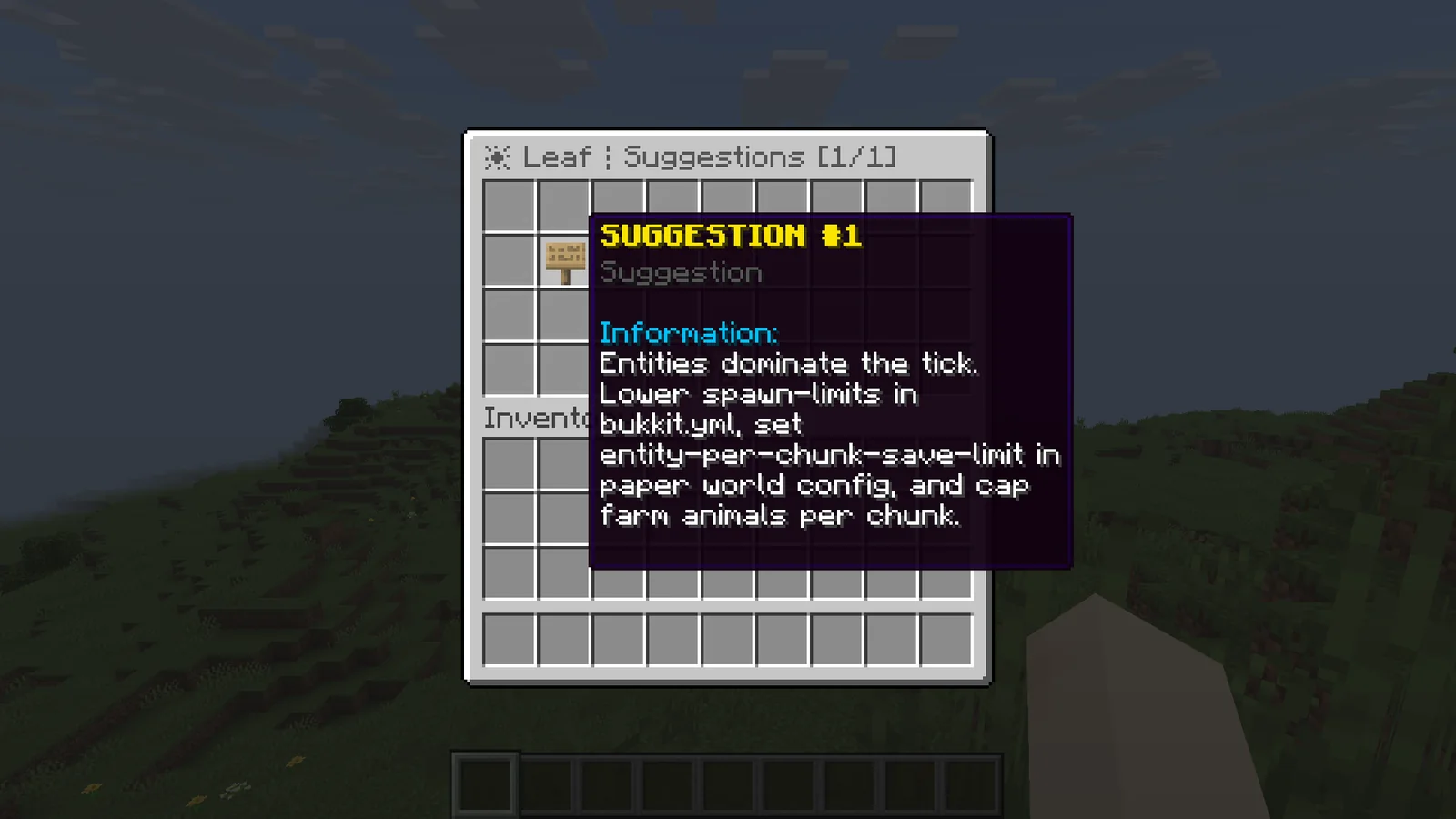
Suggestions come from what the report found: tick spikes at 20 TPS, heavy hoppers, dropped items, entities, villagers, collisions, redstone, entity tracking, mob spawning, random ticks, chunk generation, autosave, more than one anticheat, a single plugin over 5% of the tick, chunks over 1 ms per tick, and heap over 90%. Each one names the setting or build to look at.
From the console the same report prints as text.
Share links#
When a report is ready, the chat also gets a link like https://portal.blazez.lol/cosmos/report/<id>. Click it to open the full report in a browser, or send it to whoever helps you with the lag. The page shows the same numbers, categories, plugins, suggestions, laggy chunks and hot methods as the menu.
- The link has a random id and isn't listed anywhere, so only people you give it to can open it.
- It works for 30 days, then the report is deleted.
- Uploading sends the report only: the numbers, plugin names, world names and chunk coordinates in it. No player names, IPs or configs.
- Turn it off with
share-link: falsein Lag analyzer settings. Reports then stay on the server.
Laggy chunks#
/leaf admin lagchunks measures how much tick time every chunk costs for 10 seconds, split into entities, block entities, random ticks and scheduled block ticks. The 10 worst chunks are listed in chat with their cost per tick, location and the main cause, such as villager, hopper or Redstone and block ticks.
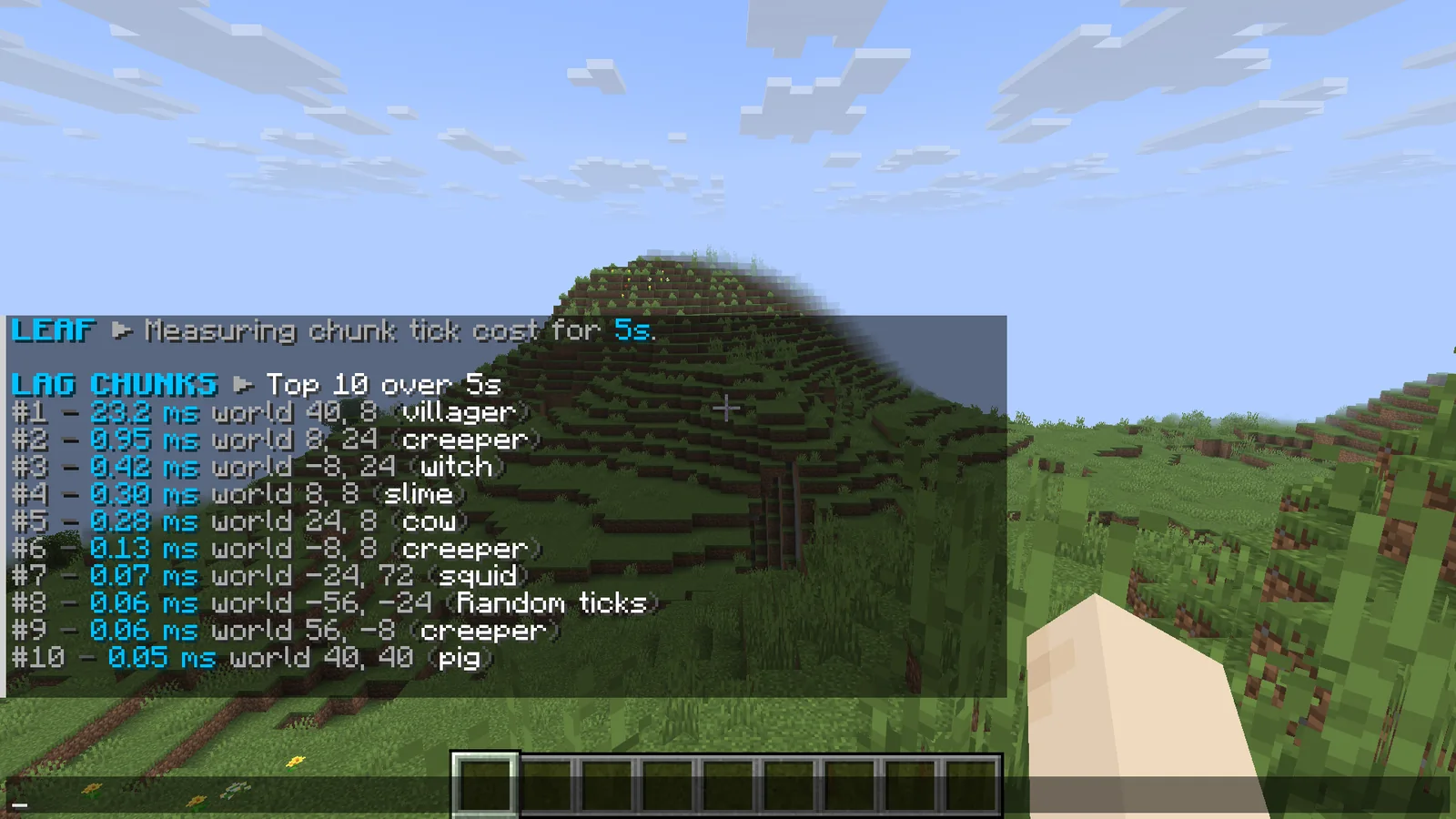
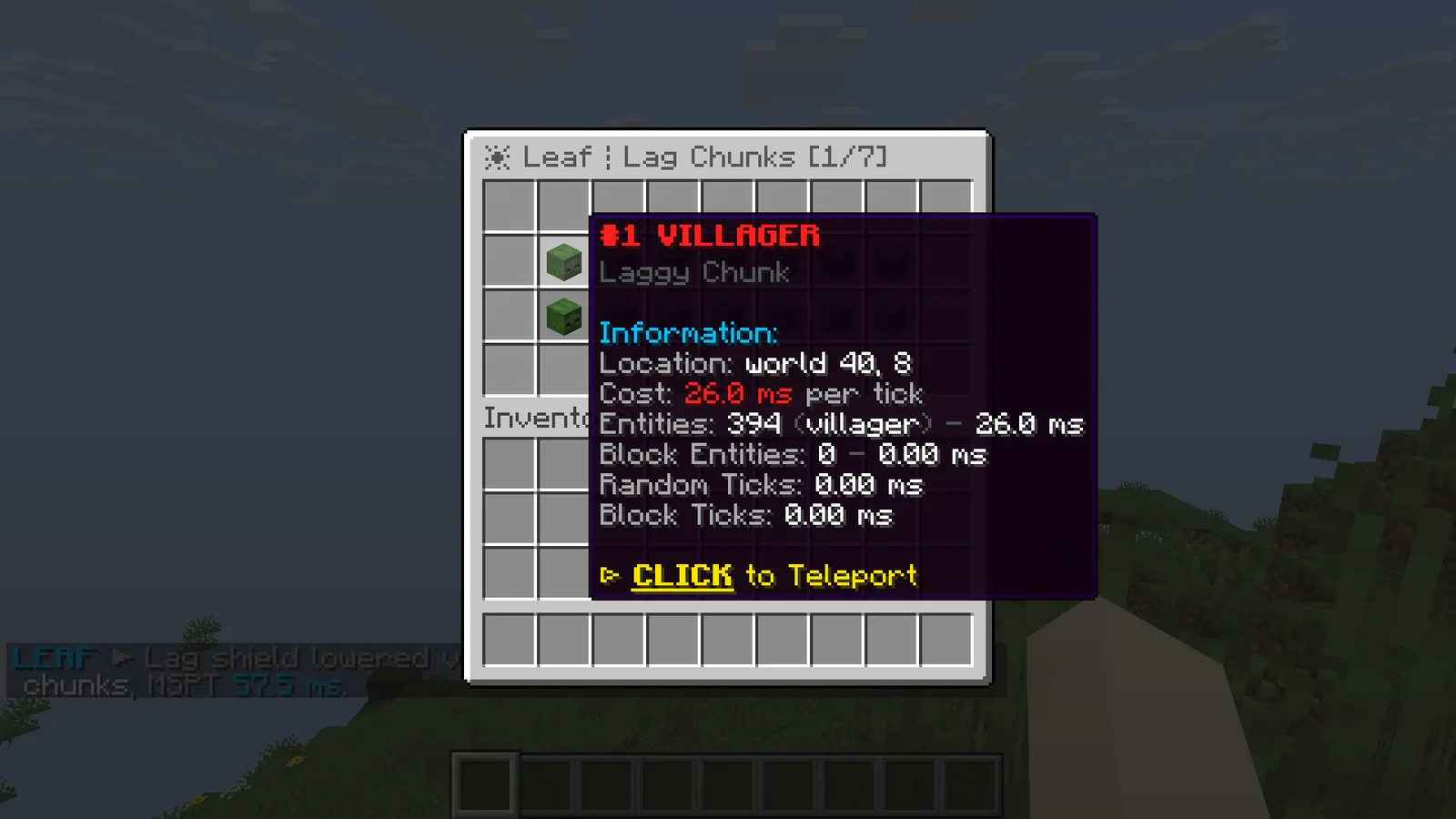
Hover a line for the breakdown and click it to teleport there. Players also get a menu with all results, up to 100 chunks. /leaf admin lagchunks tp 3 teleports you to the third chunk and open shows the last result again.
Lag shield#
The lag shield watches the average tick time. When it stays at or above 45 ms for 10 seconds in a row, it lowers view distance and simulation distance in every world by one chunk. If the server keeps lagging, it lowers them again every 10 seconds, down to 6 and 4 chunks. Once tick time stays at or below 30 ms for 60 seconds, it raises them one chunk, and again after each further 60 seconds until they are back to normal.
Players see fog closer while the shield is active, and fewer mobs and farms tick far from them. A world whose normal distance is already at or below the minimum is not touched. The shield changes distances only while the server runs, so a restart always starts from your configured values.
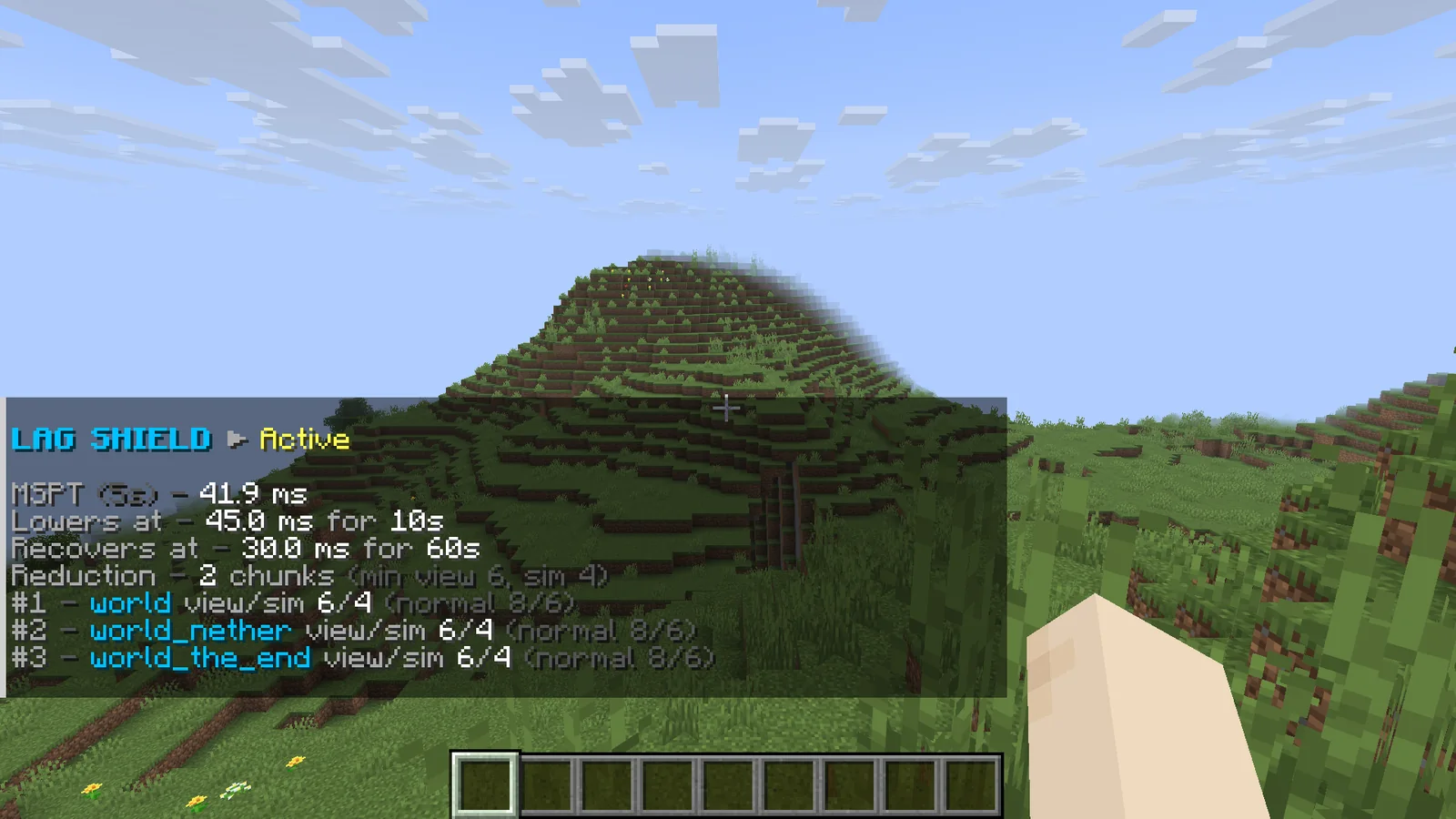
Staff with leaf.lagshield.notify get a chat message on every change, for example "Lag shield lowered view and simulation distance by 2 chunks, MSPT 45.1 ms." /lagshield reset restores normal distances right away, and /lagshield off turns the shield off and saves that in config/leaf-global.yml. The thresholds are in Lag shield settings.
Server info#
/tps shows the server's state in one panel.
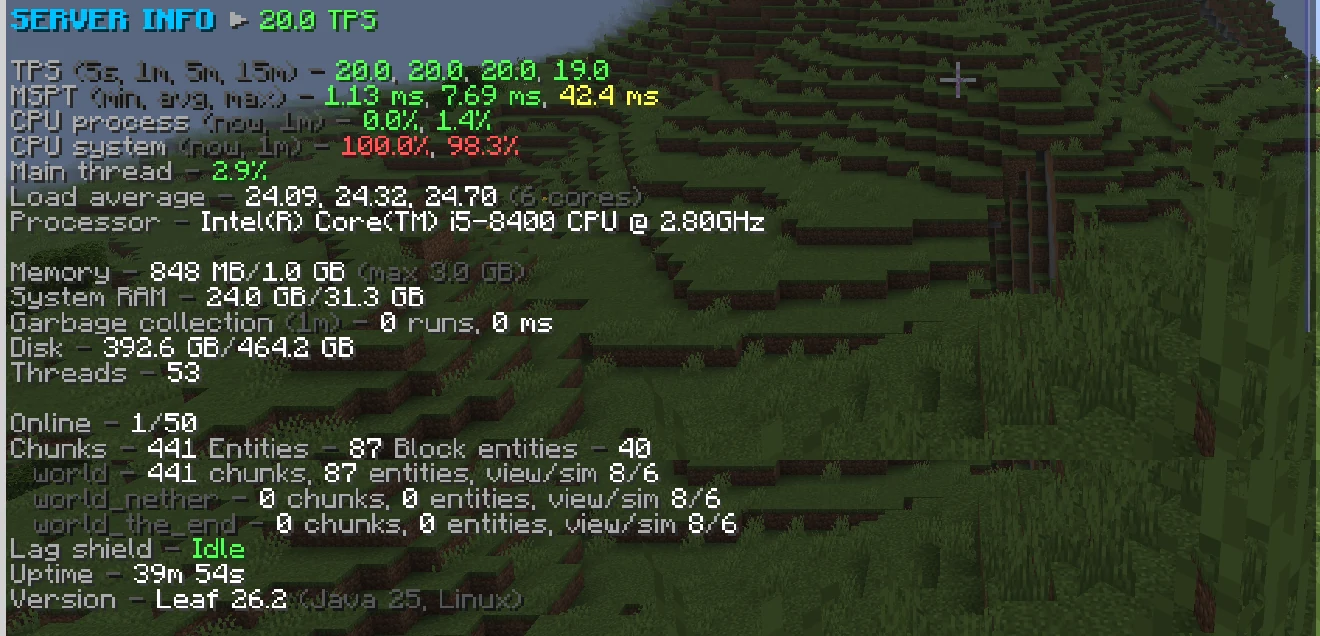
| Line | What it shows |
|---|---|
| TPS | Ticks per second over 5 seconds, 1, 5 and 15 minutes. |
| MSPT | Shortest, average and longest tick over the last 5 seconds. |
| CPU process | CPU used by the server, now and over the last minute. |
| CPU system | CPU used by the whole machine. |
| Main thread | How busy the main thread is, as a share of one core. |
| Load average, Processor | The machine's load and CPU model. Read from Linux, other systems show less. |
| Memory | Heap in use, heap reserved and the maximum heap. |
| System RAM, Disk, Threads | Machine memory, disk use of the server's drive, and Java threads. |
| Garbage collection | Collections and time spent in them over the last minute. |
| Online, Chunks, Entities | Players, plus loaded chunks, entities and block entities in total and per world, with each world's view and simulation distance. |
| Lag shield | Disabled, Idle, or Active with how many chunks it removed. |
| Uptime, Version | Time since start, server version, Java version and OS. |
Pregeneration#
/leaf admin pregen 5000 generates every chunk up to 5000 blocks from block 0, 0 in your current world, as a square. Add a world name to pick another world. The square is centered on 0, 0, not on spawn or the world border. Only one pregeneration runs at a time.
Progress shows in chat and the console every 10 seconds with chunks done, speed and time left. /leaf admin pregen status shows the latest numbers and cancel stops after the regions in progress. Chunks are saved as they unload, so run save-all when it finishes.
It uses every CPU thread by default and pauses while more than 20000 chunks are loaded. Both limits are in config/leaf-global.yml under misc.fast-world: pregen-threads (0 is all threads), pregen-in-flight-per-thread (16) and pregen-max-loaded-chunks (20000). Worlds in the MCA region format pregenerate about 35% faster than Linear.
Fast world#
misc.fast-world.enabled: true makes the dimensions listed in misc.fast-world.dimensions (minecraft:overworld by default) use Cosmos's own lightweight generator. Its terrain has hills, oceans, beaches, plains, forests, deserts and snow, with ores and trees. For these worlds /leaf admin pregen writes region files directly on worker threads instead of loading each chunk. Restart after changing it.
Warning
Fast world terrain is not vanilla. It has no caves, structures or vanilla features, and existing chunks keep their old terrain, so borders between old and new chunks won't line up. Only use it on new worlds that you want built this way.
Gamerules menu#
/gamerules lists every gamerule of your current world, 14 per page. Add a world name to open another world.
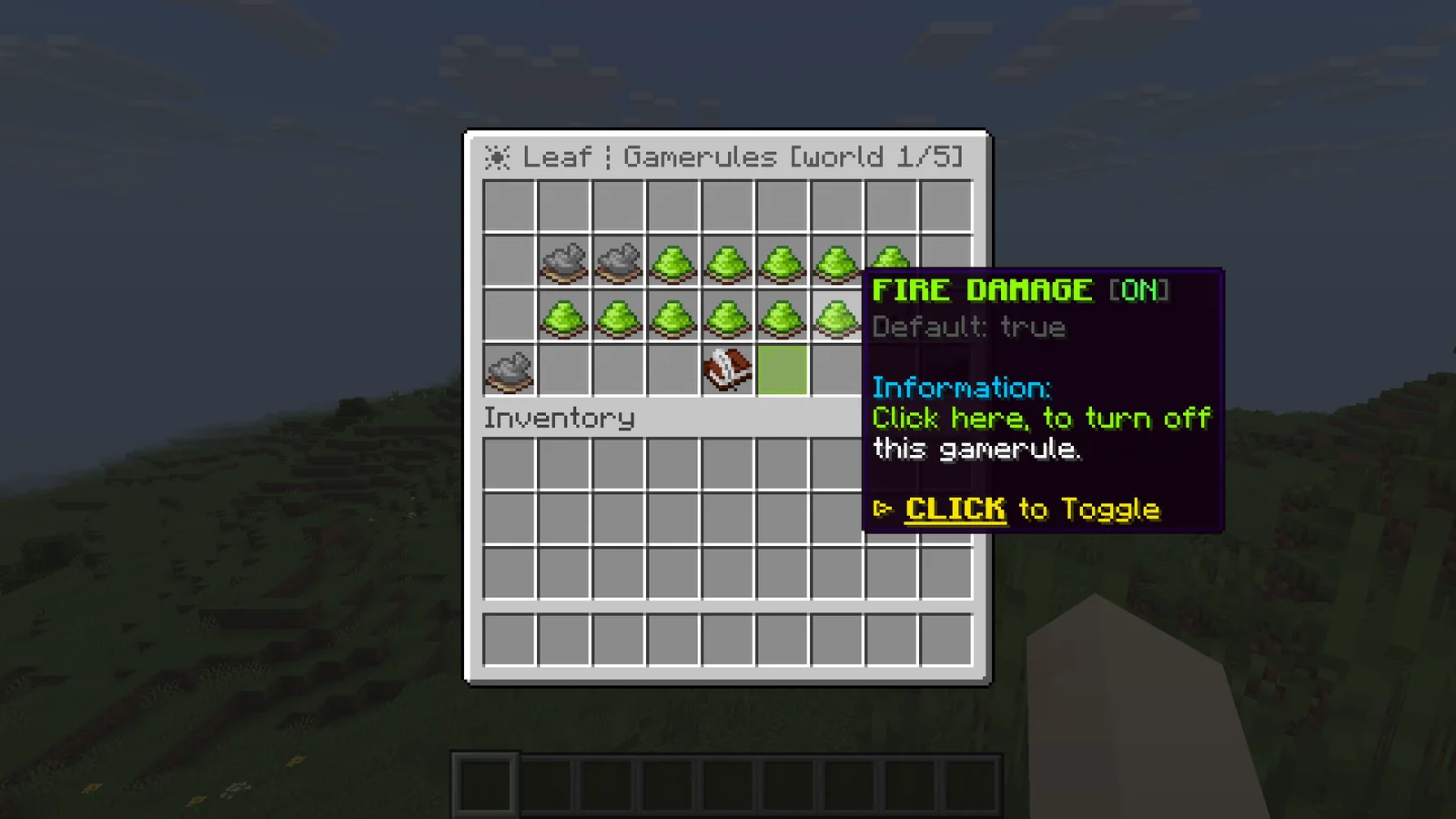
- On or off rules: click to switch them.
- Number rules: left-click adds 1 and right-click subtracts 1. Hold Shift for steps of 10, or 1000 once the value is 1000 or more.
- Press your drop key (Q) on a rule to reset it to its default.
- ALL WORLDS applies your changes to every world that has the rule. SWITCH WORLD shows the next world.
Each change is confirmed in your action bar.
Disguise#
/disguise <username> switches you to another player's account on this server, without logging out. You get that account's name, skin and UUID, and with it the inventory, location and stats it has saved on this server. Your own account's progress stays saved under your account. /undisguise switches you back.
- While disguised you have the permissions and OP status of the account you switched to.
/disguiseand/undisguisealways keep working for you. - In online mode the name must be a real Minecraft account. In offline mode any valid name works.
- You can't switch to an account that is online on this server, or to your own.
- If the real owner joins, you are switched back to your own account and the disguise is removed.
- Disguises stay through relogs and restarts until you undisguise. They are stored in
config/leaf-disguises.json. - The disguise only exists on this server. Your proxy and other servers still see your real account.
With misc.disguise.allow-others: true, staff with leaf.command.disguise.others can run /disguise <player> <username> and /undisguise <player>. A player who is offline switches on their next login. Set misc.disguise.action-bar: true to remind disguised players in their action bar.
If another plugin such as LibsDisguises owns /disguise, use /leaf disguise and /leaf undisguise.
Knockback sync#
When you hit a player, the server works out the knockback from where it last saw them. With ping, that view is a moment old. A player who is about to land still counts as in the air, so the hit only keeps their falling speed, while on their own screen they already landed and expect to be knocked up. Knockback sync fixes that.
While players fight, Cosmos measures each one's ping with a small ping packet every few ticks. When a player is hit in the air, Cosmos simulates their fall against that ping. If they reach the ground before the knockback reaches them, they get the same knockback as a hit on the ground.
- Only player hits change. Mobs, projectiles and explosions keep vanilla knockback.
- Players with low ping are not affected, because the server already sees them where they are.
- Players who are rising after a jump, flying, gliding, swimming, climbing, riding or stuck in cobwebs keep vanilla knockback.
- Hits in a fast combo keep vanilla knockback, because the player is still moving from the last hit.
- If the KnockbackSync plugin is installed, Cosmos leaves knockback to the plugin.
The settings are in Knockback sync settings.
Projectiles#
In vanilla every thrown or shot projectile gets a small random spread, so a pearl thrown straight up drifts off to the side and a second throw never follows the same line. Cosmos removes that spread for players: pearls, wind charges, snowballs, potions, arrows and tridents leave in exactly the direction you look.
Vanilla wind charges also pass through ender pearls and other projectiles. In Cosmos they collide and burst on them. A pearl caught by a wind charge lands right there: you are teleported to the pearl and the burst launches you up from that spot, so a pearl thrown straight up followed by a wind charge takes you high into the air. Arrows stuck in blocks, fishing hooks and firework rockets are not hit.
With wind-charge-self-boost on, a wind charge thrown downward while you are in the air bursts at your feet instead of flying to the ground. It gives the same push as a wind charge jump off the ground, so you can stay in the air longer before a mace or spear hit. It is off by default because it changes how wind charges thrown down at players below you work. Players on the ground, in water, riding, or flying in creative are not affected.
Your movement is still added to the throw, like in vanilla. To turn that off too, set misc.disable-relative-projectile-velocity to true in config/paper-world-defaults.yml. The settings are in Projectile settings.
Item shadowing#
In older Minecraft versions, item shadowing put the same item in two places at once. Technical players use it for immortality machines: the totem in your hand is shadowed into a barrel, a comparator reads the barrel, and when the totem pops the barrel empties, the redstone pulls an ender pearl stasis chamber and you get teleported home. Mojang patched it, and the old setups need update suppression. Cosmos brings it back with one click.
- Turn it on with
enabled: truein Item shadowing settings. - Open a barrel or chest and double-click the totem in your inventory. A ghost of it appears in the container and your totem stays where it was.
- With
trigger: swap-keyorboth, you can also hover an empty slot of the container and press the totem's hotbar number key, or the swap hands key (F) for the totem in your offhand. - With
trigger: shift-double-clickorall, shift-click the totem twice quickly instead. A single shift-click still moves the totem into the container, a moment later than usual.
What a ghost does:
- Comparators read it like a real item. One totem in a barrel gives a signal of 1.
- When the real totem pops, breaks or is used up, every ghost of it disappears at once and the comparators turn off. This also works when the ghost's chunk isn't loaded.
- Moving your totem around your inventory, to your offhand or into another container keeps the link. Relogging and restarts keep it too.
- One item can have ghosts in up to
max-ghosts-per-itemcontainers, so a single totem can run several machines.
Ghosts can't be used to dupe:
- Clicking a ghost makes it fade away.
- Hoppers can't pull ghosts, and breaking or blowing up the container drops nothing.
- A ghost totem doesn't protect anyone, even if a plugin moves it somewhere else.
Players need leaf.itemshadowing.use, which everyone has by default.
Leaf decay#
When a tree loses its logs, its leaves decay on random ticks, so most of them are gone within a few minutes. speed in Leaf decay settings slows down only that: at 25 leaves take about four times as long, and at 0 they never decay on their own. Unlike lowering the random tick speed gamerule, crops, grass, ice and everything else that uses random ticks keep their normal speed. Decaying leaves still drop saplings and apples, and leaves placed by players never decay, like in vanilla.
Anti map stealer#
World downloader mods save every chunk the server sends into a single-player copy of your map. Cosmos spots them when they register their plugin channels with the server, right after the player joins.
- With
action: kick, the player is kicked with the kick message before they can save anything. - With
action: disable, the player stays and Cosmos sends the downloader its own "downloads disabled" setting, so its download button stops working. - Staff with
leaf.antimapstealer.notifyget a chat message naming the player, and the console logs the channel that matched. - Players without a downloader are never touched, including modded clients with minimaps or other mods.
- Give
leaf.antimapstealer.bypassto players who are allowed to download the map, for example a builder backing up their own work.
Out of the box it blocks World Downloader, including older clients that join through ViaVersion. To block another mod, add its plugin channel to blocked-channels. The settings are in Anti map stealer settings.
Perf watcher#
The lag analyzer profiles the server when you ask it to. The perf watcher runs all the time in the background, so when the server lagged an hour ago you can still see why.
- It samples the tick threads 20 times a second and splits the tick time between plugins and server work such as entities, redstone and chunk loading.
- It times every plugin event listener and scheduler task on the tick thread, so each plugin gets a cost in milliseconds per tick and the event that costs it the most.
- Every minute is saved with its average and peak tick time, players, entities, loaded chunks and the costliest plugins. The last 24 hours are kept across restarts in
cache/cosmos-perf-history.json. - When ticks stay slower than 50 ms for 10 seconds, it raises a lag spike alert with the top causes. Staff with
leaf.perfwatcher.notifyget it in chat, the console logs it, and it can be posted to a Discord webhook.
/leaf admin perf opens the menu: the server right now, the last hour and the last 24 hours, lag spikes and the top cause. From there you can open the plugin costs, an hour by hour history and every recent lag spike, or start a 30 second deep scan with the lag analyzer. From the console the same command prints the plugin costs, and /leaf admin perf history or /leaf admin perf spikes print the other lists.
SAVINGS in the menu, or /leaf admin perf savings, shows the work Cosmos skipped in the last minute and since the start: AI decisions, frozen entity ticks, equipment, fluid and activation checks, item merges the limiter held back, redstone updates it delayed, vehicles it removed and pearl landings it moved. It also counts the mobs in each profile and how many are on slower AI right now. Savings work even with the perf watcher turned off.
The settings are in Perf watcher settings.
Legacy combat#
Every combat option is off by default, so a server keeps vanilla combat until you turn one on. Together they bring back 1.8 PvP on a modern server:
- Old knockback replaces knockback from hits with the 1.8 formula and lets you tune it. Players get the upward push even when they are hit in the air. Knockback sync is not used while it is on, because the 1.8 formula doesn't depend on the ground.
- Sword blocking lets players right-click with a sword to block half the damage. While they block, a shield is put in their empty off hand and removed as soon as they stop, switch items or close the game. That shield can't be moved, dropped or kept, and axes don't disable it.
- No attack cooldown gives players an attack speed of 40, so every hit lands at full strength. Turning it off again puts their attack speed back to vanilla.
- Old golden apples, old Sharpness and old armor restore the 1.8 numbers.
- Mace cap stops mace smashes from growing past a fall distance you choose.
- Bow boosting lets an arrow hit its own shooter, so a Punch bow launches you again.
- Fixes for ghost blocks from off hand placement, right-clicks resetting the attack cooldown, and zero-strength hits stopping a player's movement.
The settings are in Combat settings.
Lag limiters#
Limiters stop lag machines and huge farms from taking the whole server down. All of them are off by default.
- Redstone limiter: each area of the world (512 by 512 blocks by default) gets a budget of tick time per tick for redstone and block updates. A clock or contraption that goes over it has its remaining updates skipped for that tick, and the console names the spot once a minute.
- Item merge cap: limits how many dropped item stacks try to merge each tick, which helps when a farm drops thousands of items.
- Excess vehicles: removes empty minecarts or boats that are crammed into one spot by the dozen.
- Snowball saving: snowballs in flight are not saved, so a snowball lag machine is gone after a restart.
- Chunk unloads: sets how many chunks unload per tick when many are waiting.
The settings are in Limiter settings.
Entity control#
Entity control gives you a per-type switch for the costly parts of entities, for example on a lobby with hundreds of armor stands or an event map full of mobs:
- Freeze entity types completely, or only remove their AI goals.
- Turn off mob AI for every mob.
- Send position updates less often for some types, or show them from a shorter distance.
- Make projectiles such as arrows or snowballs keep the chunks they fly through loaded.
The settings are in Entity control settings.
Packet cuts#
Particles and sounds cost bandwidth for every player who sees them. Packet cuts stop the server from sending the ones most players don't miss: landing dust, death puffs, other players' block-break effects, bubble column splashes, spawner flames, shoulder parrots, angry piglins, swimming, shields and pistons. Each one is its own switch and all are off by default.
The settings are in Packet cut settings.
Structures and spawners#
- Turn off any structure in newly generated chunks, for example trial chambers.
- Keep mineshafts and strongholds inside a height range. They are moved as a whole, so their layout stays intact.
- Set spawn count, nearby mob cap, player range and spawn range for every spawner, next to Leaf's spawner delays.
The settings are in Structure settings and Spawner settings.
Proxy packet IDs#
Behind a proxy, every packet the server sends is compressed, and the proxy has to look inside to know which packet it is. With network.proxy-packet-ids: true, Cosmos writes each compressed packet's ID in front of the compressed data. BlazeVelocity reads it and passes the packet on to the player without unpacking it.
- It only turns on for players who join through BlazeVelocity with
backend-packet-ids = trueinblazevelocity.toml, which is the default. Cosmos and BlazeVelocity agree on it during login, so any other proxy, or a BlazeVelocity with it off, gets normal packets. - It needs Velocity modern forwarding, which BlazeVelocity uses when
player-info-forwarding-mode = "modern". - Players see no difference. The proxy uses less CPU because it skips the unpacking.
The setting is in Network settings.
Plugin auto-update#
On every start, before plugins load, Cosmos checks ViaVersion, ViaBackwards and ViaRewind on Modrinth and Geyser and Floodgate on GeyserMC. Newer builds replace the old jars in the same start, and missing plugins from the install list are downloaded. It checks each file's hash, never installs an older build than the one you have, and keeps the replaced jars in plugin-backups/<plugin>/.
The console logs every result, for example Installed ViaVersion 5.12.0. or ViaVersion is up to date (5.12.0).. ViaBackwards and ViaRewind are installed only together with ViaVersion, which they need. A download that takes longer than timeout-seconds is dropped and logged as timed out, for example Could not install Geyser: timed out, and startup continues. The next start tries again.
Plugin auto-update doesn't run on a server behind a proxy, which means settings.bungeecord: true in spigot.yml or proxies.velocity.enabled: true in config/paper-global.yml. ViaVersion and Geyser belong on the proxy there, so nothing is updated or installed and the console logs Plugin auto-update is skipped because this server runs behind a proxy.
To keep another Modrinth plugin updated, add it under sources with its plugin name in lower case:
misc:
  plugin-auto-update:
    sources:
      luckperms: "modrinth:luckperms"
The updater always takes the newest file of the project, so only add plugins whose latest release supports your Minecraft version. To stop updates for one plugin, add it to exclude. To stop them all, set enabled: false.
Mob profiles#
Cosmos sorts every mob into a profile:
| Profile | Mobs |
|---|---|
villagers | Villagers and wandering traders. |
hostile | Monsters. |
passive | Animals, golems, bats and other land mobs. |
water | Fish, squid, dolphins, axolotls and other water mobs. |
bosses | The wither, ender dragon, warden and elder guardian. |
Each profile has its own AI rate. A vanilla mob picks new goals and targets every second tick and keeps doing what it already chose in between. With ai-interval: 2 it picks every fourth tick, with 4 every eighth. Walking toward a target it already chose stays smooth, so players mostly notice mobs reacting a little later. With dab: true and far mob AI turned on (performance.dab.enabled), mobs in the profile also decide less often the further they are from players, scaled by the other performance.dab settings.
Protection#
Named mobs, pets, NPCs and mobs spawned by plugins are protected, plus any types in protection.types. Protected mobs always run at the vanilla rate, far mob AI skips them, entity control can't freeze them or turn off their AI, and the check intervals check them every tick. This keeps custom bosses, pets and NPCs from plugins such as MythicMobs, Citizens and pet plugins working. Protection is on even while profiles are off. /leaf admin perf savings shows how many mobs are in each profile, including protected ones.
Check intervals#
Mobs re-check their armor, check for water and lava, and the activation range wakes up mobs near players, every tick by default. Check interval settings spread those checks out. Players and protected mobs are always checked every tick, and a mob that is already in water or lava keeps its fluid checks every tick.
Suffocation and line of sight already have intervals in Gale's config: small-optimizations.reduced-intervals.check-stuck-in-wall in config/gale-world-defaults.yml (10 by default) and small-optimizations.reduced-intervals.update-entity-line-of-sight in config/gale-global.yml (4 by default).
Config check#
/leaf admin check reads your configs and lists settings that are risky or fight each other, world by world: simulation distance above view distance, mob AI turned off, very low item merge limits, long AI or check intervals, parallel world ticking, a region format other than MCA, too little memory, and mistakes in leaf-worlds.yml. Warnings are red and notes gray. The same check runs 2 seconds after every start and logs the warnings.
Tuning map#
Where to change common performance and gameplay knobs:
| To change | Setting | File |
|---|---|---|
| How far from players mobs run full AI, per mob category | world-settings.default.entity-activation-range | spigot.yml |
| Far mob AI | performance.dab | config/leaf-global.yml |
| AI rate per kind of mob | performance.entity-profiles | config/leaf-global.yml |
| How often mobs start targeting, following parents, avoiding and following food | performance.entity-goal.start-tick-chance | config/leaf-global.yml |
| Freeze, no AI or update rates for single entity types | performance.entity-control | config/leaf-global.yml |
| Equipment, fluid and activation checks | performance.check-intervals | config/leaf-global.yml |
| Suffocation checks | small-optimizations.reduced-intervals.check-stuck-in-wall | config/gale-world-defaults.yml |
| Line of sight checks | small-optimizations.reduced-intervals.update-entity-line-of-sight | config/gale-global.yml |
| Item merges per tick | performance.limiters.max-item-merges-per-tick | config/leaf-global.yml |
| Mob pushing | collisions.max-entity-collisions | config/paper-world-defaults.yml |
| Chunks projectiles may load | small-optimizations.max-projectile-chunk-loads | config/gale-world-defaults.yml |
| Chunks other entities may load | performance.entity-control.chunk-loading-entities | config/leaf-global.yml |
| Fewer retries after failed mob spawns | performance.throttle-mob-spawning | config/leaf-global.yml |
| Spawner counts, delays and ranges | gameplay-mechanisms.spawner-settings | config/leaf-global.yml |
| Critical hit damage | gameplay-mechanics.player.critical-damage-multiplier | purpur.yml |
| Knockback | gameplay-mechanisms.combat and gameplay-mechanisms.knockback-sync | config/leaf-global.yml |
| Mace damage cap | gameplay-mechanisms.combat.mace-max-fall-distance | config/leaf-global.yml |
| Raids, weather and natural mob spawning | The gamerules, in /gamerules | per world |
| Particles and sounds | performance.packet-cuts | config/leaf-global.yml |
| Everything above at once | /setup |
Plugin manager#
Cosmos runs every plugin from a private copy of its jar in cache/cosmos-plugins/. You can upload a new jar over the old one in plugins/ while the server runs, from SFTP or a panel file manager. The running plugin keeps working without zip file closed or NoClassDefFoundError errors, and the new jar is used on the next reload or restart. On Windows the jars in plugins/ are no longer locked either.
/plugman opens a menu with every plugin and every jar in plugins/ that is not loaded. Click a plugin to reload, disable, enable or unload it, or click a jar to load it. Disable and unload ask to confirm first and list the plugins they affect. Every action is also a command, see Commands.
A reload also reloads the plugins that hook into the target:
- plugins that list it under
dependorsoftdepend, or that it lists underloadbefore - plugins that registered services with its classes, like LuckPerms and Essentials for Vault
- plugins that loaded any of its classes
They unload together and load back in the startup order, so their hooks point at the new classes and services. Unload and disable work the same way. /plugman info <plugin> shows the list under "Needed by". Set include-dependents: false to act on one plugin only.
When a jar in plugins/ changes or a new jar appears, staff with leaf.pluginmanager.notify get a chat message such as Essentials changed on disk, 2.21.0 to 2.22.0. Click to reload it. and the console logs the same. The notice waits until the file stops changing, so a half-uploaded jar is never loaded. With auto-reload: true the plugin reloads on its own instead.
A reload starts the plugin fresh, the same as a restart does for that plugin, so anything it only keeps in memory is reset. Some plugins print a /reload warning when they load after startup. Two kinds of plugins need a restart:
- Paper plugins with a bootstrapper (
bootstrapper:inpaper-plugin.yml) only load at startup. You can unload them, but loading them again needs a restart. - A plugin that generates one of your worlds can't be disabled or unloaded.
Resource pack reload#
The server resource pack comes from the resource-pack lines in server.properties, which Paper only reads on start. With Cosmos you change those lines, or upload a new pack under the same link, and run /leaf admin resourcepack reload:
- Cosmos reads
resource-pack,resource-pack-id,resource-pack-sha1,require-resource-packandresource-pack-promptagain. The rest ofserver.propertiesstays as the server loaded it. - It downloads the pack and works out its sha1. When
resource-pack-sha1is empty or wrong, it writes the right one toserver.properties, so you never copy a hash by hand. - Everyone online gets the new pack right away, and players who join later get it as usual.
A new file under the same link still reaches everyone, because its sha1 changed. A new resource-pack-id removes the old pack first, and an empty resource-pack removes the pack from everyone online. When nothing changed, nothing is sent. When the download fails, the current pack stays and the command says why.
Packs sent by plugins such as ItemsAdder or Nexo are separate and stay loaded. With require-resource-pack=true, a player who declines the new pack is kicked, the same as on join. /leaf admin resourcepack info shows the pack the server uses right now, and /leaf admin resourcepack send <player> sends it to one player again.
Performance#
Leaf already contains most performance work from Gale, Pufferfish, Purpur, SparklyPaper and Lithium. Cosmos adds its own changes on top:
- Entities: collision boxes are packed for crowded spaces and pushing uses a grid, so packed mob farms cost less. Idle mobs reuse their block lookups until something nearby changes, and looking up entities by type skips chunks that have none.
- Villagers: a villager that found no bed or job site waits longer before searching again (see Performance settings).
- Ticking: random ticks skip chunk sections with nothing to tick, and mob spawning looks up nearby players once per chunk.
- Redstone: Alternate Current is the default engine.
- World generation: on the 26.2 build the density function compiler is on, which made chunk generation about 30% faster with the same terrain. Chunk generation threads run at a lower OS priority on Linux, so generating doesn't slow the main thread.
- Memory: block shapes and block state data are shared, worldgen data is released sooner, and structure templates that haven't been used for 10 minutes are unloaded. Change that time with
-Dleaf.structureTemplateExpireSeconds=<seconds>. - Ports from DivineMC:
/locateruns off the main thread, command blocks cache their parsed command, raid banners are cached, and goats skip work they don't need. Async chunk sending and parallel mob sensors are available as options.
Measured on the 26.2 build against Paper 26.2 with the same JVM flags:
| Test | Paper | Cosmos | Result |
|---|---|---|---|
| Villager farm | 100% | 10.1% | 9.9 times faster |
| Redstone | 100% | 15.4% | 6.5 times faster |
| Item entities | 100% | 58.8% | 1.7 times faster |
| Hostile mobs | 100% | 66.7% | 1.5 times faster |
| Animals | 100% | 66.7% | 1.5 times faster |
| Chunk generation | 100% | 77% | 30% faster |
| Live heap | 376 MB | 211 MB | 44% less |
| Process memory | 1450 MB | 800 MB | 45% less |
The entity and redstone rows are main-thread tick cost in flat-world farm tests. Process memory uses the recommended start script. Your numbers depend on hardware, plugins and players.
Plugin compatibility#
Pet and custom mob plugins such as CombatPets give Allays, Frogs, Goats and other brain-driven mobs their own brains, which often leave out some of the memories vanilla mob AI reads. On Paper the mob throws Unregistered memory fetched and is removed on its first tick. Cosmos reads those memories as empty, so the mobs spawn and stay. Nothing to configure.
Some plugins clear the whole command map when they shut down or reload their commands. On Paper that removes every command on the server, so even stop and op answer Unknown or incomplete command. Cosmos removes only the commands of that plugin and logs <plugin> tried to clear every command on the server, so vanilla and other plugin commands keep working. /bukkit:reload still clears and rebuilds everything. Nothing to configure.
Troubleshooting#
Startup fails with UnsupportedClassVersionError. The server is running on Java older than 25 for a 26.x build, or older than 21 for a 1.21.x build. Check java -version on the machine or panel that starts the server.
The server stops during startup with a license message. The key is missing or wrong. With the loader, put it in cosmos-loader.yml as license-key: "<key>". Without the loader, put it in license.yml as license-key: <key>. You can also pass it with -Dcosmos.license=<key>.
The loader says a Minecraft version is not on your license. That version belongs to the edition you don't own. The message lists the versions your license unlocks. Set one of them as minecraft-version in cosmos-loader.yml.
The loader says the update server could not be reached. Without an installed build the server cannot start. Check that the machine can reach cosmos.blazez.lol over HTTPS, then start again. Once a build is installed, the loader boots it when the update server is down.
The loader says Cosmos needs a newer Java. Switch the server to the Java version it names. On Pterodactyl that is the Docker image under Startup.
/tps, /ping, /disguise or /plugman opens another plugin's command. That plugin registered the name first. Use /leaf tps, /leaf ping, /leaf disguise or /leaf plugman.
The console logs <plugin> tried to clear every command on the server. That plugin tried to remove every command, which on Paper breaks stop, op and the commands of every other plugin. Cosmos kept them and removed only the commands of that plugin. Update the plugin, or ask its author to unregister only its own commands.
/plugman reload says another plugin depends on the target and cannot be reloaded with it. That plugin uses a Paper bootstrapper or generates a world. Restart the server, or set include-dependents: false to reload the target alone.
A world that was opened on a newer Minecraft version won't load. A Cosmos build can't read chunks saved by a newer Minecraft version. Restore a backup from before the world was opened on the newer version, or use the Cosmos build for that version.
Java refuses to start with Unrecognized VM option 'UseCompactObjectHeaders'. That flag needs Java 24 or newer. Remove it from the start script when you run a 1.21.x build on Java 21.
/leaf admin resourcepack reload says it could not download the resource pack. The server downloads the pack itself to work out its sha1, so the link must work from the server machine and point straight at the zip file, not at a download page. Test it with curl -I <link> on that machine, or set compute-sha1: false and write the sha1 into server.properties yourself.
/leaf admin mspt says parallel world ticking is off. Per-world tick times need async.parallel-world-ticking.enabled: true in config/leaf-global.yml. /tps shows the server's tick times without it.